ProviderScaling

ProviderScalingSetting includes extra parameters that are specified at the Provider level, enabling manipulation of the prices and volumes received in the XCore from the Provider, as well as the size and price of trade execution sent from the XCore to the Provider. Scaling factors are set up on a per-Liquidity Provider and per-Symbol basis. Edit ProviderScalingSetting in Pending Config; Real-Time Config provides viewing access. It has the following attributes:
| attributes | required | default settings | Attribute type | description |
|---|---|---|---|---|
| provider | Y | – | INT | The ID of the Provider (shown by name in the Portal). |
| symbol | Y | – | VARCHAR | The name of the Symbol. |
| quote_price | Y | 1 | DOUBLE | Prices on quotes sent by the LP will be multiplied with this factor before entering the XCore. • If quote_price is added, the appropriate trade_price must be added to balance the price adjustment on trading. Example: quote_price = 2 (The price received from the LP will be multiplied by 2). trade_price = 0.5 (The trade will occur on 2x smaller price than streamed out). |
| quote_size | Y | 1 | DOUBLE | Volumes on quotes sent by the LP will be multiplied with this factor before entering the XCore. |
| trade_price | Y | 1 | DOUBLE | Prices on trade requests will be multiplied with this factor when sending trades to the LP. • If quote_price is added, the appropriate trade_price must be added to balance the price adjustment on trading. Example: quote_price = 2 (The price received from the LP will be multiplied by 2). trade_price = 0.5 (The trade will occur on 2x smaller price than streamed out). |
| trade_size | Y | 1 | DOUBLE | Volumes on trade requests will be multiplied with this factor when sending trade to the LP. |
| source | Y | n/a | VARCHAR | Defines a source symbol from which market data and trade routing are inherited. |
| verified | Y | – | INT | Displays if the scaling factor is verified. • The scaling rule will not be applied unless the changes have been verified and approved by two different users, one with the verify right and one with the approve right; a user with both rights can set neither. |
| approved | Y | – | INT | Displays if the scaling factor is approved. • The scaling factor will not be applied unless the changes have been verified and approved by two different users, one with the verify right and one with the approve right; a user with both rights can set neither. |
WARNING: It’s important to exercise caution when using this component, as incorrect configuration may lead to excessive exposure to Liquidity Providers. XCore owners should conduct thorough testing on the functionality before modifying settings in their live environment.
Note: For IG_CFD_V3/IG_CFD_V2, a scaling vs. ContractMultiplier (tag 231) conflict follows AllowScalingOverride: default rejects orders and clears the book; enabled overrides ContractMultiplier with the configured scaling.
A source mapping reuses a source symbol on the same provider. It requires an eligible source stream and active target stream/session settings; the target must have at least as many configured layers as the source. Chained source mappings are not supported.
Provider fills are converted back to internal units by dividing the filled quantity by trade_size and the execution price by trade_price. Quote and trade factors are independent; reciprocal values are not assigned automatically. Rounding can affect the result.
Scaling settings are saved in the configuration database. On normal shutdown, XCore also saves entries with at least one factor different from 1 to system/scaling.dat; database rows take precedence at startup. A source mapping with all four factors set to 1 is retained by its database row.
How are Scaling Factors handled in the XCore
Example 1
Assume that a Provider uses different volume representations for specific instruments (among which EURUSD) than the conventional ones, where 1 unit of volume on the LP’s side is equivalent to 100k in notional volume.
As the XCore shows notional volume, we need to translate the LP’s volume representation into notional volume before sending the prices to the XCore and converting the volume into the LP’s representation when a trade is sent to the LP.
To achieve the above, we need to define two parameters at the level of each symbol to be adjusted, as follows:
Scaling Quote Size = 100000
Scaling Trade Size = 0.00001
For instance, if the LP is advertising the following liquidity book for EURUSD:
| Volume | Price |
|---|---|
| 1 | 1.25895 |
| 5 | 1.25897 |
| 30 | 1.25898 |
When sending quotes into the XCore, the above liquidity book volume will be multiplied by 100,000 (Scaling Quote Size) and will be shown in the XCore as follows:
| Volume | Price |
|---|---|
| 100k | 1.25895 |
| 500k | 1.25897 |
| 3m | 1.25898 |
Now when the XCore sends a trade of 300k, for example, to the LP (in two legs), the volume will be multiplied by 0.00001 (Scaling Trade Size), so it gets converted into the LP’s trade size representation (where 1 contract = 100k) as follows:
100k x 0.00001 (Scaling Trade Size factor) = 1 @ 1.25895
200k x 0.00001 (Scaling Trade Size factor) = 2 @ 1.25897
Example 2
Assume that the Provider is streaming UKOIL prices into the XCore, and one UKOIL contract is equivalent to 100 barrels. The price on the LP’s side is shown in terms of 100 barrels which is equal to the price of 1 barrel x 100. However, on the broker’s side the contract is equivalent to one barrel, and the price shown to clients is the price of 1 barrel. In this case, we need to adjust the price sent into the XCore by the Provider and convert it into the price of 1 barrel and adjust the trade price to be sent to the LP by converting it back into the price of 100 barrels.
To achieve the above, we need to define two parameters at the level of UKOIL, as follows:
Scaling Quote Price = 0.01
Scaling Trade Price = 100
For instance, if the LP is advertising the following liquidity book for UKOIL at the price of 100 barrels:
| Volume | Price |
|---|---|
| 800 | 6585 |
When sending the quotes to the XCore, the above liquidity book price will be multiplied by 0.01 (Scaling Quote Price) and will be sent into the XCore as follows:
| Volume | Price |
|---|---|
| 800 | 65.85 |
Now when the XCore sends a trade of 200 to the Provider, the price will be multiplied by 100 (Scaling Trade Price) so it gets converted into the LP’s price representation as follows:
200 @ 65.85 x 100 (Scaling Trade Price factor) = 200 @ 6585
How to Add/Update Scaling Factors
From the XCore Pending Config component select Provider Scaling Setting field and press the Add button to configure scaling for a provider.
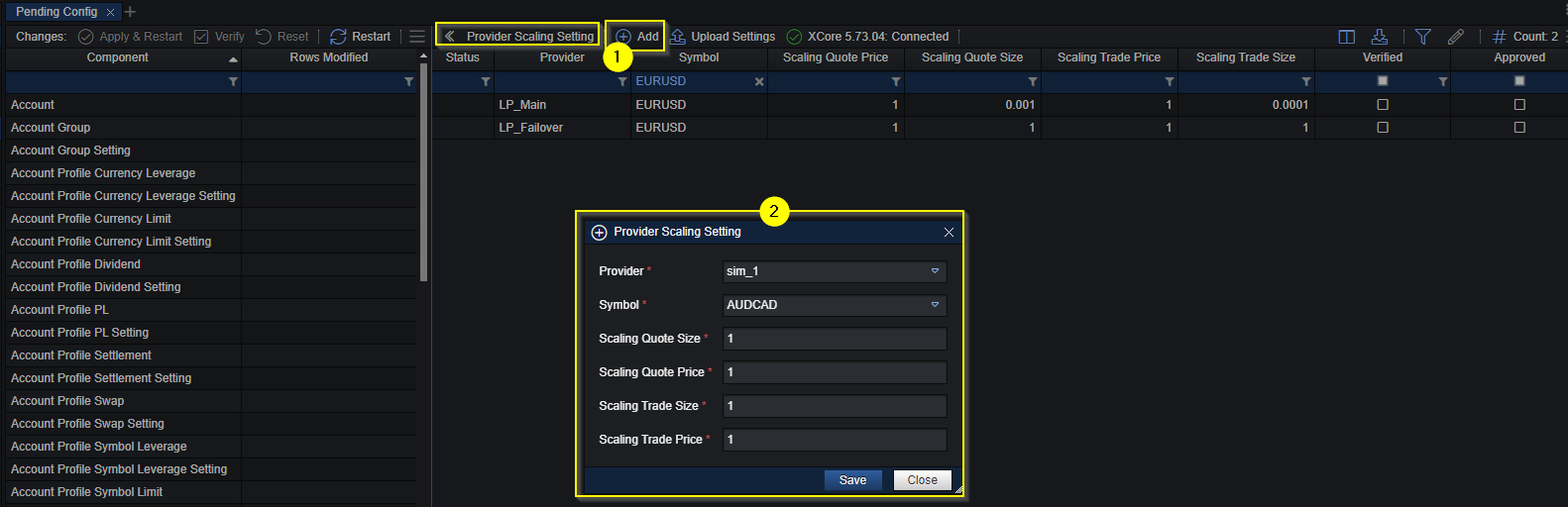
Once the scaling is configured it must be approved and verified by two different users who have permission to do so.
When scaling configuration has been approved and verified an XCore Apply & Restart must be performed in order for the changes to become active.
Below is an example of a setting with numerical scaling and another with all four factors set to 1. Factors of 1 leave numerical values unchanged; an assigned source symbol still controls feed and instrument mapping.

Note: Setting all four factors to 1 neutralizes numerical scaling only. It does not remove an assigned source mapping. Change source mappings through Pending Config, then verify and approve the change and perform Apply & Restart.