Account
The Accounts component provides an overview of all the XCore Accounts configured in the system. Information provided includes the current balance, equity, the current exposure of a specific XCore Account as well as used and free margin.
| attributes | description |
|---|---|
| account | the name of the XCore accounts |
| currency | the deposit currency of the account into which all balance operations and charges will be translated |
| pnl | Equity − Balance: the PnL of all positions (open PnL plus closed PnL not yet booked to the balance), in account currency. |
| balance | this represents the accumulated operations conducted on the account including deposits, withdrawals, settlements, commissions, swaps and so on |
| equity | the current equity of the account which includes the unrealized PnL Equity = Balance + running PnL |
| % | percentage of used margin out of the equity % = Used Margin/Equity x 100 |
| Margin Used | The Sum of margins reserved by open trades. It is calculated as below depending on the Account configuration: In case the Account is linked to a Leverage Symbol Profile: - Step 1: Used Margin (per symbol) = Open Trade size in Base X Conv Base currency to Account Currency X 1/Symbol Leverage; - Step 2: Total Used Margin = Sum of Symbol Used Margin; In case the Account is linked to a Leverage Currency Profile: - Step 1: Used Margin (per CCY) = Netted Open Trades in CCY X Conv CCY to Account Currency X 1/CCY Leverage; - Step 2: Total Used Margin = the larger of the long-currency total and the short-currency total; Where a profile defines leverage tiers, each slice of the position uses its tier's leverage. An account can have both: symbols with a Leverage Symbol setting are margined per symbol, the rest per currency, and the two totals are added. |
| Free Margin | The free margin available for trading. Free Margin = Equity – Used Margin |
| Exposure | The total, live exposure of all open positions on the XCore account converted to the account currency. Current Exposure = symbol-margined exposure + the larger of the netted long and short currency totals (unleveraged; pending orders not included). |
| Exposure limit | The account's exp_limit: unleveraged exposure in account currency. Note: -1 disables the account-wide cap; margin, symbol and currency limits still apply. |
| Exposure ratio | The Current exposure given as a percentage of the exposure limit set for the account. Exposure Ratio % = (Current Exposure / Exposure Limit) * 100 |
Note: Stop-out is triggered by XCore's margin utilization, not by this %. XCore divides Margin Used by the account group's reference: the Balance when the group's EXPOSURE is BALANCE, the Equity otherwise. For BALANCE groups the two differ whenever Equity differs from Balance.
Operation Function
The operation function is used in order to perform balance adjustments to the XCore accounts (Deposit, withdraw).
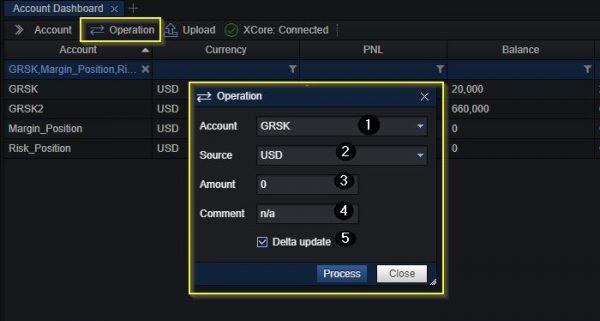
- Select the target XCore account to adjust the balance.
- Select the wallet to adjust.
- Specify the currency in which the balance adjustment will be performed.
- Specify the amount of the adjustment.
- If needed can add a description for the operation which can be found later on the in Account logs.
- If the Delta Update box is unticked, the entered amount replaces the selected wallet balance.
Upload Function
The upload function allows a user to upload a file with multiple balance adjustments on multiple XCore Accounts.
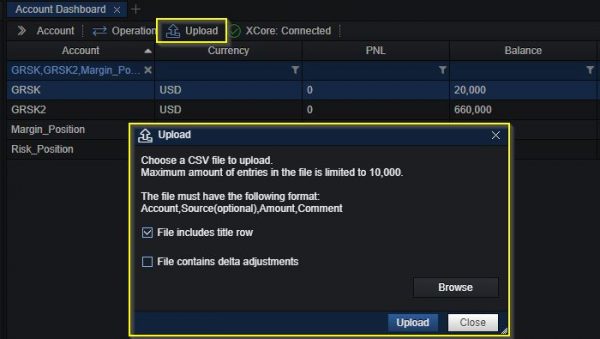
The file must be a CSV file with exactly seven values per row, in this order:
Account,Currency,Wallet,Amount,Comment,Comment2,Delta
e.g.: Margin_Position,USD,BALANCE,30000,Deposit Test,,true
- Account, Currency and Wallet identify the wallet balance to adjust. Fill in all three fields and provide a numeric Amount.
- Delta must be
true(or1) orfalseon every row and must match the File contains delta adjustments checkbox of the dialog (ticked by default): with Delta, the amount is added to the current balance; without it, the amount becomes the new balance. - Tick File includes title row when the first row holds the column names. Save the file with Windows line endings (CRLF); a file is limited to 10,000 entries.
- Please refer to the account_balance_adjustment_sample.csv file, which shows the format with an example.