Position Admin

Position Admin shows positions for XCore accounts and provides operation and import functions for manual position adjustments.
| attributes | description |
|---|---|
| Account | Name of the account(s) defined in the Account component |
| Symbol | The name of the position symbol |
| % | The position's percentage of the account's total position value: % = (Base × Conv 1 × Conv 2) ÷ (sum of |Base| × Conv 1 × Conv 2 over all positions of the account) × 100. Short positions show a negative percentage; 0 is shown when the account has no position value. |
| Base | The position amount in the symbol's base currency. For Sell Position, Base = -1 x (Trade Fill Size) For Buy Positions, Base = Trade Fill Size |
| Quote | The position amount in the symbol's quote currency. For Sell Position, Quote = Trade Fill Size x Trade Fill Price For Buy Positions, Quote = -1 x (Trade Fill Size x Trade Fill Price) |
| Total PnL | Open PnL + Closed PnL, in account currency. |
| Closed PnL | PnL from closing all or part of a position in this symbol, shown in account currency. |
| Open PnL | Current floating PnL of the symbol, in account currency. |
| Time | The time and date of the base and/or quote values were last updated (last executed deal time or manual intervention) |
| Base $ | Base converted to account currency: Base × Conv 1 × Conv 2. |
| Quote $ | Quote converted to account currency: Quote × Conv 2. |
| Conv 1 | The symbol's current closing price (bid for a long, ask for a short position) multiplied by its contract size; values the base position in the quote currency. |
| Conv 2 | Conversion rate from the symbol's quote currency to the account currency. |
| Total PnL Quote | Open PnL Quote + Closed PnL Quote, in the symbol's quote currency. |
| Open PnL Quote | Current floating PnL of the symbol in quote currency. |
| Closed PnL Quote | PnL from closing all or part of a position in this symbol, shown in the symbol's quote currency. |
| VWAP | The volume-weighted average price, calculated as abs(Quote / Base). If Base is zero, the displayed value is zero. |
| Now | The time and date when an update of the positions occurs. |
| Overflow | The trade volume for the specific symbol that has been routed to Liquidity Providers as a result of trade requests which would increase the post-exposure above the exposure limit. |
Calculation notes
The percentage is 100 × Base $ / total position value.
To calculate the total, add the Base $ values of all positions in the account, treating negative values as positive. Base $ is expressed in account currency. If the total is zero, the percentage is 0%.
For example:
- VWAP: Base = 100,000 and Quote = −110,000 give
abs(−110,000 / 100,000) = 1.10. If Base is zero, the displayed VWAP is zero. - Total PnL: Closed PnL of USD 20 plus Open PnL of USD −5 gives Total PnL of USD 15. Add values expressed in the same currency.
If a position adjustment needs to be made, the operation function needs to be used.
Operation Function
The operation function allows a user to manually adjust the position for a specific XCore Account if needed.
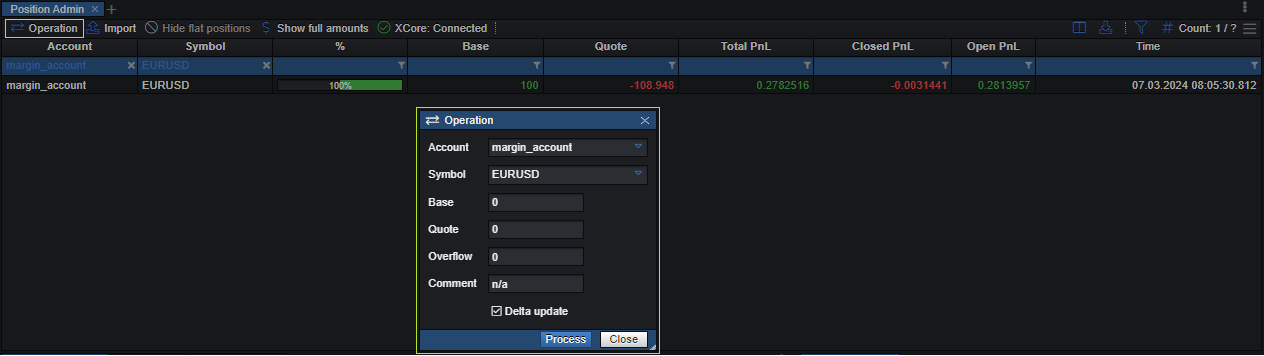
- Select the target XCore Account to which a position adjustment needs to be made.
- Select the specific symbol of the position that needs to be adjusted.
- Set the “Base” amount by which the base position will be changed or replaced (positive amount will result in an increase, negative amount will result in a decrease)
- Set the “Quote” amount by which the quote position will be changed or replaced (positive amount will result in an increase, negative amount will result in a decrease)
- Set the “Overflow” amount by which the overflow will be changed or replaced (positive amount will result in an increase, negative amount will result in a decrease)
- Add an optional comment for the position adjustment. The comment will be visible in the position report.
- When the Delta Update box is unticked, the entered Base, Quote and Overflow replace the current values (leave them at 0 to flatten the position); the increase or decrease in steps 3–5 applies when it is ticked.
Import
The import function allows a user to upload a file (.csv) with multiple position adjustments at once if needed.
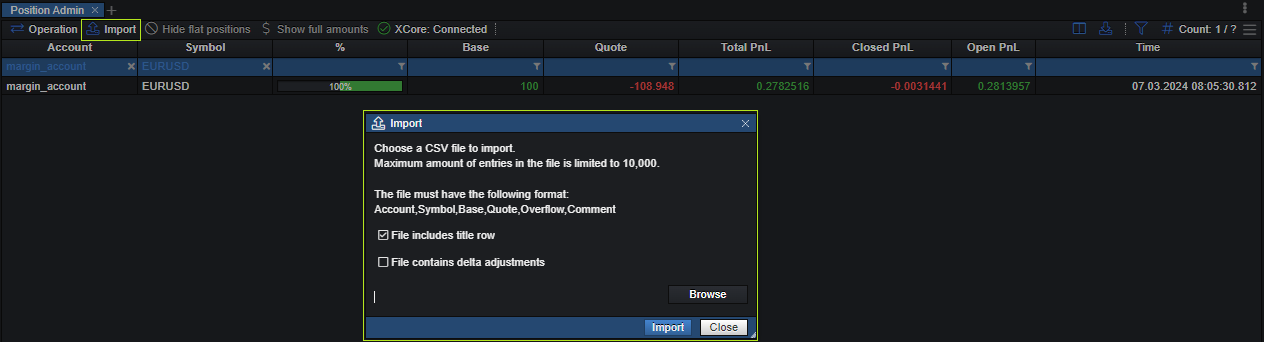
The file should be in .csv format and data should have the following format:
Account,Symbol,Base,Quote,Overflow,Comment
e.g.: margin_account,EURUSD,30000,10000,0,Test
Please refer to the position_adjustment_sample.csv file to learn more about the correct format.