Release Notes
October 6th, 2026 – Reporting Portal - New Release
2026-10-06
Added:
- Templates: See order details for Filled, Partial, Rejected, and Pending orders in one report with the new Deal (All Statuses) report type.
- Templates: Filter Deal reports by the client's margin account with the new Deal (Margin Account) report type.
- Templates: Track orders rejected for exceeding the max spread with the new Max Spread Reject Report.
- Templates: New Position P&L report type for daily B-Book PnL by position.
- Templates: Chart hourly or per-minute averages with the new Date Grouping option.
- Templates: See wallet balances in your account's own currency on Account Wallet EOD with the new
#account_wallet.beginning_balance_acc_ccy,#account_wallet.ending_balance_acc_ccy, and#account_wallet.delta_balance_acc_ccyfields, plus#filter.missing_conv_rateto flag missing conversion rates. - Templates: Compare maker and taker slippage across symbols on Deal reports with the new
#deal.slippage_maker_pips,#deal.slippage_tob_dpm, and#order.slippage_tob_dpmfields, and on Deal (ClickHouse) with#deal_ch.slippage_tob_dpm. - Dashboard: Compare Liquidity Providers' pricing over time with the new predefined Maker Comparison dashboard, powered by the new TOB by Maker (ClickHouse) report.
- Dashboard: In Manual Refresh Mode, filter and sort a report by any column before generating it.
- Dashboard: Export the Position EOD Report split by day — one file per day in a single ZIP.
- Dashboard: Drag to zoom into a narrower time range on any Line Chart with a date or time field on Axis X.
- Dashboard: Clear all column filters and sorting of a report in one click.
- Scheduler: Monitor scheduled report deliveries with the new Scheduler Logs component.
- Scheduler: Saving an SFTP Destination now checks the connection and shows host or credential errors directly on the field.
Fixed:
- Templates: Deleting a single report template no longer fails on Save.
- Dashboard, Scheduler: EOD Symbol Price now resolves the bid and ask independently, matching the Position component.
- Dashboard, Scheduler: ClickHouse report filters (Provider, Symbol, Account, Connector) are no longer case-sensitive.
- Dashboard, Scheduler: Reports no longer fail with an error when the same field is added twice with different Summary Aggregations.
- Dashboard: Exporting a report from the burger menu is no longer limited to the template's Rows Limit.
- Dashboard: The Global and Burger Menu filter window now scrolls when a predefined filter list has more than 20 items, and its Apply and Cancel buttons stay visible.
- Dashboard: The order.account column filter on a Deal report now always lists Connector Accounts.
- Dashboard: Leg date/time fields on the Order Reject dashboard now display the correct date and time.
- Scheduler: Saving changes to a Scheduled Task no longer overwrites its Last Execution status.
October 6th, 2026 – Monitoring - New Release
2026-10-06
Improved:
- Long lines in the Log Viewer now scroll horizontally instead of being cut off.
Fixed:
- Searching the Log Viewer archive by file name now works for large log archives.
- Copying lines from a log file in the Log Viewer no longer copies the line numbers.
September 27th, 2026 – XCore v6.05.55 changes
2026-09-27
Key Changes:
- XCore v6.05.55
- Added Maker type HARMONY (AegeanLabs Harmony).
- Added the leg_markup table to the trade database.
- DealerTrade
devandttlchanges now apply in real time. - The Connector Account FOK threshold no longer converts orders to FOK.
- Fixed EOD Symbol Price in reports sometimes differing from Conv 1 in the Position component.
- Fixed Maker type XOPENHUB_V2 not handling a BusinessMessageReject sent in response to a new order.
- Fixed Binance maker source IP binding to incorrect address in some environments.
- Configuration API 2.62.07: Updated to ensure compatibility with XCore v6.05.55.
September 10th, 2026 – Monitoring - New Release
2026-09-10
Added:
- The new Monitoring app gives direct access to XCore logs - System, Maker, Taker, Filter, and more.
Action Required:
- Grant Monitoring access - not granted by default.
September 6th, 2026 – Upcoming XCore v6.05.52: LMAX Perpetual and KuCoin Provider Integration, Commission Security Setting, B-book Fallback
2026-09-06
Key Changes:
- XCore v6.05.52
- Added Maker type KUCOIN (KuCoin).
- Added Maker type LMAX_PERP (LMAX Perpetual).
- Added an every-day wildcard for swap multiplier rules.
- Added commission rules per Security.
- Added a B-book fallback for amounts below the Provider's minimum trade size.
- Added the option for FIX LIMIT orders to rest on the Provider instead of on XCore.
- Fixed swap multiplier
key=*rules not applying correctly together with day-specific rules. - Fixed repeated
subscription existserrors insystem.logforProviderScalingSetting.sourceafter a Provider reconnect. - Fixed
Giveuprule editor selecting all values instead of a specific one. - Fixed SenderSubID placement in FIX messages sent to the OneZero Liquidity Provider.
- Fixed XCore disconnecting a Connector when a
MarkupProfilename has a trailing space. - Configuration API 2.62.06: Updated to ensure compatibility with XCore v6.05.52.
Action Required:
- After your XCore is updated, review
ProfileSwapMultiplierSettingandCommissionProfileSetting.
August 26th, 2026 – MT4 Bridge v9.34 Update
2026-08-26
We've released PrimeXM MT4 Bridge version v9.34.
Key Changes:
- v9.34
- Added swap synchronization for stop and stop-out triggers.
To download this latest version and review the complete change log, please click here:
August 24th, 2026 – MT5 Gateway v2.3.0.1 Update
2026-08-24
We've released PrimeXM MT5 Gateway version v2.3.0.1.
Key Changes:
- v2.3.0.1
- Added logging when MT5 Gateway parameter items have no match.
To download this latest version and review the complete change log, please click here:
August 19th, 2026 – Reporting Portal - New Release
2026-08-19
Added:
- Scheduler: Restrict a Destination to specific Providers, Connectors, or Accounts.
- Scheduler: Filter Trade Decay reports by a single Decay Interval.
- Scheduler: Saving Task settings no longer activates manually paused Tasks; invalid Tasks resume automatically once fixed.
- Scheduler: Clone a Scheduler Task to quickly create a similar scheduled report.
- Templates: Precision now shows the default rounding (e.g. "default: 3").
- Templates: New Trade Flow by Login Rollup and Toxic Client Watchlist Rollup report types read settled business days from a pre-aggregated table, so long date ranges return much faster. Fields and calculations match Trade Flow by Login and Toxic Client Watchlist; the current day is still read live.
Fixed:
- Dashboard, Scheduler: "Exclude deleted accounts" no longer excludes disabled accounts.
- Dashboard: Refresh now reliably loads fresh data.
August 17th, 2026 – Upcoming XCore v6.05.46: Provider Scaling Override for IG ContractMultiplier
2026-08-17
Key Changes:
- XCore v6.05.46
- Added
AllowScalingOverride(default: N), letting configured scaling override IG's ContractMultiplier (tag 231) instead of raising a conflict.
- Added
August 3rd, 2026 – Upcoming XCore v6.05.45: Dealer Link Provider Config Routing
2026-08-03
Key Changes:
- XCore v6.05.45
DealerLink.provider_confignow routes trades to the respective Provider trading session.- XCore restart does not close MariaDB connections.
July 27th, 2026 – MT4 Bridge v9.33 Update
2026-07-27
We've released PrimeXM MT4 Bridge version v9.33.
Key Changes:
- v9.33
- Fixed Bridge disconnection caused by invalid negative execution prices from MT4.
To download this latest version and review the complete change log, please click here:
July 19th, 2026 – Upcoming XCore v6.05.44: GTN Maker Subscribe Feed Override
2026-07-19
Key Changes:
- XCore v6.05.44: For Maker type GTN,
ProviderStreamSetting.valuesnow overrides the subscribe feed (MT:q/MT:o) per symbol. Default (if empty or n/a): FX → MT:q, others → MT:o. - FX and non-FX now use a single subscription map with the key e~s (exchange~symbol).
Action Required:
- After your XCore is updated, review
ProviderStreamSetting.valuesfor GTN Maker streams.
July 18th, 2026 – Upcoming XServer v2.62.5.3
2026-07-18
Key Changes:
- Automated Rules for
ItemMarkupProfileSettingfields are migrated. - Improved performance of the Activity Logs view, preventing timeout errors when loading logs.
- Added an Import option to Dealer Link for faster setup, instead of configuring each link manually.
July 16th, 2026 – Reporting Portal - New Release
2026-07-16
Added:
- Dashboard: Heat Map view for Trade Flow and Toxic Client Watchlist reports, highlighting values from -100% (red) to 100% (green).
- Dashboard: Configurable field Grouping for Trade Flow and Toxic Client Watchlist reports.
- Scheduler: Clone a Query with its Template and Filters.
Fixed:
- Dashboard, Scheduler: Fixed incorrect Trade Decay values in Trade Flow and Toxic Client Watchlist reports when bid/ask values are 0.
July 8th, 2026 – Reporting Portal - New Release
2026-07-08
Added:
- Templates: New report types — Trade Flow by Login and Toxic Client Watchlist.
- Dashboard: PDF export support.
- Dashboard: Global filters for Hide Deleted Accounts and Hide Flat Positions.
- Scheduler: PDF report delivery support.
- Scheduler: EXCLUDE_DELETED_ACCOUNTS and FLAT_POSITIONS query filters.
- Scheduler: Added task retry, error handling, and execution status notifications with configurable recipient email addresses.
- Scheduler: New EMAIL_SUBJECT_OVERRIDE parameter to force the email subject regardless of Destination settings.
Fixed:
- Fixed incorrect date range boundaries for scheduled reports using certain Period configurations.
July 4th, 2026 – MT5 Gateway v2.3.0.0 Update
2026-07-04
We've released PrimeXM MT5 Gateway version v2.3.0.0.
Key Changes:
- 2.3.0.0
- Fixed memory issues during the reuse of order execution operations.
- Added SendBufferSize and RecvBufferSize configuration parameters (in KB), default value = 256.
To download this latest version and review the complete change log, please click here:
May 26th, 2026 – Reporting Portal - New Release
2026-05-26
Added:
- Permissions: Added a new access control system for managing permissions to reports and data sources in the Reporting Portal.
- Short tutorial videos for the new Permissions components are available here.
Improved:
- Scheduler: Improved delivery of large scheduled reports in CSV format via SFTP.
May 18th, 2026 – MT5 Gateway v2.2.0.7 Update
2026-05-18
We've released PrimeXM MT5 Gateway version v2.2.0.7 (MetaTrader 5 Build 5830).
Key Changes:
- v2.2.0.7
- Rebuilt with the new MT5 libraries (version 5830).
- Manager DLLs are now embedded in the gateway executable (no separate MT5APIManager64.dll download required).
To download this latest version and review the complete change log, please click here:
May 12th, 2026 – Important Update: MT4/5 Gateway Version Deprecation Notice
2026-05-12
Please note that in an upcoming XCore release, the following versions will no longer be supported:
- MT5 Gateway versions below v2.2.0.1
- MT4 Bridge versions below v9.30
Once the new XCore version is deployed, older versions may no longer be able to establish a connection. We strongly recommend ensuring that your MT5 Gateway and MT4 Bridge are upgraded to the latest supported versions as soon as possible.
To download the latest versions and review the complete changelogs, please refer to the links below:
April 29th, 2026 – Contact and Emergency number Update
2026-04-29
Our contact and emergency numbers have changed. Please update your records accordingly.
Support & Sales:
📞 +357 25055941
📞 +44 7575 542321
Emergency Support:
📞 +44 7863 763748
Note: Previous contact numbers will remain available until August 1st, 2026, after which they will be discontinued.
For more information, please visit the Contact Us page, or the Emergency Assistance page for urgent incidents.
April 25th, 2026 – MT5 Gateway v2.2.0.5 Update
2026-04-25
We’ve released PrimeXM MT5 Gateway versions v2.2.0.5 (MetaTrader 5 Build 5770). These updates include important functionality improvements, stability fixes, and performance optimizations.
Key Changes:
- v2.2.0.5 (includes updates from v2.2.0.4)
- Added PartyID to SubID3 in the format:
"mt5_login-mt5_partyId". - Added
module_idto executions. - Improved memory usage.
- Added coverage retry when
MT_RET_REQUEST_PRICE_OFF (10021)is returned. - Fixed an issue where
error.datwas cleared after restart when new errors were received.
- Added PartyID to SubID3 in the format:
Action Required:
- Ensure the MT5APIManager64.dll is updated to support Coverage sync.
To download this latest version and review the complete change log, please click here:
- Gateway
April 22nd, 2026 – Reporting Portal - New Release
2026-04-22
Added:
-
Reports: Support aggregation by calendar day when grouping by date fields (e.g., open_date, close_date, quote_date).
-
Filters: "Sort symbols by security" button in symbol filter to organize symbols into security-based folders.
April 16th, 2026 – Reporting Portal - New Release
2026-04-16
Added:
-
Dashboard & Scheduler: XLSX export now includes legacy-style header (Title, Created date, From/To range, row count) when "Include Header" is enabled.
-
Dashboard & Scheduler: Configurable date format for exported data columns.
-
Dashboard & Scheduler: Configurable date format for export file header.
April 10th, 2026 – Upcoming XCore v6.04.01: Additional Connector Profile Trade Lock Settings (source_type)
2026-04-10
Key Changes:
- XCore v6.04.01: Introduces
slandtpsource_type for Connector Profile Trade Lock Setting, allowing separate configuration of SL and TP settings for trades originating from MT4 and MT5.
Action Required:
- After your XCore is updated, review
ConnectorProfileTradeLockSetting.source_typefield.
April 9th, 2026 – Reporting Portal - New Release
2026-04-09
Added:
-
Dashboard: Shared data between chart and grid views to avoid re-fetching.
-
Dashboard: Export works even before data is displayed when using manual mode.
-
Dashboard: Auto-refresh pauses on inactive tabs to reduce background requests.
-
Dashboard: Default grid page size increased from 1000 to 2000 rows.
-
Templates: Pagination enabled by default for all report templates.
-
Filters: "Add folder" button added to Filters toolbar in folder view.
-
Filters: Items and folders can be moved via "Move to Folder" action.
Improved:
-
Dashboard: Removed thousands separators from Order ID fields.
-
Dashboard: Side and Book filters now display "ALL" instead of "N/A".
-
Dashboard: Report template selector auto-scrolls to the selected template.
-
Templates: "Select All" and "Remove All" buttons now affect only the filtered items when adding fields to a template.
-
Filters: Filter tree actions (edit, delete, add, move) now appear on hover with improved positioning.
Fixed:
-
Fixed #leg.state values in Order Reject reports.
-
Fixed slippage calculation when order.price = 0.
-
Fixed markup sign inversion for SELL trades in ClickHouse reports.
March 31st, 2026 – Reporting Portal - New Release
2026-03-31
Added:
-
Client-side data export for faster exports without re-querying the database.
-
Configurable file naming for scheduled reports.
-
Support for multiple destinations per Scheduler task.
-
Auto-refresh for dashboards with configurable intervals.
-
Collapse/expand all folders toggle in the component trees.
Fixed:
-
Fixed issue where dashboard row count showed 0 despite existing data.
-
Fixed account column filter showing connector names instead of account names.
-
Fixed error when applying operator-based numeric filters on dashboards.
March 30th, 2026 – Reporting Portal - New Release
2026-03-30
Added:
-
ClickHouse-based reports for improved performance. Predefined templates available with "_CH" suffix.
-
Leg information added to Order Reject reports.
-
EMAIL_COMPRESSION setting for Email destinations to enable ZIP compression.
Fixed:
-
Fixed SFTP delivery issues.
-
Fixed conversion rate calculation.
-
Fixed issue where Field Settings changes appeared unsaved after tab switch.
-
Fixed issue where burger filters affected grid filter value lists across reports.
March 20th, 2026 – Reporting Portal - New Release
2026-03-20
Improved:
-
precision = N/Ain Field Settings now rounds prices according toSymbol.price_unit. -
Support for duplicate columns in templates. Multiple columns with the same
itemvalue are now displayed and exported correctly.
Fixed:
- Fixed an issue blocking export of reports containing the
#deal.symbol_quote_ccyfield.
IMPORTANT: March 5th, 2026 – Upcoming XCore v6.03.00
2026-03-05
Key Changes:
- Tiered CCY Leverage AccountProfileCcyLeverageSetting
- Tiered Symbol Leverage AccountProfileSymbolLeverageSetting
- Replaced the currency/symbol limit with separate long and short limits in AccountProfileCcyLimitSetting and AccountProfileSymLimitSetting
- Configuration API: Updated to ensure compatibility with XCore v6.03.00.
After XCore update, please review the following configuration tables:
- AccountProfileCcyLeverageSetting
- AccountProfileSymbolLeverageSetting
- AccountProfileCcyLimitSetting
- AccountProfileSymLimitSetting
March 3rd, 2026 – Scheduler Update (New Reporting Portal)
2026-03-03
We've released an update to the Scheduler in the new Reporting Portal.
Added:
-
Separate Schedule, Period, Query, and Destination Profiles.
-
Ability to combine profiles when creating Tasks.
-
Folder structure for profile management.
Due to the data structure change, migration of all scheduler tasks within the new Reporting Portal is required and is performed automatically upon upgrade.
Short tutorial videos on the new Scheduler are available here.
February 23rd, 2026 – MT5 Feeder (v2.0.2.6) & Gateway (v2.1.0.2) Update
2026-02-23
We’ve released PrimeXM MT5 Feeder v2.0.2.6 and Gateway v2.1.0.2. These updates include important functionality and performance improvements.
Key features of this release:
MT5 Feeder:
- Fixed SendBookDiff logic to prevent skipping book resets.
MT5 Gateway:
- Added MT5 Coverage Sync.
- Minor fix in the nio/ByteBuffer handling.
To download this latest version and review the complete change log, please click here:
- Feeder
- Gateway
February 1st, 2026 – Analytics Portals & Report Manager Module Migrated to New Reporting Portal
2026-02-01
Analytics Portals and Report Manager Module have been migrated to the New Reporting Portal, available at https://reporting.uk.primexm.com.
Clients were previously notified via email with details about the transition timeline.
- Analytics Portals: Already disabled for all clients
- Report Manager Module: Removal started from February 1st, 2026
For more information on the new system, please visit the New Reporting Portal documentation.
December 31st, 2025 – Upcoming XCore v6.01.70 & MT5 Gateway (v2.1.0.0) Update
2025-12-31
Key Changes:
- XCore v6.01.70 and MT5 Gateway (v2.1.0.0): Introduce MT5 Coverage Sync, enabling daily balance synchronization between MT5 and XCore.
Action Required:
- Test the new MT5 Coverage Sync functionality using your Demo XCore environment.
- Once your Live XCore is updated to v6.01.70 or above, migrate the existing synchronization configuration to the new MT5 Coverage Sync framework.
November 21st, 2025 – Upcoming XCore v6.01.60: Additional Connector Routing Key
2025-11-21
Key Changes:
- XCore v6.01.60: Introduces
rkey3for Connector, allowing more precise routing.
Action Required:
- After your XCore is updated, review
Connector.rkey3field.
November 16th, 2025 – MT5 Gateway (v2.0.6.3) Update
2025-11-16
Key Changes:
- Fixed a condition where a close followed by a stop-loss in MT5 resulted in duplicate XCore executions and MT5 booking failures.
To download the latest version and review the complete change log, please click here: MT5 Gateway
November 6th, 2025 – MT4 Bridge (v9.31) & MT5 Gateway (v2.0.6.2) Update
2025-11-06
Key Changes:
- Added account color to order requests (MT4 Bridge v9.31 & MT5 Gateway v2.0.6.2), enabling color-based routing alongside other parameters in ConnectorRoute
To download the latest version and review the complete change log, please click here: MT4 Bridge and MT5 Gateway
October 23rd, 2025 – Upcoming XCore v6.01.55: New ConnectorProfileTradeLock Mode
2025-10-23
XCore v6.01.55 is now available on DEMO.
Key Changes:
- XCore v6.01.55: Introduces a new mode
absorb_rangefor ConnectorProfileTradeLock.
Action Required:
- After your XCore is updated, review
ConnectorProfileTradeLock.modevalues.
October 21st, 2025 – New Reporting System - Demo Rollout
2025-10-21
Starting 1st of November, the old demo reporting system will no longer be accessible.
Key Changes:
- Enhanced data visualization with customizable dashboards, diverse chart types, and widgets enabling multi-series displays for improved analysis and client experience.
- More flexible and convenient report customization and scheduling.
- Faster performance when generating reports.
Action required:
To access the new reporting system, please contact our support team on Microsoft Teams.
October 20th, 2025 – MT4 Bridge (v9.30) Update
2025-10-20
Key Changes:
- Added synchronization of contract sizes (MT4 Bridge v9.30)
To download the latest version and review the complete change log, please click here: Bridge
October 6th, 2025 – Upcoming XCore v6.01.53
2025-10-06
Key Changes:
- MT4 Gateway versions older than 9.23 are no longer supported.
- Added new margin TYPE = POSITION for maker features AccountGroup
Action Required:
- Please update to MT4 Gateway 9.23+ to avoid service interruption. To download latest version and review the complete change log, please click here: Bridge
October 3rd, 2025 – Upcoming XCore v6.01.51: New ConnectorProfileTradeLock Features
2025-10-03
XCore v6.01.51 is now available on DEMO.
In this release we’re giving you more flexibility with ConnectorProfileTradeLock:
- Updated column
order_typetosource_type– specifies the requested trade execution type to which theConnectorProfileTradeLocksettings apply. - Added
target_type– specifies the execution type of the trade (default: n/a). - Added
ref_price– choose between top-of-book or order’s requested price (default: tob). - Added
devflag – control requested deviation in limit orders (default: off).
Key Changes:
- XCore v6.01.51: Introduces additional critical parameters for ConnectorProfileTradeLock.
- Configuration API: Updated to ensure compatibility with XCore v6.01.51.
Action Required:
- After your XCore is updated, review
ConnectorProfileTradeLock.source_type,ConnectorProfileTradeLock.target_type,ConnectorProfileTradeLock.ref_priceandConnectorProfileTradeLock.devvalues. - RabbitMQ Users: Update to Config API v2.60.85.
September 26th, 2025 – Upcoming XCore v6.01.50: New ConnectorProfileTradeLock Features
2025-09-26
XCore v6.01.50 is now available on DEMO.
In this release we’re giving you more flexibility with ConnectorProfileTradeLock:
- Added
ref_price– choose between top-of-book or order’s requested price (default: tob). - Added
devflag – control requested deviation in limit orders (default: off).
Key Changes:
- XCore v6.01.50: Introduces additional critical parameters for ConnectorProfileTradeLock.
- Configuration API: Updated to ensure compatibility with XCore v6.01.50.
Action Required:
- After your XCore is updated, review
ConnectorProfileTradeLock.ref_priceandConnectorProfileTradeLock.devvalues. - RabbitMQ Users: Update to Config API v2.60.85.
CRITICAL: September 11th, 2025 – MT4 Bridge (v9.29) Update
2025-09-11
We’ve released the latest PrimeXM MT4 Bridge v9.29. This update addresses critical functionality and performance improvements.
Key features of this release:
- Fixed issue with bulk operations.
To download this latest version and review the complete change log, please click here: Bridge
CRITICAL: August 11th, 2025 – MT4 Bridge (v9.28) Update
2025-08-11
We’ve released the latest PrimeXM MT4 Bridge v9.28. These updates address critical functionality and performance improvements.
Key features of this release:
- Fixed issue with reconnect.
- Disabled warning message: UPDATE_NORMAL.
To download this latest version and review the complete change log, please click here: Bridge
CRITICAL: July 17th, 2025 – MT5 Feeder (v2.0.2.5) & Gateway (v2.0.6.1) Update
2025-07-17
We’ve released the latest PrimeXM MT5 Feeder v2.0.2.5 & Gateway v2.0.6.1. These updates address critical functionality and performance improvements.
Key features of this release:
MT5 Feeder:
- Rebuilt with the new MT5 libraries (version 5120).
MT5 Gateway:
- Rebuilt with the new MT5 libraries (version 5120).
- Fixed synchronization issue for symbols and groups after startup.
- Added a 5-second verification delay to ensure groups and symbols are loaded properly.
To download this latest version and review the complete change log, please click here:
- Feeder
- Gateway
IMPORTANT: May 13th, 2025 – Upcoming Change: XCore Historical Log Compression Switching to zstd (.zst)
2025-05-13
Starting from May 14, 2025, on our Demo systems, and gradually rolling out to Live systems starting May 17, 2025, we will be transitioning from the older ZIP format to the more modern Zstandard (zstd) compression algorithm for historical log files.
This change is being implemented to improve performance. Zstandard offers significantly faster decompression speeds compared to the traditional ZIP format, which will allow you to access your historical log data more quickly and efficiently.
You will notice that new log files will have the .zst file extension instead of .zip.
For users accessing these files on Windows, please note that decompressing .zst files typically requires third-party software, as Windows does not support this format natively.
For information on how to decompress .zst files on Windows and a list of compatible tools, please visit: Decompressing .zst files in Windows
May 7th, 2025 – Margin Account Charges & Billing
2025-05-07
Dear Clients,
We hope this message finds you well. Following our April 1, 2025, announcement regarding the new pricing structure, we’ve noticed that many clients have not yet unlinked or disabled unused connector or provider-side margin accounts, as recommended.
To avoid unnecessary charges on your April invoice, we strongly urge you to review and disable any unneeded margin accounts by the end of the week of May 17, 2025. If you take action by this deadline and contact us to confirm the adjustments, we will waive the margin-related fees for your April invoice. However, if these accounts remain active after May 17, 2025, the associated fees will be applied.
Please reach out to our support team at your earliest convenience to rectify these configurations or if you need assistance. You can contact us in Microsoft Teams.
Thank you for your prompt attention to this matter and for your continued partnership with PrimeXM.
May 2nd, 2025 – MT4 Bridge Update (v9.26)
2025-05-02
Dear Clients,
We’ve implemented a critical safeguard in XCore to protect brokers from catastrophic failures that can threaten business continuity.
New Parameter: max_executing_entry_requests (default: 10)
This limit controls the number of simultaneous entry order requests per login, symbol, and side. It is specifically designed to prevent extreme scenarios — such as a faulty plugin triggering an uncontrolled loop — that could result in thousands of unintended orders.
Without this safeguard, such behavior can severely disrupt trading operations and, in extreme cases, put a broker out of business.
More information is available here: PrimeXM MT4 Bridge
If you have any questions or concerns, please contact PrimeXM Support.
April 23rd, 2025 – Migration of XCore to XCore connections from PRIMEXM_FIX44 type to PRIMEXM_XC
2025-04-23
Dear Clients,
Please be informed that starting this coming weekend (26–27th April 2025), we will gradually begin migrating all live XCore to XCore connections, both taker and maker, from the current PRIMEXM_FIX44 type to PRIMEXM_XC.
This transition is part of our ongoing efforts to optimize performance. While both protocols are identical in terms of trading functionality, PrimeXM_XC uses a binary format that is significantly more efficient for pricing compared to FIX.
The migration will be handled by our team to ensure a smooth and seamless transition.
If you have any questions or require further information, please contact our support team.
February 24th, 2025 – MT5 Restart - GW Enable/Disable Required
2025-02-24
Dear Clients,
After restarting the MT5 servers, it is important to disable and then re-enable the Gateway (GW) once the restart is complete. This is necessary due to an issue where the history server does not immediately initialize all symbols after a restart, which can result in a “route not found” error in the GW. This error may lead to trade rejections. Disabling and re-enabling the GW after the restart helps to mitigate this issue and ensure smooth trading operations. This is a temporary fix while we work on a permanent resolution. We recommend following this procedure after every server restart to avoid potential disruptions.
If you require further assistance, please contact our support team.
January 23rd, 2025 – Important Update: New Pricing Structure Effective April 1, 2025
2025-01-23
Dear Clients,
Effective April 1, 2025 , we will implement our new pricing structure. For a detailed description of the updated pricing, please visit our website:
https://primexm.com/xcore/pricing-new/
The motivation behind this new pricing structure is to ensure that the invoiced amounts more accurately reflect the resources consumed and the features utilized by each client. This resource-based approach enables a more balanced and precise allocation of costs, ensuring fairness across the board while maintaining our commitment to competitive pricing. Key changes include:
Connectivity Fees:
Although connectivity fees may initially seem higher, they are now more competitive for most clients. We will now charge only the greater of maker or taker fees, rather than the combined total.
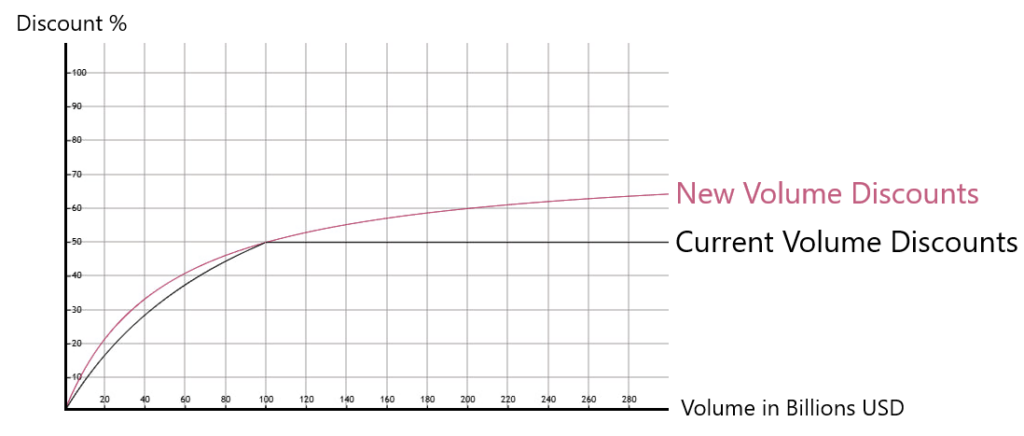
Volume Fees:
We have introduced a new fee for XCore margin accounts, which in turn enables us to be more competitive in other areas. This adjustment has allowed us to:
- Offer more aggressive volume discounts (see the chart below for a detailed comparison of old and new volume discounts).
- Reduce pricing for XCore-to-XCore volumes by allowing them to benefit from volume discount levels.
- Substantially reduce pricing for crypto through a combination of halving B-book crypto fees and enabling both A-book and B-book crypto fees to benefit from volume discount levels.
Transaction Fees:
We have introduced a new transaction fee, carefully designed to avoid impacting most of our clients. Its purpose is to ensure a reasonable level of income for processing, particularly in cases where specific clients generate large amounts of micro-tickets.
To avoid unnecessary charges, we recommend that clients unlink and disable any connector or provider-side margin accounts that are no longer required. During the billing periods of January, February, and March, we will provide clients with a detailed breakdown of charges under the new pricing structure. This will allow for a clearer understanding of the impact of these changes and facilitate any necessary adjustments to your configuration.
We appreciate your continued trust in PrimeXM and remain committed to providing you with the best service and value.
If you have any questions or need further assistance, please don’t hesitate to contact us.
December 20th, 2024 – PrimeXM Analytics: Trade Decay_v4
2024-12-20
In XCore v.6.01.xx+ we have updated Trade_Decay_V2 to Trade_Decay_v4
The trade_decay_v4 table provides highly granular trade analysis by recording incremental bid and ask prices for each order leg at fixed time intervals, up to 300 seconds. This enhances visibility into how orders decay over time.
By cross-referencing this data with trade execution data from order, leg, and deal tables, users can analyze liquidity provider (LP) performance, detect toxic client behavior, and evaluate execution flows across A-book and B-book.
Visit the PrimeXM Analytics portal which contains curated dashboards such as Market Share, Trade Decay Curve, Top 20 Toxic and Profitable logins filtered by Date, symbol, Taker (Connector), Maker (Liquidity Provider) trade flow type (A-book or B-book) and order side (Buy / Sell).
The Analytics portal has since been retired. See the New Reporting Portal documentation.
If you have any questions or need assistance, please reach out to our support team in Microsoft Teams or at support@primexm.com
December 18th, 2024 – Important: New MT5 Gateway v2.0.4.9
2024-12-18
We’ve released the latest MT5 Gateway v2.0.4.9.
This MT5 Gateway version fixes an issue where in hedging mode a client could close positions which are already under execution by executing a closeby.
To download this latest version and review the complete change log, please click here
December 6th, 2024 – Important: Upcoming XCore v.6.01.04+ Update: Key Changes and Action Required
2024-12-06
We are excited to announce the release of XCore v6.01.xx, now available on DEMO.
- For clients on XCore v5.77.xx: You will be directly updated to XCore v6.01.xx. All configurations, except ConfigAutomation rules targeting LiquidityProfiles, will be automatically migrated.
- For clients already on XCore v6.00.xx: XCore v6.01.xx reintroduces support for markup_type decimal. If you wish to migrate your MarkupProfileSettings from markup_type price_unit to markup_type decimal , please contact our support team in Microsoft Teams.
Key Changes:
- XCore v6.00.xx: Replaces LiquidityProfiles with MarkupProfiles.
- XCore v6.01.xx: Introduces additional critical parameters for Symbols.
- Configuration API: Updated to ensure compatibility with XCore v6.01.xx.
Action Required :
- PrimeXM MT5 Feeder: XCore v6.00.xx and later versions drop support for MT5 Feeder versions older than v2.0.2.0. Clients must update to MT5 Feeder version v2.0.2.0 or later.
- PrimeXM MT5 Gateway: XCore v6.00.xx and later versions drop support for MT5 Gateway versions older than v2.0.4.0. Clients must update to MT5 Gateway version v2.0.4.0 or later.
- Review symbol settings: After your XCore is updated, please review and validate the values for symbol.min_markup and symbol.max_markup.
- Config Automation Rules: Clients using the ConfigAutomation must manually migrate rules targeting LiquidityProfiles to MarkupProfiles.
- FIX44 API Changes: XCore v6.00.xx removes support for FIX44 API Takers subscribing with incorrect values in tag 265. Clients should take the necessary actions as described in the March 21, 2024 notification.
- RabbitMQ Users: Update to Config_API_v2.60.76.
December 6th, 2024 – New PrimeXM Config API 2.60.76
2024-12-06
We are pleased to announce the release of PrimeXM XCore Configuration API v2.60.76, which adds support for XCore version 6.01.02.
To download the updated API and view the full changelog, please visit the PrimeXM Configuration API page on the Helpcenter.
For assistance or inquiries, reach out via the Product Development channel in Microsoft Teams or through the official support channels.
November 29th, 2024 – Important Reminder: symbol.max_markup and symbol.min_markup
2024-11-29
Dear Client,
We would like to draw your attention to the newly introduced attributes in XCore versions 6.00.00+: symbol.max_markup and symbol.min_markup.
These settings establish system-wide limits on the total markup and markdown that can be applied to each symbol, overriding your existing Markup Profile settings if those exceed the defined limits.
Please Note: Not all clients have been fully migrated to the latest XCore 6 version. Whether you have already updated or are scheduled to update soon, understanding these new settings is essential to maintain your desired pricing configuration
Why This Matters:
- Potential Impact on Pricing: If these limits are not properly configured, your intended markups or markdowns may not be fully applied due to the caps enforced by
symbol.max_markupandsymbol.min_markup.
This could affect your pricing and markup earnings.
Action Required:
- Review Your Symbol Markup Limits:
- Verify Settings: Please check the
symbol.max_markupand symbol.min_markup values for each of your trading symbols. - Adjust if Necessary: Ensure these limits align with your intended markups and markdowns. Adjust them as needed to prevent any unintended pricing limitations.
- Verify Settings: Please check the
- Set Up Alerts for Limit Breaches:
- Use Alert Module: We recommend setting up alerts using the Alert Module to notify you if the applied markups or markdowns exceed the defined limits.
- Keywords to Monitor: Configure your alerts to monitor for the keywords MAX_MARKUP_LIMIT and MIN_MARKUP_LIMIT.
- Please Note:
- For markup_type set to price_unit: The system will generate alerts when limits are breached upon configuration.
- For markup_type set to basis_point: Warnings will only appear in the system.log after a restart. Therefore, extra caution is advised when configuring markups using basis_point.
- Ensure Team Awareness:
- Inform Your Team: Please make sure that your technical and trading teams are aware of these settings and their implications.
For detailed information on these settings and how to configure them, please visit the Symbol page on our Help Center.
If you have any questions or need assistance, please reach out to our support team in Microsoft Teams or at support@primexm.com
November 28th, 2024 – New PrimeXM Config API 2.60.75
2024-11-28
We are pleased to announce the release of PrimeXM XCore Configuration API v2.60.75.
This release exposes XCore System component table in read only.
To download the updated API and view the full changelog, please visit the PrimeXM Configuration API page on the Helpcenter.
For assistance or inquiries, reach out via the Product Development channel in Microsoft Teams or through the official support channels.
November 27th, 2024 – New PrimeXM MT4 Bridge v9.20
2024-11-27
We’ have released the latest PrimeXM MT4 Bridge v9.20.
This version is compatible only with XCore version 6.00.03 or later.
Key features of this release:
- Enhanced the OrderStatusRequest message to address potential issues with incorrect clOrdIDs when the MT4 server crashes.
Clients are encouraged to test this update on their MT4 demo environment first.
To download and review the complete change log, please visit the PrimeXM MT4 Bridge page on the Helpcenter.
November 26th, 2024 – New PrimeXM MT5 Feeder v2.0.2.3
2024-11-26
We have released the latest PrimeXM MT5 Feeder v2.0.2.3.
Please note this version is only compatible with XCore v6.00.02 or later.
To download this latest version and review the complete change log, please visit the PriemXM MT5 Feeder page.
November 18th, 2024 – Important: Upcoming XCore v.6.00.02+ Update: Key Changes and Action Required
2024-11-18
We are excited to announce the release of XCore v6.0.0.2, which is now on DEMO. If you were not updated to XCore v5.77.55, please note that you will be updated directly to XCore v6.0.0.2+, and similar changes and actions are now required. Gradual deployment to LIVE will follow, with each client receiving advance notice of their specific update date and time.
In this release the LiquidityProfile has been replaced by the MarkupProfile simplifying how markups, spreads, and symbol settings are applied.
When updated to XCore v.6.00.02 or later, existing LiquidityProfileSettings will be automatically migrated to MarkupProfileSetting and adapted for the Key Changes.
XCore v.6.00.02 also adds FULL_REFRESH support alongside INCREMENTAL_REFRESH for PrimeXM FIX44 API Takers and drops support for PrimeXM MT5 Gateway older than v.2.0.4.0.
Please take note of the Key Changes and Actions Required, as there may be updates or changes.
Key Changes:
For comprehensive details on Key Changes, please refer to the following Helpcenter pages:
Action Required :
- After your XCore is updated, review
symbol.min_markupandsymbol.max_markupvalues:- Default values are automatically set to double the highest absolute value among your existing respective
MarkupProfileSetting.markup_bid,MarkupProfileSetting.markup_ask, orMarkupProfileSetting.spreadmin, rounded up to a minimum of 10 units.
- Default values are automatically set to double the highest absolute value among your existing respective
-
Config API Changes for RabbitMQ Users , will need to update to Configuration API v 2.60.73 and:
- Update API Targets: Configuration API targets have changed from LiquidityProfile to MarkupProfile. For details, consult the Changelog.
- Adjust for logic when changing values to be in units based on the
symbol.price_unitinstead of decimals andsymbol.basis_pointsinstead ofpercentage. - Ensure to follow Updated Positive/Negative Logic for
MarkupProfileSetting.markup_bidandMarkupProfileSetting.markup_ask.
-
Clients using the Config Automation Component in the PrimeXM Portal will need to :
- Manually migrate Config Automation rules that target LiquidityProfile to target MarkupProfile, configuring them in units based on the
symbol.price_unitinstead of decimals andsymbol.basis_pointsinstead ofpercentage. - Ensure your rules are adapted to follow the Updated Positive/Negative Logic for
MarkupProfileSetting.markup_bidandMarkupProfileSetting.markup_ask.
- Manually migrate Config Automation rules that target LiquidityProfile to target MarkupProfile, configuring them in units based on the
- For Clients Using PrimeXM MT5 Gateway & Feeder:
- FULL_REFRESH rollout in PrimeXM FIX44 Taker API
- XCore v.5.77.55 adds FULL_REFRESH alongside INCREMENTAL_REFRESH. Ensure your FIX44 API Takers subscribe correctly to INCREMENTAL_REFRESH with (tag 265=1). See March 21, 2024 notification for details.
Important Information:
- XCore v.5.77.55+ is currently on DEMO , allowing you to test these changes before LIVE deployment.
- You will receive further advance notification specifying the date and time when your LIVE XCore will be updated.
- Before your LIVE XCore is updated, ensure your internal Technical and Trading teams are aware of this notification.
- Plan for Rollback (Config API & Config Automation users only): Prepare to revert API, targets, markup, and Config Automation rules if needed.
- Alert PrimeXM immediately if you encounter any markup-related issues after your LIVE XCore is updated.
- Support: If you have any questions or need assistance, please reach out to our support team in Microsoft Teams or at support@primexm.com.
November 6th, 2024 – Important: Upcoming XCore v.5.77.55+ Update: Key Changes and Action Required
2024-11-06
We are excited to announce the release of XCore v.5.77.55 which is now on DEMO. Gradual deployment to LIVE will follow, with each client receiving advance notice of their specific update date and time.
In this release the LiquidityProfile has been replaced by the MarkupProfile simplifying how markups, spreads, and symbol settings are applied.
When updated to XCore v.5.77.55 or later, existing LiquidityProfileSettings will be automatically migrated to MarkupProfileSetting and adapted for the Key Changes.
XCore v.5.77.55 also adds FULL_REFRESH support alongside INCREMENTAL_REFRESH for PrimeXM FIX44 API Takers and drops support for PrimeXM MT5 Gateway older than v.2.0.4.0.
Please take note of the Key Changes and Actions Required.
Key Changes:
For comprehensive details on Key Changes, please refer to the following Helpcenter pages:
Action Required :
- After your XCore is updated, review
symbol.min_markupandsymbol.max_markupvalues:- Default values are automatically set to double the highest absolute value among your existing respective
MarkupProfileSetting.markup_bid,MarkupProfileSetting.markup_ask, orMarkupProfileSetting.spreadmin, rounded up to a minimum of 10 units.
- Default values are automatically set to double the highest absolute value among your existing respective
-
Config API Changes for RabbitMQ Users , will need to update to Configuration API v 2.60.72 and:
- Update API Targets: Configuration API targets have changed from LiquidityProfile to MarkupProfile. For details, consult the Changelog.
- Adjust for logic when changing values to be in units based on the
symbol.price_unitinstead of decimals andsymbol.basis_pointsinstead ofpercentage. - Ensure to follow Updated Positive/Negative Logic for
MarkupProfileSetting.markup_bidandMarkupProfileSetting.markup_ask.
-
Clients using the Config Automation Component in the PrimeXM Portal will need to :
- Manually migrate Config Automation rules that target LiquidityProfile to target MarkupProfile, configuring them in units based on the
symbol.price_unitinstead of decimals andsymbol.basis_pointsinstead ofpercentage. - Ensure your rules are adapted to follow the Updated Positive/Negative Logic for
MarkupProfileSetting.markup_bidandMarkupProfileSetting.markup_ask.
- Manually migrate Config Automation rules that target LiquidityProfile to target MarkupProfile, configuring them in units based on the
- For Clients Using PrimeXM MT5 Gateway & Feeder:
- FULL_REFRESH rollout in PrimeXM FIX44 Taker API
- XCore v.5.77.55 adds FULL_REFRESH alongside INCREMENTAL_REFRESH. Ensure your FIX44 API Takers subscribe correctly to INCREMENTAL_REFRESH with (tag 265=1). See March 21, 2024 notification for details.
Important Information:
- XCore v.5.77.55+ is currently on DEMO , allowing you to test these changes before LIVE deployment.
- You will receive further advance notification specifying the date and time when your LIVE XCore will be updated.
- Before your LIVE XCore is updated, ensure your internal Technical and Trading teams are aware of this notification.
- Plan for Rollback (Config API & Config Automation users only): Prepare to revert API, targets, markup, and Config Automation rules if needed.
- Alert PrimeXM immediately if you encounter any markup-related issues after your LIVE XCore is updated.
- Support: If you have any questions or need assistance, please reach out to our support team in Microsoft Teams or at support@primexm.com.
November 1st, 2024 – Important: New MT5 Gateway v2.0.4.8
2024-11-01
We’ve released the latest MT5 Gateway v2.0.4.8.
This MT5 Gateway version fixes an issue where Volume on Coverage orders, could potentially be rounded down to 0..
To download this latest version and review the complete change log, please click here
October 30th, 2024 – XCore Demo Environment - Access Rights Module Version Rollback
2024-10-30
The access rights on the XCore Demo environment will be adjusted to align with those on the live platform.
This update is necessary as certain changes have not yet been rolled out to the live environment, and we want to maintain consistency across both.
For more details, please refer to our Access Rights Module on the PrimeXM HelpCenter.
Support: If you have any questions or need assistance, please reach out to our support team in Microsoft Teams or at support@primexm.com.
October 24th, 2024 – Action Required: XCore v.5.77.50+ Update – MarkupProfile, Config API, MT5 Gateway, and FIX44 Taker API Changes
2024-10-24
The release of XCore v.5.77.50 includes important changes that require your attention.
Please review the Key Changes as well the Action Required sections below:
Key Changes in XCore v.5.77.50 and later
1. Migration from LiquidityProfile to MarkupProfile
- As notified on October 10th, 2024, the LiquidityProfile has been replaced by MarkupProfile in XCore v.5.77.50. The migration will be done automatically. Markups, spreads, and symbol settings are now configured in units based on the symbol’s
price_unitrather than decimals, improving precision across instruments.You can review the original notification here: October 10th, 2024 – XCore v.5.77.50 Update: Migration from LiquidityProfile to MarkupProfile.
Action Required :
- The LiquidityProfile will be automatically migrated to MarkupProfile and will be specified in units based on the symbol’s
price_unitinstead of decimals. - The Config Automation Component rules that target LiquidityProfile will be automatically migrated to target MarkupProfile and will be specified in units based on the symbol’s
price_unitinstead of decimals. - While this change and migration have been thoroughly tested, it is crucial to take note of the update and alert PrimeXM immediately if you encounter any markup-related issues after the XCore update.
2. Config API Changes for RabbitMQ Users
- As communicated on October 18th, 2024, if you are using the RabbitMQ Configuration API, it is essential to update your logic to migrate from LiquidityProfile to MarkupProfile. Key changes include:
- Updated API Targets: Configuration API targets have changed from LiquidityProfile to MarkupProfile.
- Unit-Based Configuration: Symbol settings are now specified in units based on the symbol’s
price_unit, rather than using decimals.
For complete details on these changes, refer to Configuration API v 2.60.71. You can review the original notification here: October 18th, 2024 – Migration from XCore LiquidityProfile to MarkupProfile for RabbitMQ Config API Users.
2.1 Action Required :
- Update to Configuration API v 2.60.71 and review the Changelog to ensure all updates for the new MarkupProfile settings are properly implemented ensuring smooth migration from LiquidityProfile to MarkupProfile.
- Update your RabbitMQ Configuration API scripts to:
- Reference the new MarkupProfile API targets.
- Adjust your logic for symbol settings to use units based on the
price_unitinstead of decimals.
- Caution: Be prepared for an XCore version rollback if necessary. Ensure you have a plan to:
- Roll back to the previous Configuration API version to ensure compatibility with the old targets and settings.
- Revert to decimal-based logic for specifying LiquidityProfile markup settings.
- Restore the previous LiquidityProfile targets.
3. PrimeXM MT5 Gateway Support
- XCore v.5.77.50 will no longer support PrimeXM MT5 Gateway versions older than v.2.0.4.0.
3.1 Action Required :
- Ensure that your MT5 Gateway is updated to v.2.0.4.0 or later for continued compatibility with XCore. You can download here latest MT5 Gateway version.
4. FULL_REFRESH Rollout in PrimeXM FIX44 Taker API
With the release of XCore v.5.77.50, the PrimeXM FIX44 API will support FULL_REFRESH alongside INCREMENTAL_REFRESH. Immediate action is required to ensure that your FIX44 API Takers are correctly subscribing to INCREMENTAL_REFRESH (tag 265=1).
Reminder: You can review the notification here : March 21, 2024 – PrimeXM FIX44 API Update: Addressing Incorrect Configurations for Incremental Refresh
4.1 Action Required :
- If you have FIX44 API Takers, ensure they are subscribed correctly INCREMENTAL_REFRESH (
tag 265=1).
Next Steps:
- Testing Environment: XCore v.5.77.50+ is currently available on the demo environment, allowing you to test these changes before live deployment.
- Before your XCore is updated, ensure your internal Technical and Trading teams are aware of this notification.
- After your XCore is updated : Monitor for any issues, especially around the Key changes at Market Open, escalating any issue to PrimeXM immediately.
- Support: If you have any questions or need assistance with updating your Config Automation Rules or RabbitMQ Configuration API logic, please reach out to our support team in Microsoft Teams or at support@primexm.com.
October 18th, 2024 – Migration from XCore LiquidityProfile to MarkupProfile for RabbitMQ Config API Users
2024-10-18
On October 10th, 2024, we sent you a notification regarding the release of XCore v.5.77.50, which includes the migration from LiquidityProfile to the enhanced MarkupProfile. If you need more details, you can access the original notification on our help center at notifications.
We are writing to provide additional important information for clients using RabbitMQ – XCore Configuration API.
Action Required:
- Update to Configuration API v 2.60.71 and review the Changelog to ensure all updates for the new MarkupProfile settings are properly implemented ensuring smooth migration from LiquidityProfile to MarkupProfile.
- Update your RabbitMQ Configuration API scripts to:
- Reference the new MarkupProfile API targets.
- Adjust your logic for symbol settings to use units based on the
price_unitinstead of decimals.
- Caution: Be prepared for an XCore version rollback if necessary. Ensure you have a plan to:
- Roll back to the previous Configuration API version to ensure compatibility with the old targets and settings.
- Revert to decimal-based logic for specifying LiquidityProfile markup settings.
- Restore the previous LiquidityProfile targets.
Next Steps:
- Testing Environment: XCore v.5.77.50 is currently available on the demo environment, allowing you to test these changes before live deployment.
- Before your XCore is updated, ensure your internal Technical and Trading teams are aware of this notification.
- After your XCore is updated : Monitor for any issues, especially around the Key changes at Market Open, escalating any issue to PrimeXM immediately.
- Support: If you have any questions or need assistance with updating your Config Automation Rules or RabbitMQ Configuration API logic, please reach out to our support team in Microsoft Teams or at support@primexm.com.
October 14th, 2024 – New PrimeXM MT4 Bridge v9.19
2024-10-14
We’ have released the latest PrimeXM MT4 Bridge v9.19.
Key features of this release:
- Added support for distinct execution settings for Entry (
STOP_ENTRY) and Exit (STOP_EXIT) stop orders, allowing separate configurations for each. - Execution mode
STOPremains available for backward compatibility, ensuring previous configurations continue to function as expected.
Clients are encouraged to test this update on their MT4 demo environment first.
To download and review the complete change log, please visit the PrimeXM MT4 Bridge page on the Helpcenter.
October 10th, 2024 – XCore v.5.77.50 Update: Migration from LiquidityProfile to MarkupProfile
2024-10-10
Starting from XCore v.5.77.50, the LiquidityProfile has been replaced by the enhanced MarkupProfile, bringing changes to how markups, spreads, and symbol settings are applied.
Key Changes:
- Automatic Migration : When updated to XCore v.5.77.50 or later, existing LiquidityProfileSettings will automatically migrate to MarkupProfileSettings
- Markups and Spreads in Units: Markups (
bid/ask) and spread boundaries (spread_min/spread_max) are now specified in units based on the symbol’sprice_unit, rather than decimals. This improves precision across instruments. - Introduction of
byandkeyFields: The newbyfield can be set to either symbol (sym) or security (sec), while thekeyfield determines the specific symbol or security. This configuration approach is gradually being rolled out across allconfig_settingtables and is already in use in settings like TradeLock. - Updated Precision Settings: Existing settings have been renamed (MINUS_1, PLUS_1, PLUS_2), and new options (MINUS_2 and PLUS_3) have been introduced for finer control over rounding.
Action Required :
- The LiquidityProfile will be automatically migrated to MarkupProfile and will be specified in units based on the symbol’s
price_unitinstead of decimals. - The Config Automation Component rules that target LiquidityProfile will be automatically migrated to target MarkupProfile and will be specified in units based on the symbol’s
price_unitinstead of decimals. -
While this change and migration have been thoroughly tested, it is crucial to take note of the update and alert PrimeXM immediately if you encounter any markup-related issues after the XCore update.
Example:
For EURUSD, where the price_unit is set to 0.00001 in the Symbol table:
- A
bidmarkup of -5 for EURUSD in the MarkupProfileSettings now subtracts 5 points (0.00005) from the bid price. This reflects the change from specifying markups in decimals to using the symbol’s unit.
Next Steps:
- Testing Environment: XCore v.5.77.50+ is currently available on the demo environment, allowing you to test these changes before live deployment.
- Before your XCore is updated, ensure your internal Technical and Trading teams are aware of this notification.
- After your XCore is updated : Monitor for any issues, especially around the Key changes at Market Open, escalating any issue to PrimeXM immediately.
- Support: If you have any questions or need assistance, please reach out to our support team in Microsoft Teams or at support@primexm.com.
October 7th, 2024 – New MT5 Gateway v2.0.4.6
2024-10-07
We’ve released the latest MT5 Gateway v2.0.4.6.
This MT5 Gateway version fixes an issue where “route not found” rejection messages might appear right after an MT5 Server Restart leading to order rejection.
To download this latest version and review the complete change log, please click here
October 6th, 2024 – New Custom MT5 Trading Parameter: RejectOnCancel in ConnectorConfigSetting
2024-10-06
A new custom parameter, RejectOnCancel, has been added to the ConnectorConfigSetting for trading. This parameter, when set to Y, ensures that XCore sends a rejection message back to MT5 whenever an order is canceled by the Liquidity Provider.
To see all the custom parameters in ConnectorConfigSetting, please click here
September 30th, 2024 – New MT5 Gateway Version v2.0.4.5
2024-09-30
We’ve released the latest MT5 Gateway v2.0.4.5.
Key features of this release:
- Safeguards added to prevent fill sizes from exceeding requested order sizes, ensuring no booking failures.
- Users can disable the order rounding behavior via specific gateway parameter settings.
- Orders below
min_sizewill no longer be rounded to meet MT5’s minimum requirements. - Coverage orders are no longer by the restricted MT5
max_size limit.
To download this latest version and review the complete change log, please click here
August 8th, 2024 – Deprecation of Improvements Parameter
2024-08-08
We are announcing the deprecation of the ‘ improvement ’ parameter within the _ConnectorAccountSetting _and its associated configuration will be removed on Saturday, September 7th, 2024.
Action Required
Clients are advised to migrate their ‘ Improvements ’ configurations specified in ‘ ConnectorAccountSettings’ to align with the new ‘ ConnectorProfileTradeLock ’ settings. Once a ‘TradeLock’ profile is defined in ConnectorAccount, the ‘ Improvement ’ settings will no longer be applicable. If you are not using the ‘ improvement ’ feature there is no action required.
August 5th, 2024 – Introduction of ConnectorProfileTradeLock
2024-08-05
Also we’ve introduced ConnectorProfileTradeLock, this feature offers more granular control over how negative ‘loss’ or positive slippage ‘gain’ is handled within the system.
For detailed guidance on configuring Tradelock Profile settings as well as examples, please refer to TradeLock documentation in HelpCenter and our tutorial video here
July 24th, 2024 – PrimeXM Analytics: Trade Decay - Top 20 Toxic Logins
2024-07-24
We’ve introduced the Trade Decay feature in XCore, offering insights into short-term trade value changes post-execution, recorded at intervals up to 30 seconds. Access the first dashboard, Trade Decay Dashboard of Top 20 Toxic Logins, on the PrimeXM Analytics portal, with more dashboards to follow.
The Analytics portal has since been retired. See the New Reporting Portal documentation.
July 23rd, 2024 – New MT5 Gateway Version v2.0.4.3
2024-07-23
We’ve released the latest MT5 Gateway v2.0.4.3.
This release resolves an issue where market orders included MT5 group markups in the reference price. We recommend updating to this version at your earliest convenience.
June 14th, 2024 – Position Report
2024-06-14
We’ve introduced a Position Request feature to our Taker_FIX44 API Specification. This allows takers of the type PrimeXM_FIX44_V2 to request position reports for margin accounts.
For additional information, please view our tutorial video here.
June 5th, 2024 – Sampling Interval
2024-06-05
April 10th, 2024 – New XCore Update v5.75.99
2024-04-10
The upcoming XCore update v5.75.99 includes MarketDataRequest (35=V) messages: the system will no longer accept symbol names, requiring the exclusive use of instrument identifiers for enhanced market data accuracy.
To ensure a smoother transition, this XCore update also introduces TRADE_ON_SYMBOL parameter in ConnectorConfigSettings it will allow the use of symbol names for market data and trading.
April 9th, 2024 – New MT5 Gateway v2.0.4.0 Features
2024-04-09
We have introduced two new crucial features in the latest MT5 Gateway v2.0.4.0.
Please click on the links for the video guide.
1. MT5 Gateway Parameter ExecErrorTimeout 2. MT5 Gateway Order Replay
April 2nd, 2024 – LMAX Custom Parameter 'TradeLimit'
2024-04-02
This video provides instructions on configuring the custom parameter ‘TradeLimit’ for your LMAX connection in XCore.
March 22nd, 2024 – Market Data Request Symbol Subscription
2024-03-22
This video explains critical subscription issues, causing conflicts with giveup rules. It guides you through checking the warnings and offers solutions for resolution.
March 21st, 2024 – PrimeXM FIX44 API Update: Addressing Incorrect Configurations for Incremental Refresh
March 20th, 2024 – New Authorized Contact Component in XCore Web Portal
2024-03-20
We introduced an essential update to the XCore Web Portal: the Authorized Contact Component. This new feature streamlines communication between your organization and PrimeXM, ensuring your team receives updates efficiently.
- Review and update your Authorized Contact list for accuracy to maintain effective communication with PrimeXM.
- Access the Authorized Contact to manage contacts, ensuring correct assignment for specific update categories: Notifications, Billing, Marketing, and Microsoft Teams support channels.
Please click on the link for Authorized Contact video.