ProviderStatus

ProviderStatus allows users to monitor the status of individual liquidity provider connections configured in the XCore, per session (pricing and trading). ProviderStatus has the following attributes:
| attributes | description |
|---|---|
| provider | The name of the Liquidity Provider. |
| session | The type of session for the Liquidity Provider (Pricing/Trading). |
| sound alert | A sound alert configured for the change of status for each session. Please see below on how to configure a sound alert. |
| status | Displays the Connection Status of the specific session. The available values are: • Connected – The session is connected and is ready to send/receive data • Disconnected – The session is not connected • Disabled – The session is not enabled within the XCore • Subscriptions Enabled (pricing session) – The session is connected and the XCore has subscribed to the pricing from the Provider. |
| time status | Time status depends on the status value and it will display the last date and time a liquidity provider connected to the XCore, as well the time of the disconnection or disabling of a specific provider. |
| alert sessions | The timeframe in which the sound alert will trigger. |
How to configure Sound Alerts
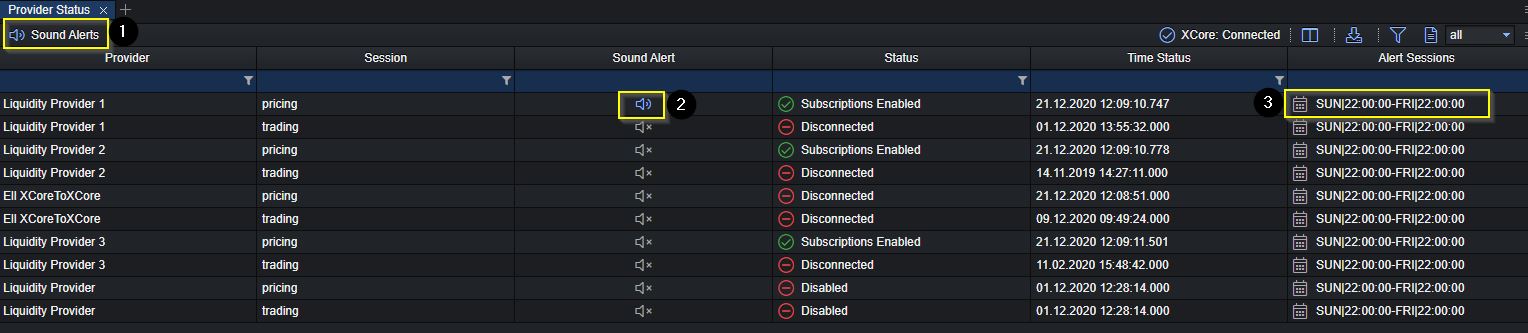
When the connection status of the provider changes between any of the available status values, an alert will be triggered and a sound notification will be sent.
Sound Alerts will only be triggered if the following conditions are met:
- The Sound Alerts master switch (1) is enabled. If this switch is disabled, then no sound alerts will be triggered at all.
- The provider pricing and/or trading session alert (2) is enabled. If the Sound Alert session switch is disabled, then no sound alerts will be triggered for that specific provider pricing and/or trading connection.
- The provider pricing and/or trading Alert Sessions (3) covers the specific moment in time.