ProfileDividend

AccountProfileDividend contains dividend settings per symbol. Rates are defined in the symbol’s quote currency and applied to its net position. The settlement profile selects the currency booked to the account’s wallet. All such settings are defined in AccountProfileDividendSetting.
This profile has the following attributes and can be accessed via:
| attributes | required | default settings | attribute type | description |
|---|---|---|---|---|
| id | Y | – | INT | The ID of the profile; generated. |
| name | Y | – | STRING | The name of the profile |
| description | N | n/a | STRING | Free text |
AccountProfileDividendSetting

AccountProfileDividendSetting defines dividend settings per symbol. AccountProfileDividendSetting has the following attributes:
| attributes | required | default settings | attribute type | description |
|---|---|---|---|---|
| profile | Y | – | SMALLINT(5) | The name of the profile. |
| symbol | Y | – | VARCHAR(32) | The name of the symbol, or * as a fallback for all other symbols. An explicit symbol row takes precedence over the fallback. |
| long | Y | 0 | DOUBLE | Dividend rate for a net long position, expressed as an amount in quote currency per internal base-position unit. Allowed values: 0 or greater. Set 0 to apply no dividend to long positions. |
| short | Y | 0 | DOUBLE | Dividend rate for a net short position, expressed as an amount in quote currency per internal base-position unit. A positive rate produces a debit on a short position. Allowed values: 0 or greater. Set 0 to apply no dividend to short positions. |
| tax | Y | 0 | DOUBLE | Tax percentage applied to long-position dividends after markup, booked separately to the dividend-tax wallet. Set 0 to apply no tax. Short positions do not incur this tax. |
| markup | Y | 0 | DOUBLE | Percentage markup applied to the dividend amount. It reduces a long dividend credit and increases a short dividend charge. Allowed values: 0 or greater. Set 0 to apply no markup. |
| comment | – | – | VARCHAR(64) | Free text for the comment of the dividend and tax bookings. The following tokens are replaced when the dividend is settled: - #SYM# – symbol name- #VALUE# – the long or short dividend rate that was applied- #TAX# – the tax percentage applied- #CONV# – conversion rate from the symbol’s quote currency to the booking currency- #%# – the markup percentage appliedExample: the template #SYM#|#VALUE#|#TAX#|#CONV# produces a comment such as AAPL.US|0.25|15|1 in the account report. The tokens are optional and can be combined with any wording. |
| comment 2 | – | – | VARCHAR(64) | A second comment template supporting the same tokens as comment. |
Info Notes
- Dividends are supported for both FX and non-FX instruments. Configure the dividend and settlement profiles for the applicable symbols.
- Dividend Value is denominated in the Quote currency of the Instrument.
- A Settlement Profile needs to be configured separately, which would apply to the dividend profile setup specifying the timeframe of the application on the positions
Dividend calculation
The amount before markup, expressed in the dividend settlement currency, is:
Gross dividend =
  signed net base position
  × applicable long/short rate
  × quote-to-settlement rate
Use the long rate for a net long position and the short rate for a net short position. The position quantity retains its sign, so a positive rate produces a credit for a long position and a debit for a short position before markup.
Convert from the symbol's quote currency to the currency selected in the dividend Settlement Profile. If its ccy is n/a, use the account group's default currency.
Markup and tax
Apply the markup to the gross dividend:
Long dividend  = gross dividend × (1 - markup / 100)
Short dividend = gross dividend × (1 + markup / 100)
Markup is included in the dividend amount; it does not create a separate broker-account or markup-wallet credit. For a long position, markup above 100% changes a dividend credit into a debit.
For example, with a position of 1,000 units, a rate of 0.1, a conversion rate of 1, tax of 0 and markup of 1,000%:
Long dividend  =  100 × (1 - 10) =   -900
Short dividend = -100 × (1 + 10) = -1,100
Tax applies to the dividend after markup for long positions only:
Dividend-tax booking = -long dividend × tax / 100
The dividend and tax are booked separately. Short positions do not incur this configured dividend tax.
How Dividends Are Configured and Applied
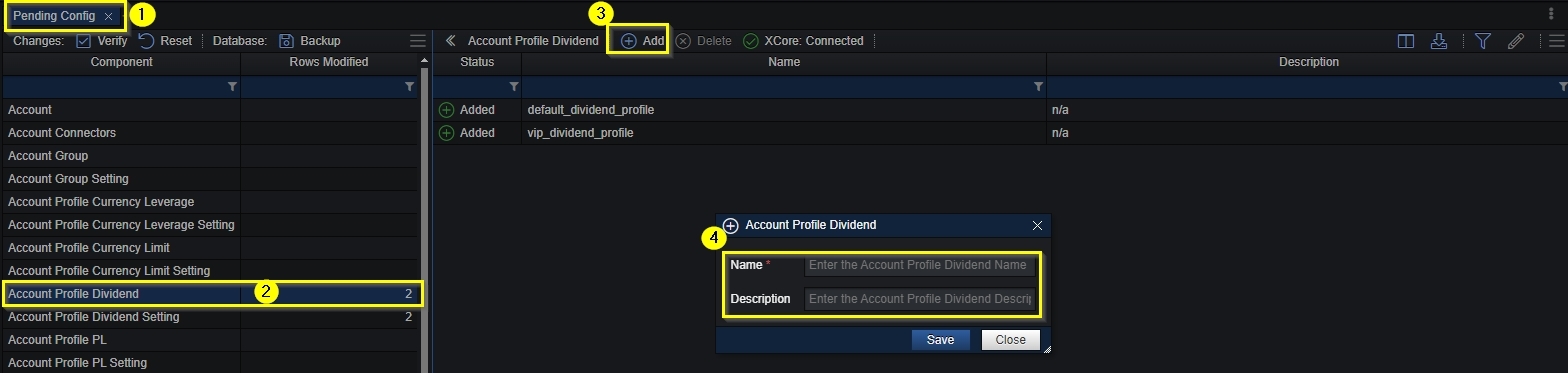
In order to use the dividends in the XCore, an account profile dividend must be created by providing a name and a description from the Pending Config component.
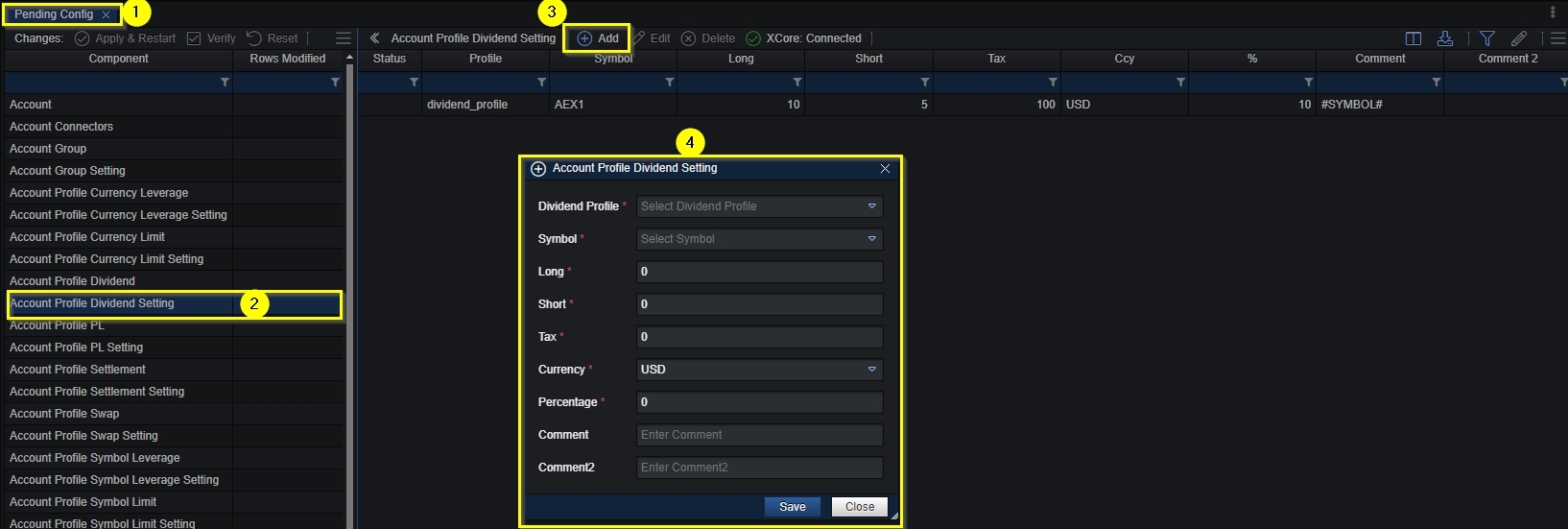
Once the dividend profile is created, the values of the symbols we need to apply dividends on must be set up, as well as the time frame when they should apply/be charged.
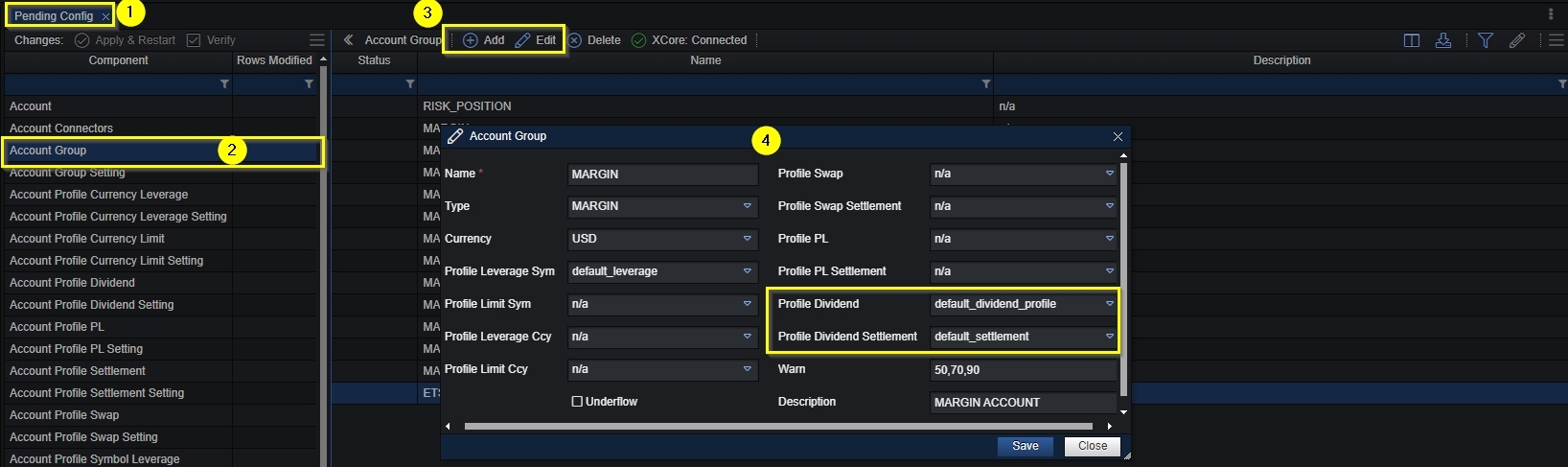
The Account Profile Dividend and Profile Dividend Settlement must be linked with an Account through the Account Group component.
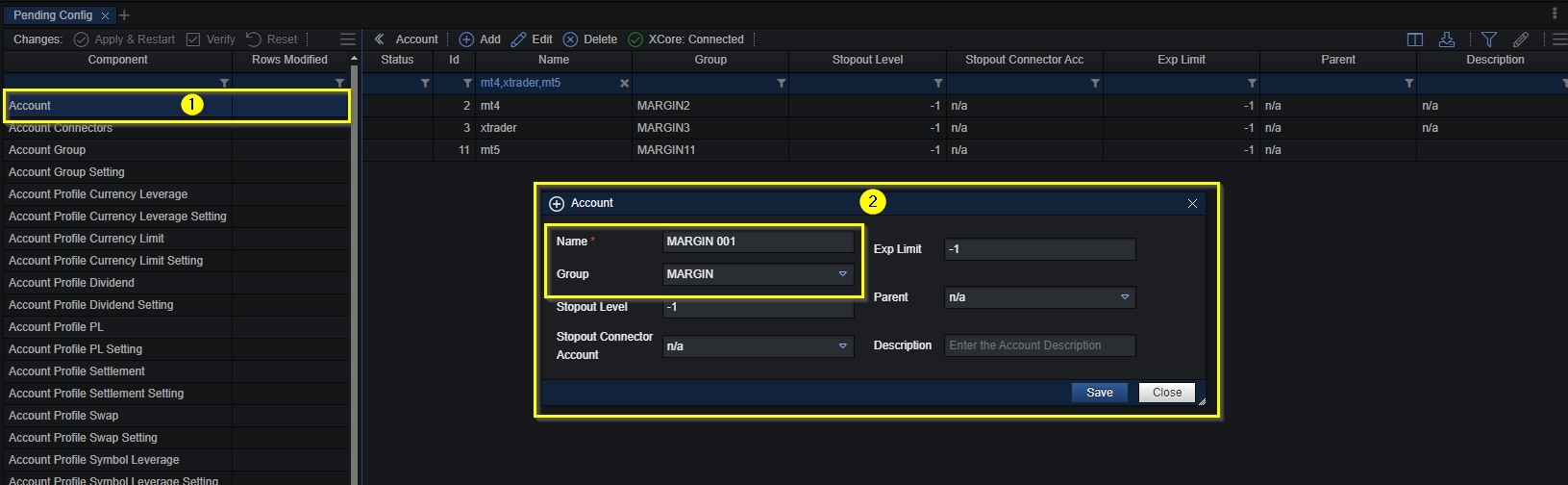
The Account Group needs to be linked with a specific XCore Account in the Pending Config under the Account field.
When the specified timeframe applies, according to the configuration under the Account Profile Dividend Setting component, the dividends will be charged accordingly on the symbols configured to the open positions in the XCore of the Connector linked with the XCore Account.
Upload Dividend Settings via CSV
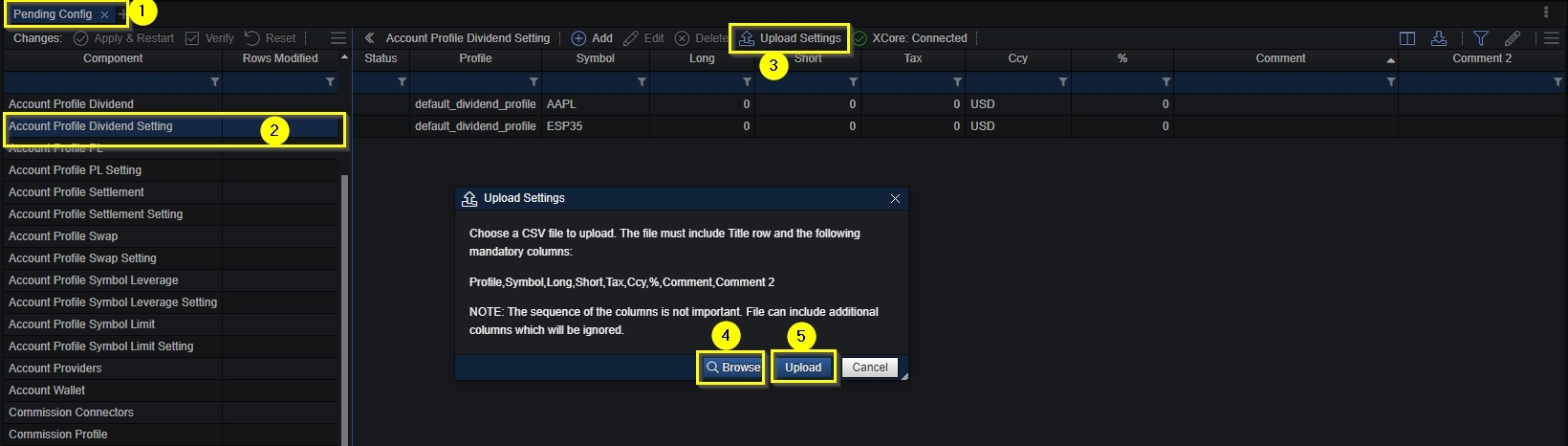
You can upload a list of the dividend setting into the XCore in case you have already configured them on excel.
- Open Account Profile Dividend Setting field under the Pending Config component.
- Press the Upload Settings button to open pop up window.
- Press the Browse button to find the file that you have already prepared and saved locally on your PC.
- Press the Upload after you have selected the file from your local PC to upload the settings.
- After uploading the settings in Pending Config, use Apply & Restart to activate the changes.
In Real-Time Config, Upload Settings can update existing dividend-setting rows for the same profile and symbol. Review and save the imported changes to apply them without a restart. New profiles, new setting rows, AccountGroup assignments and settlement schedules require Pending Config and Apply & Restart.
Dividends use the net position present when each settlement occurrence is processed. Rates are not automatically cleared after payment, so a recurring schedule can pay or charge again. Check the rate and settlement schedule together for one-off dividends. The wallet profile must provide both dividend and dividend-tax destinations.