Exposure

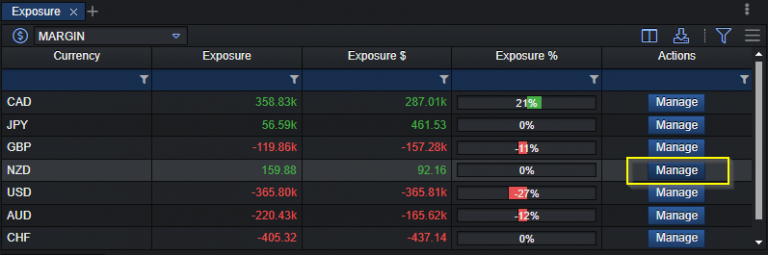
Exposure helps users understand and manage their currency exposure in trading. It provides information on the currencies involved, nominal exposure, account currency exposure, and exposure percentage per currency. Additionally, it offers a management feature to help users adjust their exposure to particular currencies, based on their preferences and risk tolerance. Exposure has the following attributes:
| attributes | description |
|---|---|
| Currency | Lists all currencies involved in trading, based on held positions. |
| Nominal exposure | The net amount of the currency across the open positions: base amounts where it is the base currency plus quote amounts where it is the quote currency, in that currency. |
| Account currency exposure | The nominal exposure in the account currency (base × Conv 1 × Conv 2, quote × Conv 2). This value is netted. |
| % Exposure | The account currency exposure of the currency as a percentage of the sum of the absolute account currency exposures of all currencies. |
| Manage | Allows the user to adjust exposure for a specific currency, using available currencies in the XCore platform. |
Note: Data information that is shown in the exposure component is presented once you have configured an XCore Account, linked/mapped it to the required XTrader connector.
How to manage (reduce) exposure of a currency
In order to manage exposure of currency the Exposure component is used, which presents exposures of each currency that have open positions associated with a specific XCore Account that is linked with an XTrader connector.
Decide on the currency on which you need to reduce exposure and press the Manage button which will open pop up window.
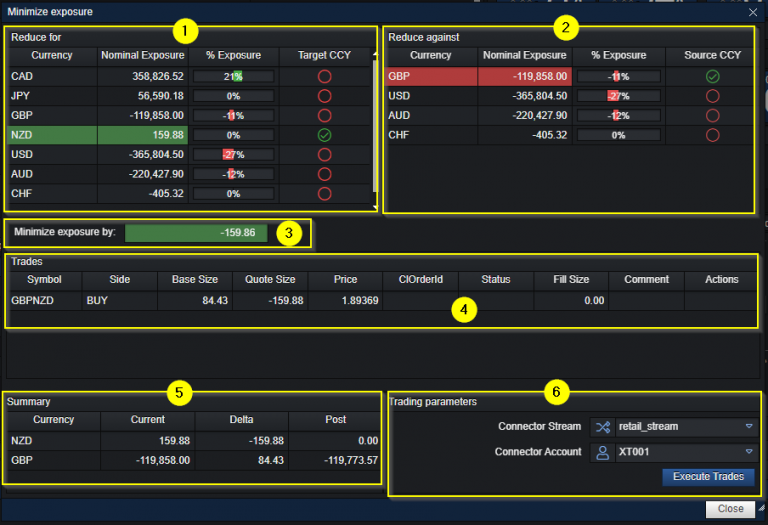
- In the top left of window it presents the current exposures of currencies, which user can select from.
- In the top right of window it presents the list currencies against which user can reduce exposure.
- Presents the currency by which the exposure will be reduced. (This can be changed manually if needed by entering values)
- In the middle of window it presents the preview of the trade to be executed, showing the Base, Quote, Price.
- In the bottom left of window it presents the summary of exposure of currency after the trade is executed.
- In the bottom right of window it presents trading parameters on which the trade will be executed and the Execute Trades button to place the trade.
Once the user has decided to reduce exposure, the user needs to press Execute Trades button to proceed filling the order and currency is reduced.
Executed trade is shown indicating how the trade was executed (Fill/Partial).
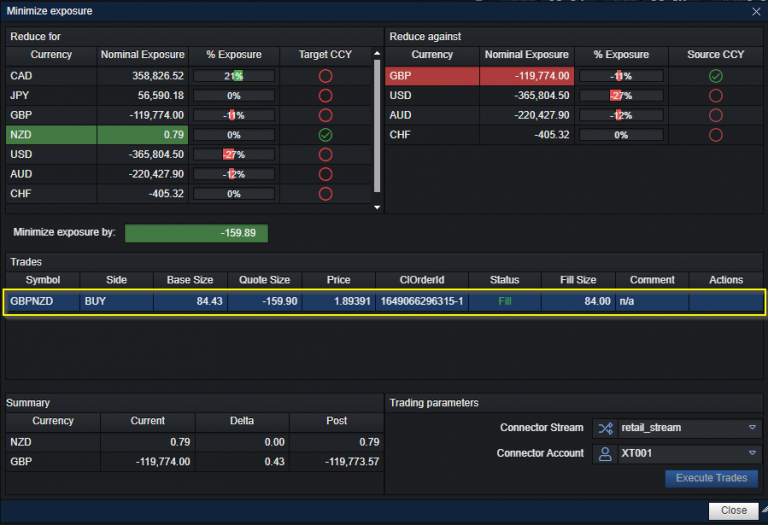
Note: The Max size of the trade to be sent for execution depends on the Max Size value that is set in the Connector Account Setting component.
Note: The exposure amount by which currency can be reduced also depends on the AStep value that is set in the Connector Account Setting component