Template
The template component of the Admin Client Module can be used optionally if needed by the XCore Admin user in case they wish to create their dedicated layout templates and report templates to preload them into their XCore for the users of their system to use them.
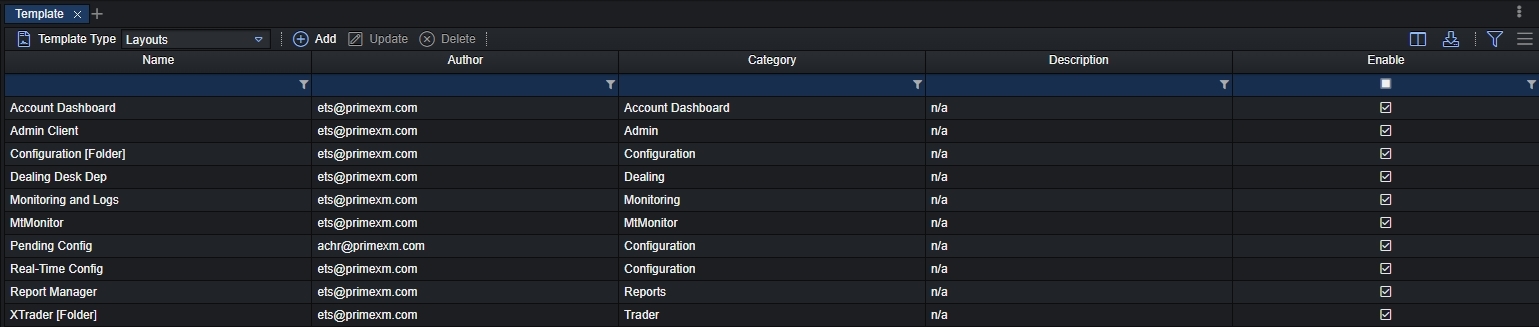
| Top Panel Functionalities | Description |
|---|---|
| Template Type | Select under which type you wish to add a template on the specific XCore instance: - Layouts: select to load a configured layout that will be available for the XCore users from the list of the Predefined XCore Templates during the import layout. - Report Templates: select to load a configured report template available for the XCore users from the list of the Predefined Report Templates. - Access Groups: select to load a configured access-group available for the XCore users from the list Predefined Access Group Templates. - Automation Rules: select to load a configured automation rule available for the XCore users from the list of the Predefined Automation Rules Templates. - Report Data Filters: select to load a configured report data filter. |
| Add | Opens the wizard to proceed and upload a preconfigured template: - Template Type: Selected template type from the previous step. - Template Name: Provide a name for the preconfigured template that all other XCore users will see. - Category Type: Select between custom to create a new category under which the template will be located or existing in case you already have configured a category type. - Description: Provide a meaningful description for the template. |
| Update | Open the wizard to update the template, its name, and description, and disable or enable it. |
| Delete | Deletes fully the loaded template from the XCore. |
| Column Name | Column Description |
|---|---|
| Name | The name of the template as it was configured in the template wizard. |
| Author | The author/user who uploaded the template in the XCore. |
| Category | The category under which the template belongs as it was configured in the template wizard. |
| Description | The description of the template as it was configured in the template wizard. |
| Enable | Indication whether a specific template is enabled or disabled in the XCore: - Enabled: the template will be visible to all users in the XCore from the Predefined Templates. - Disabled: the template will not be visible to any user in the XCore from the Predefined Templates. |