Exposure
The MT Monitor Exposure components allow users to monitor, in real-time the open exposure of all open positions on a per currency basis
Exposure is displayed using 2 components:
- Exposure Data
- Exposure Chart
Note: When the components are linked  the exposure will match according to the settings defined in the “parameters”
Exposure Data

| Field | Description |
|---|---|
| Currency | specifies the single currency for which the real-time exposure is calculated Note: a currency will only be shown if there are currently open positions involving the currency |
| Server | The MT4/5 Server where the exposure is held Note: “*” denotes “all” Servers currently connected |
| Group | The MT4/5 Group where the exposure is held Note: “*” denotes “all” groups on the MetaTrader server |
| Account | The MT4/5 Trading Account where the exposure is held Note: “*” denotes “all” accounts in the group |
| Buy Exposure | Sum of open positions on the specific currency, in nominal terms where: - Currency = Base and order side = BUY - Currency = Quote and order side = SELL For example: (BUY 100,000 USDJPY) + (SELL 100,000 EURUSD) = 218,000 USD Buy Exposure (considering a EURUSD rate of 1.18) |
| Sell Exposure | Sum of open positions on the specific currency, in nominal terms where: - Currency = Base and order side = SELL - Currency = Quote and order side = BUY For example: (SELL 100,000 USDCHF) + (BUY 100,000 GBPUSD) = 230,000 USD Sell Exposure (considering a GBPUSD rate of 1.30) |
| Max Exposure | The highest current exposure (in nominal terms) between the Buy exposure and the Sell exposure |
| Net Exposure | The net exposure of the respective Currency: Buy Exposure – Sell Exposure Note: In “Broker” mode this will be Sell Exposure – Buy Exposure |
| Buy Exposure $ | The BUY exposure of the respective Currency displayed in the Currency selected under “Parameters” Note: For FX Volume: Base * ConvRate Base Note: For Non FX Volume: Quote * ConvRate Quote |
| Sell Exposure $ | The SELL exposure of the respective Currency displayed in the Currency selected under “Parameters” Note: For FX Volume: Base * ConvRate Base Note: For Non FX Volume: Quote * ConvRate Quote |
| Max Exposure $ | The highest current exposure (in terms of the user selected currency) between the Buy exposure and the Sell exposure |
| Net Exposure $ | The net exposure of the respective Currency displayed in the Currency selected under “Parameters”: Buy Exposure $ – Sell Exposure $ Note: In “Broker” mode this will be Sell Exposure $ – Buy Exposure $ |
Exposure Chart
| Field | Description |
|---|---|
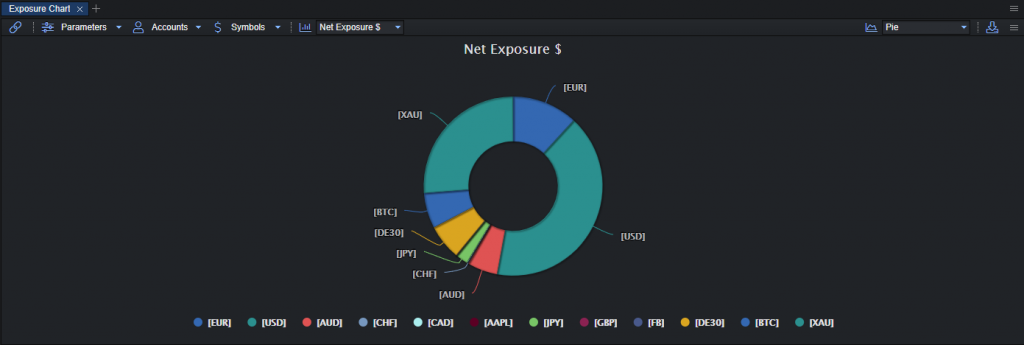
| Chart Data | The available exposure charts are: - Buy Exposure $ – shows the total BUY exposure (in the user-selected currency) relative to that of all other currencies - Sell Exposure $ – shows the total SELL exposure (in the user-selected currency) relative to that of all other currencies - Max Exposure $ – shows the total MAX exposure (in the user-selected currency) relative to that of all other currencies - Net Exposure $ – shows the netted exposure (in the user-selected currency) relative to that of all other currencies |
| Chart Type | The available chart types are: - Area - Areaspline - Column - Line - Spline |
Parameters
| Field | Description |
|---|---|
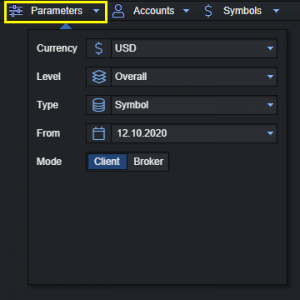
| Currency | Specifies the currency to which the real-time “Exposure $” parameters (Buy Exposure $, Sell Exposure $ and Net Exposure $) will be calculated Available currencies: - EUR - USD - GBP - JPY - CHF Note: the system will periodically (every 1 second) re-calculate the real-time CCy values of open all positions and display the results in the selected Ccy. |
| Level | Represents the data level at which you would like to aggregate. The available levels are: - Overall - Server - Group - Account For example, overall will show aggregated data for all connected servers whereas account will show data on a per trading account basis |
| From | The start date from which you would like to generate data |
| Mode | The perspective from which you would like to see the data. The available modes are: - Client - Broker Note: The Broker mode displays the total exposure (inverse of client) and does not differentiate between A- and B-book. For example, if client exposure is “100k”, Broker exposure will be “-100k” |