MT5 Coverage Setup
In order to cover XCore trades on an MT5 coverage account some basic configuration needs to be performed on both the XCore and the MT5 Administrator Terminal.
In order to configure your MT5 coverage account, you will need to add a new rule in the Giveup component. This can be done directly from the Pending Config component. There are several parameters that need to be defined which impact the way trades are recorded into the account.
The below parameters need to be completed in order to setup your Giveup rule.
| Parameter | Description |
|---|---|
| Connectors | the name of the source connector(s) from where the received trades need to be saved to the coverage account Note: you can have one or multiple connectors. Examples below: - * – All connectors will be set as the source - trade/fixclient1 – Connector with name fixclient1 will be set as the source - trade/fixclient1,trade/fixclient2 – Connectors fixclient1 and fixclient2 will be set as the source - trade/fixclient* – Connectors that start with trade/fixclient , which will include fixclient1 and fixclient2 will be set as the source - !trade/fixclient*,* – All connectors except those starting with trade/fixclient will be set as the source |
| Target | the name of the MT5 connector in the XCore that contains the MT5 coverage account where trades will be recorded |
| Accounts | the name of the connector account(s) from where the received trades need to be saved to the coverage account Note: you can have one or multiple connector account. Examples below: - * – All accounts will be set as the source - trading1 – Accounts with name trading1 will be set as the source - trading1,trading2 – Accounts trading1 and trading2 will be set as the source - trading* – Accounts that start with trading , which will include trading1 and trading2 will be set as the source - !trading*,* – All accounts except those starting with trading will be set as the source |
| Securities | the specific securities(from the ones defined in the XCore) whose trades will be covered e.g: FX – meaning only trades belonging to FX security will be covered Note: by default this is set to “*”, meaning the coverage rule is defined for all symbols of all securities |
| Symbols | the specific symbols(from the ones defined in the XCore) whose trades will be covered Note: you can have one or multiple symbol. Examples below: - * – All symbols will be set - EURUSD – Only symbol EURUSD will be set - EURUSD, GBPUSD – Symbols EURUSD and GBPUSD will be set - EUR* – Symbols that start with EUR, which will include for example EURUSD, EURGBP and more will be set - !EUR*,* – All symbols except those starting with EUR will be set |
| SubId1 | specify a parameter to filter from where the received trades need to be saved to the coverage account Note: you can have one or multiple filters. Examples below: - * – All records will be set - 123 – Only record 123 will be set - 123,124 – Records 123 and 124 will be set - 12* – Records that start with 12, which will include for example 123, 124 and more will be set - !12*,* – All records except those starting with 12 will be set |
| SubId2 | specify a parameter to filter from where the received trades need to be saved to the coverage account Note: you can have one or multiple filters. Examples below: - * – All records will be set - 123 – Only record 123 will be set - 123,124 – Records 123 and 124 will be set - 12* – Records that start with 12, which will include for example 123, 124 and more will be set - !12*,* – All records except those starting with 12 will be set |
| SubId3 | specify a parameter to filter from where the received trades need to be saved to the coverage account (for MT5 sources this is the login ID) Note: you can have one or multiple login ID(s). Examples below: - * – All login ID’s will be set - 123 – Only login ID 123 will be set - 123,124 – Login ID’s 123 and 124 will be set - 12* – Login ID’s that start with 12, which will include for example 123, 124 and more will be set - !12*,* – All login ID’s except those starting with 12 will be set |
| Providers | the name of one or several providers in case you want to only record to a coverage account trades sent to the specific provider(s). Examples below: - * – All providers will be set - provider1 – Only provider1 will be set - provider1,provider2 – provider1 and provider2 will be set - provider* – Providers that start with provider, which will include for example provider1, provider2 and more will be set - !provider*,* – All providers except those starting with provider will be set Note: for B-book trades, it considers the provider who was streaming the price used for execution. |
| Mode | This can be set to: - any – all executed trades will be recorded in the coverage account, regardless if they were executed as A-book or B-book - a_only – only trades executed as A-book will be recorded in the coverage account - b_only – only trades executed as B-book will be recorded in the coverage account Note: by default, all trades will be covered, so the execution mode parameter in the coverage rule is set to “any” |
| Values | specify coverage parameters pattern, more details can be found in the coverage parameters table at the bottom of the page. SERVER,LOGIN,INSTRUMENT,PRICE,SCALING[,MARKUP[,BOOKING_TYPE]] e.g.: 0,50001,#I#,0,1 The first five positions are required; see also the Giveup page. |
| Coverage Mode | The coverage mode depends on the MT5 group level Margin and Risk management settings under which the MT5 coverage account is located. Note: Switching MT5 Margin and Risk management settings from “for Retail Forex, CFD, Futures with Hedged positions” to “for Retail Forex, CFD, Futures” or Vice Versa requires an MT5 Server restart. |
| Priority | the priority of the rule Note: higher number means higher priority, which will supersede the rules with lower priority |
| Enable | represents if the rule is enabled or disabled Note: a disabled rule creates no coverage, but if it matches at a higher priority than the other rules for the same target, it still prevents them from applying (see Giveup). |
Coverage parameters:
Full pattern : SERVER,LOGIN,INSTRUMENT,PRICE,SCALING[,MARKUP[,BOOKING_TYPE]]
e.g.: 0,50001,#I#,0,1
| Field | Required | Description |
|---|---|---|
| Server ID | Yes | Compatibility position retained from the MT4 layout. MT5 coverage does not use it; keep the position and enter 0. |
| MT5 Login | Yes | login ID for the target coverage account; if set to “n/a” the SubID3 of the order (the MT5 login) is used as the target login |
| Instrument | Yes | pattern of the symbols enabled on the coverage account on the target MT5 - #S# = XCore Symbol Name e.g. EURUSD (FX) and GER30 (nonFX) - #I# = XCore Connector Stream Instrument name e.g. EURUSDx (FX) and GER30x (nonFX) - #1##2# = XCore Connector Stream Base/Quote name e.g EURUSD(FX) and GER30EUR(nonFX) - #S#.tt = custom pattern using the symbol name with a suffix .tt and resulting in e.g. EURUSD.tt (FX) and GER30.tt (CFD) Note: Some custom patterns can lead to errors and wrong mapping if it’s applied on all securities. Note: For #1##2# it is highly advised to be used just for FX Symbols. - Note: Please note that if an incorrect pattern is configured by the XCore user, this may lead to multiple alerts: MT5 Symbol not found, which will result in the blockage of the coverage MT login if not resolved promptly. |
| Reported Price | Yes | If the coverage price contains the markups or not: 0 — with XCore markups, 1 — raw LP price Note: Please make sure that the coverage account is placed into a separate group that has no MT5 group markups configured. Note: In case the coverage account is placed into a group that has MT5 group markups, they will be added to the covered trades and this will affect the coverage account exposure. |
| Scaling | Yes | Quantity multiplier and side of the trade placed in the coverage account: 1 – (100%, same side), -1 – (100%, reversed side), 0.5 – (50%, same side). A value of 0 behaves as 1. |
| Markup | No | Optional additional static markup applied to the fill price, in units of ten times the symbol price_unit (pips for five-digit FX symbols). A positive value lowers sells and raises buys; a value that cannot be parsed counts as zero. |
| Booking type | No | 1 books each execution leg, 2 books each deal; an absent position or any other value books the completed order. |
Note: The scaling position is required; use 1 for 100% on the same side.
MT5 Administrator Terminal Configuration
In order to ensure MT5 coverage occurs as intended, there are a few things which are necessary to be configured on the MT5 side.
- The MT5 group that the coverage account belongs to must contain (and have enabled) the respective security and symbol pattern for which trades will be covered.
- The security and thus symbol on which trades will be covered, must be enabled on the PrimeXM MT5 Gateway. If not enabled the trades will not get covered, the following error will be received: “MT5 Symbol not found“. For example: if the coverage account is in group “COV” and the symbols are under security “FOREX” then the following rule is required in the gateway:
sec=FOREX;g=*;acc=acc_1
Note: the rule shown above is simply for demonstration purposes and may be different from your MT5 gateway rule.
Note: if a general rule appears (“*”) which contains the coverage group and security, this is also acceptable. For further information on MT5 gateway rules, please see MT5 Gateway Routing Rules.
Optional
- It is also possible to trade from the coverage account itself.
- By default, MT5 coverage applies the “min” setting defined on the Symbol level. If you would like to use the precision (min) defined on the MT5 Group level then two things are required:
- Add an execution rule for coverage accounts in the Gateway.
For example, if the coverage account is under group “COV”:
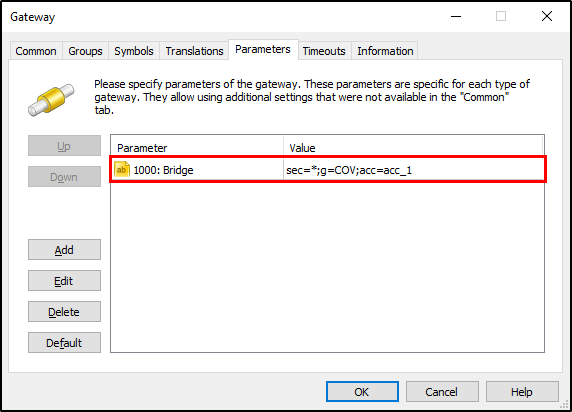 Note: the rule shown above is simply for demonstration purposes and may be different from your MT5 gateway rule.
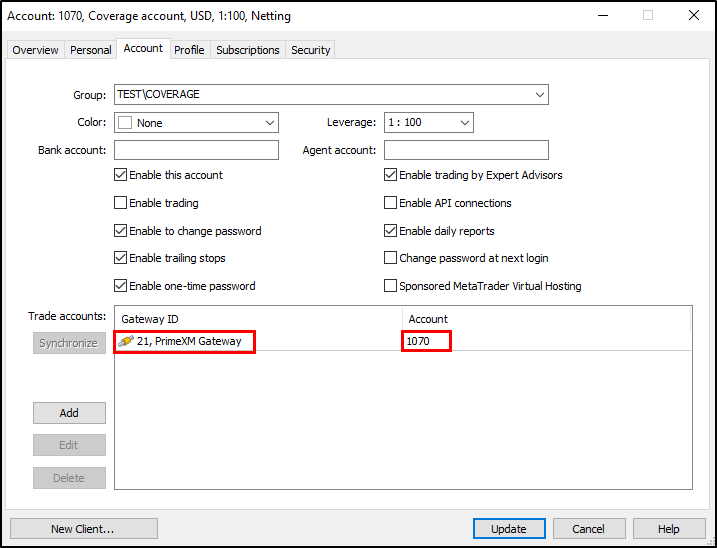
 - Link Coverage account with external gateway ID.
From the Admin terminal go to Account Settings –> Account Tab –> Link coverage account with PXM Gateway by adding the Gateway ID as shown below:
- Add an execution rule for coverage accounts in the Gateway.