Alert Session Profiles

This module allows clients to define the specific time or period during which any triggered alert notifications will be sent via the SMTP server. The “Alerts Session Profiles” has following attributes:
| Attributes | Description |
|---|---|
| Name | The name of the profile. |
| Session | Specific time or period for this profile |
Setup Alert Session Profile
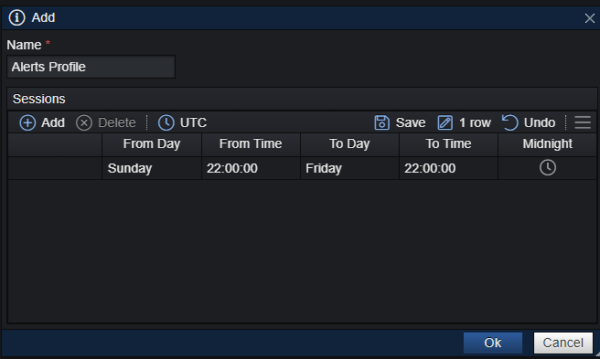
1. Click on the “Add Item” button
2. Configure “Name” for your new Alert Session Profile.
3. Click “Add” and specify the starting day and time for your Alert
4. When you have finished click “Save”
5. Choose “OK”
Note: Each Alert session follows a standard format where we define the start day of the week and time of the day, as well as the end day of the week and time of the day. These time sessions are specified in the UTC Time Zone, and adhere to the following format:
DAY HH:MM:SS – DAY HH:MM:SS
For example: SUN 22:00:00 – FRI 21:30:00
The above indicates that the session begins every week on Sunday at 22:00:00 UTC and concludes on Friday at 21:30:00 UTC.
Note: If the “Session Profile” is set to “n/a” for an alerts rule, it signifies that the alert rule will remain active all time without any time restrictions.