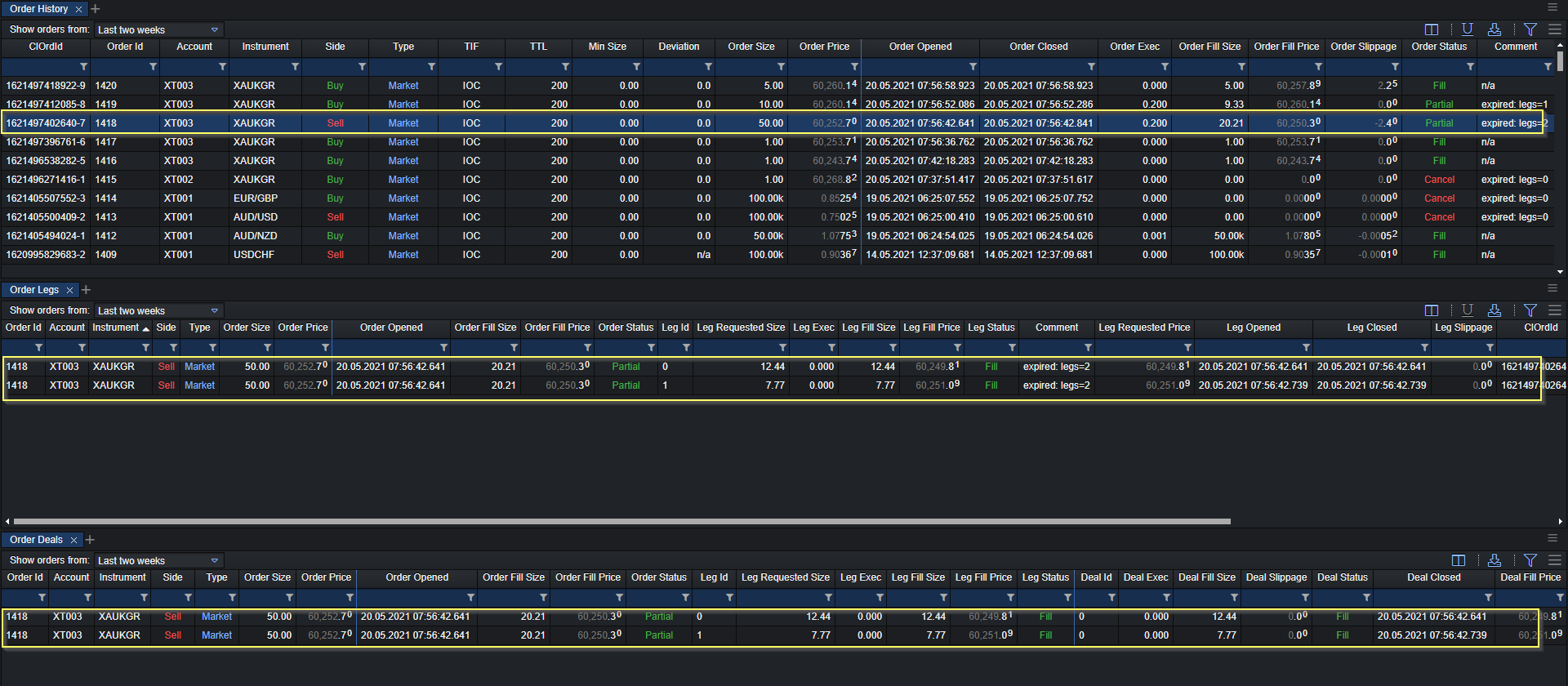
Order History/Legs/Deals
The Order History component is available in the XTrader module within your XCore Portal, providing access to a real-time Order Blotter to track all orders placed through the XTrader.
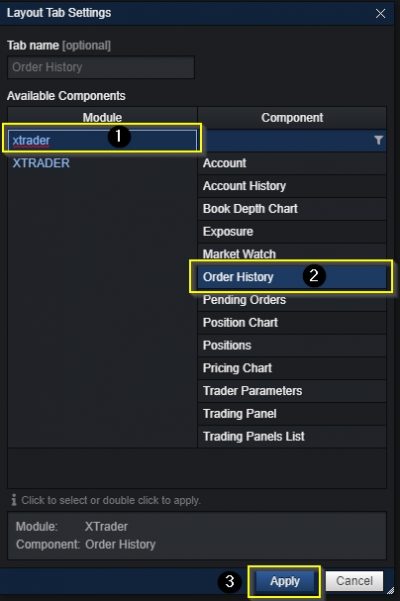
Accessing Order History
The Order History can be accessed as seen below:
Orders Overview
All orders placed via the XTrader can be viewed in the Orders component as follows:

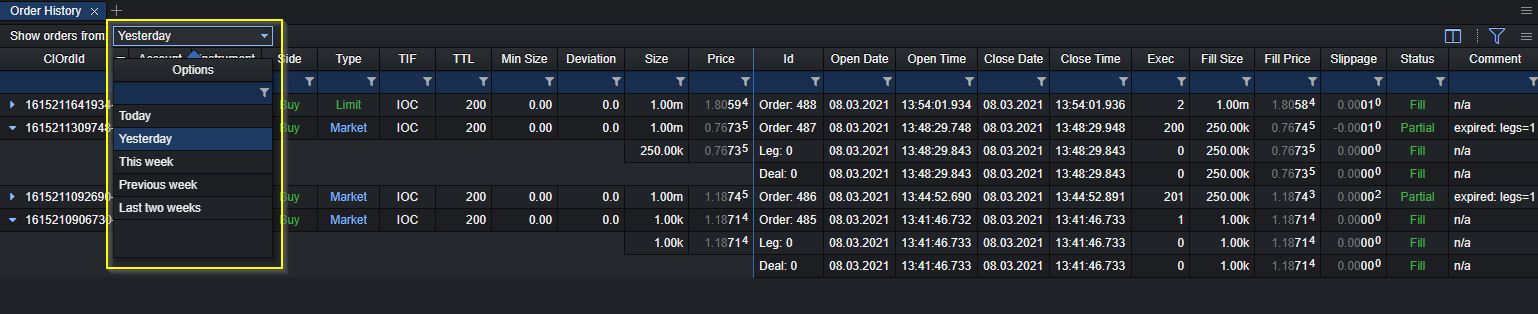
Show order since: Dropdown to select since when to show orders in the order history component. Max time up to last two weeks:
- Today
- Yesterday
- This week
- Previous week
- Last two weeks
Highlight New Order Timer: Indicator to specify in milliseconds to highlight the last order placed in the XTrader. The value specified will highlight the last placed order for X milliseconds before removing highlight.
Highlight Color: Indicator to specify the colour of highlight for the last placed order in the XTrader.
Technical Specifications
Order history component consists of the following fields:
| ClOrdId | The Order ID of the Account, within the XTrader connector. |
| Account | The connector account within the XTrader where order was placed from. |
| Instrument | The traded symbol (financial instrument). |
| Side | Order side – Buy or Sell. |
| Type | The order type: Market, Limit, Stop or StopOut. |
| TIF | The time-in-force setting for the order: FOK, IOC or GTC. |
| TTL | Time to live – duration of the order (in ms). |
| Min Size | The minimum accepted fill size specified in the order request. |
| Deviation | The maximum allowed deviation from the requested price, as sent with the order, in points; n/a means no deviation was sent with the order. |
| Order Size | The requested size of the order. |
| Order Price | The requested price of the order. |
| Order Id | XCore Order ID |
| Order Opened Date | The date on which the order was placed in the system. |
| Order Opened Full Time | The full time on which the order was placed in the system, which includes hour, minutes, seconds and milliseconds. |
| Order Closed Date | The date on which the order was closed in the system. |
| Order Closed Full Time | The full time on which the order was closed in the system, which includes hour, minutes, seconds and milliseconds. |
| Order Exec. | Order execution time in ms. |
| Order Fill Size | The volume of the order out of the requested size that was filled by the system. Note: In the event of partial filling, the fill size would be less than the requested size. |
| Order Fill Price | The price at which the order was filled in the system. |
| Order Slippage | Order slippage which is the difference between the filled and the requested price. |
| Order Status | The status of the order: pending, filled, partially filled, rejected, cancelled or timed out. |
| Comment | Additional information about the order which provides more details about the canceled orders |
| Order Opened | The date and time when the order was placed in the system, including hours, minutes, seconds and milliseconds. |
| Order Opened Short Time | The time when the order was placed, shown as hours and minutes. |
| Order Opened Long Time | The time when the order was placed, shown as hours, minutes and seconds. |
| Order Closed | The date and time when the order was closed in the system, including hours, minutes, seconds and milliseconds. |
| Order Closed Short Time | The time when the order was closed, shown as hours and minutes. |
| Order Closed Long Time | The time when the order was closed, shown as hours, minutes and seconds. |
Order Legs Component
Order Legs shows the execution legs of an order, including their requested size, fill size, price and status.

The Order Legs is capable to hold the history of orders up to the last two weeks therefore from the dropdown menu you can select the required time to check orders executed from the XTrader.

Technical Specifications
The Order Legs component consists of the following fields:
| Order Fill Size | The volume of the order out of the requested size that was filled by the system. Note: In the event of partial filling, the fill size would be less than the requested size. |
| Order Fill Price | The price at which the order was filled in the system. |
| Order Status | The status of the order: pending, filled, partially filled, rejected, cancelled or timed out. |
| Leg ID | ID assigned by XCore to an execution leg of the order. |
| Leg Requested Size | The requested execution size of the leg. |
| Leg Exec | Leg execution time in milliseconds. |
| Leg Fill Size | The filled size of the leg, equal to the sum of its confirmed deal sizes. A leg can be filled through one or several deals. |
| Leg Fill Price | The fill price of the leg before XCore markups. |
| Leg Status | The execution status of the leg: pending, filled, partially filled or rejected. |
| Comment | Additional information about the order which provides more details about the cancelled orders |
| Leg Requested Price | The requested execution price of the leg. |
| Leg Opened | The timestamp when the leg was created in XCore. |
| Leg Closed | The timestamp when the leg was completed in XCore. |
| Leg Slippage | The slippage of the leg, expressed as a decimal price difference. |
| ClOrdId | The Order ID of the Account, within the XTrader connector. |
| TIF | The time-in-force setting for the order: FOK, IOC or GTC. |
| TTL | Time to live – duration of the order (in ms). |
| Min Size | The minimum accepted fill size specified in the order request. |
| Deviation | The maximum allowed deviation from the requested price, as sent with the order, in points; n/a means no deviation was sent with the order. |
| Order Closed | The date and time when the order was closed in the system, including hours, minutes, seconds and milliseconds. |
| Order Exec. | Order execution time in ms. |
| Order Slippage | Order slippage which is the difference between the filled and the requested price. |
Order Deals Component
Order Deals shows the individual deals for an order leg, including the deal size, fill price and execution status. It is linked to Order Legs.

Technical Specifications
Order Deals component consists of the following fields:
| Order Fill Size | The volume of the order out of the requested size that was filled by the system. Note: In the event of partial filling, the fill size would be less than the requested size. |
| Order Fill Price | The price at which the order was filled in the system. |
| Order Status | The status of the order: pending, filled, partially filled, rejected, cancelled or timed out. |
| Leg ID | ID assigned by XCore to an execution leg of the order. |
| Leg Requested Size | The requested execution size of the leg. |
| Leg Exec | Leg execution time in milliseconds. |
| Leg Fill Size | The filled size of the leg, equal to the sum of its confirmed deal sizes. A leg can be filled through one or several deals. |
| Leg Fill Price | The fill price of the leg before XCore markups. |
| Leg Status | The execution status of the leg: pending, filled, partially filled or rejected. |
| Comment | Additional information about the order which provides more details about the cancelled orders |
| Leg Requested Price | The requested execution price of the leg. |
| Leg Opened | The timestamp when the leg was created in XCore. |
| Leg Closed | The timestamp when the leg was completed in XCore. |
| Leg Slippage | The slippage of the leg, expressed as a decimal price difference. |
| ClOrdId | The Order ID of the Account, within the XTrader connector. |
| TIF | The time-in-force setting for the order: FOK, IOC or GTC. |
| TTL | Time to live – duration of the order (in ms). |
| Min Size | The minimum accepted fill size specified in the order request. |
| Deviation | The maximum allowed deviation from the requested price, as sent with the order, in points; n/a means no deviation was sent with the order. |
| Order Exec. | Order execution time in ms. |
| Order Slippage | Order slippage which is the difference between the filled and the requested price. |
| Deal Fill Size | The confirmed fill size of the deal. |
| Deal Slippage | The slippage of the deal, expressed as a decimal price difference. |
| Deal Status | The execution result of the deal: filled, rejected or timed out. |
| Deal Closed | The close timestamp of the deal, with millisecond precision. |
| Deal Fill Price | The confirmed fill price of the deal. |
| Order Opened | The date and time when the order was placed in the system, including hours, minutes, seconds and milliseconds. |
| Order Opened Short Time | The time when the order was placed, shown as hours and minutes. |
| Order Opened Long Time | The time when the order was placed, shown as hours, minutes and seconds. |
| Order Closed | The date and time when the order was closed in the system, including hours, minutes, seconds and milliseconds. |
| Order Closed Short Time | The time when the order was closed, shown as hours and minutes. |
| Order Closed Long Time | The time when the order was closed, shown as hours, minutes and seconds. |
The Order History, Order Legs and Order Deals components are linked between them, therefore if all the components are presented on the same layout then you can select a specific order on the Order History which will filter the rest of the components accordingly with the selected order.