Trading Panels List
The Trading Panels component in comparison with the Trading Panel component can load multiple trading panels in a component at a time.
Settings remain the same as within the single Trading Panel component, more details see below:
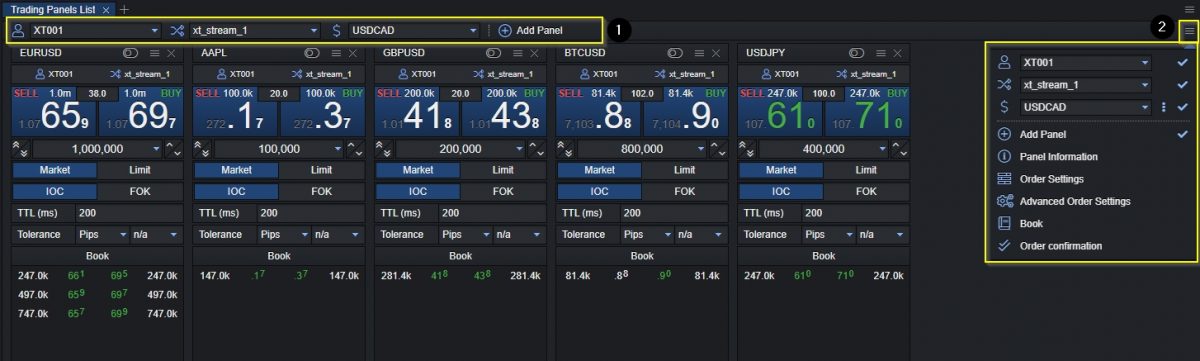
- Selection panel for Connector Account, Connector Stream and Trading Instrument.
- Settings Button contains additional settings that can be used such as:
- Panel Information indicating the selected Trading Account and Connector Stream which can be hidden by unselecting it via Settings.
- Order Settings show the available type of order to select.
- Advanced Order Settings show additional settings for TTL and Tolerance (Deviation).
- Book showing the available liquidity book with prices and liquidity of the selected symbol.
- Order confirmation enabling or disabling the 2-Click Confirmation trading.
Order Advanced Mode
The order advanced mode can be enabled on the Trading Panels by clicking the Order Advanced Mode button as shown below:
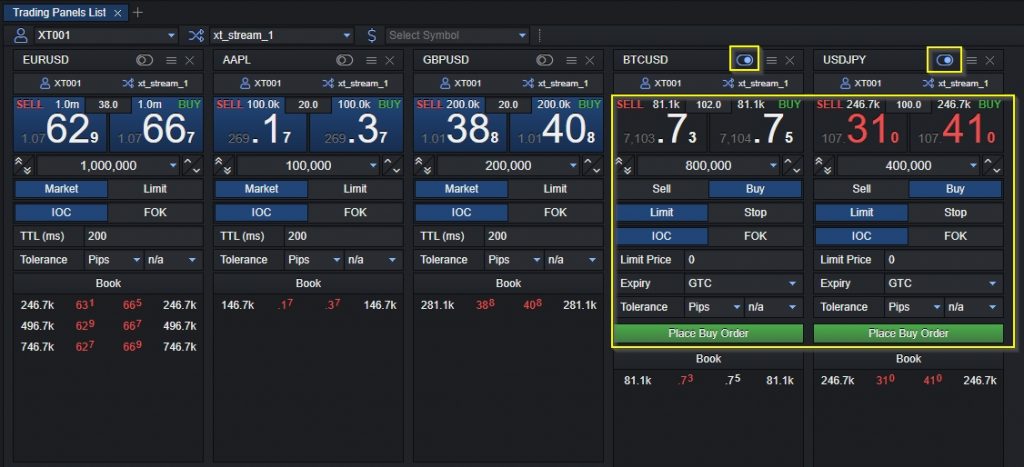
By trading from the Order Advanced Mode it is possible to place Pending Orders specifying different options that are available to select.