FIX 4.4 DropCopy API Specification v1.1
Rules of Engagement
Disclaimer
PrimeXM endeavours to ensure that the data and other material in this publication are correct and complete but does not accept liability for any error herein or omissions. The development of PrimeXM’s products and services is continuous and published information may not be up to date.
Note: V1, V2 and V3 are additional messages that are added just for trades that are originated from MT4 connectors and are not found in other types of connectors
Change log
| Date | Version | Description |
|---|---|---|
| 01/07/2014 | v1.0 | Initial version PrimeXM FIX 4.4 DropCopy API Specification v1.0 |
| 15/01/2015 | v1.1 | In the [V1]Order Request message “orderID” field replaced with “clOrdID”, see full fields description below. Changed the relationship between [V1]Order Request and [U1]Order Open messages. Now they are linked based on 3 fields, see the explanation below. |
Introduction
- Scope of this document
This document is intended to serve software developers as an implementation guide for the PrimeXM FIX DropCopy API.
- FIX version
PrimeXM supports FIX version 4.4. For further information about this version please refer to the specifications published by the FIX Protocol Organization under http://www.fixprotocol.org/specifications/FIX.4.4. Please use the FIX 4.4 dictionary for integration.
- FIX sessions
Clients need to establish single FIX connection to the PrimeXM FIX Dropcopy Server, the communication will be one-way only as PrimeXM will send the messages out, no client requests are needed.
Connectivity
- Connection type
Connection to PrimeXM’s FIX engine is available over the Internet, VPN tunnel or cross-connect to our data center facilities in UK (London) and US (New York). Please contact us for further details.
- Hours of operations
Connectivity to PrimeXM’s FIX DropCopy engine is available from FRI 17:05:30 till FRI 17:05:00 (America/New_York).
- Sequence number reset
There is a weekly sequence reset window on FRI 17:05:00 – 17:05:30 (America/New_York) on the Dropcopy (trading) connection. Trading connection has to be configured to persist sequence numbers on logon (141=N). If the client is cross-connected with us, we can consider removing SSL from the trading connection.
- Security and authentication
PrimeXM uses SSL to secure the FIX trading sessions and will provide all necessary details. Once the connection to the PrimeXM FIX server is established the client has to authenticate against the server with a username and password added to the logon (MsgType=A) message.
Messages
As defined in the FIX protocol, the PrimeXM FIX Dropcopy server is using two different data levels: Session and Application. The Session level handles the delivery of data and the Application level defines the business-related data content. The following session and application messages are supported by the PrimeXM FIX Engine:
Session messages
- Heartbeat (Client ↔ PrimeXM)
- Test Request (Client ↔ PrimeXM)
- Logon (Client → PrimeXM)
- Logout (Client → PrimeXM)
- Resend Request (Client ↔ PrimeXM)
- Reject (Client ↔ PrimeXM)
- Sequence Reset (Client ↔ PrimeXM)
Application messages
- Order Request (PrimeXM → Client)
- Order Response (PrimeXM → Client)
- Order Done (PrimeXM → Client)
- Order Open (PrimeXM → Client)
- Order Close (PrimeXM → Client)
- Leg Open (PrimeXM → Client)
- Leg Close (PrimeXM → Client)
- Deal Done (PrimeXM → Client)
Standard messages
Standard header
| Tag | Field name | Required | Comments |
|---|---|---|---|
| 8 | BeginString | Y | Identifies beginning of new message and protocol version (always first field in message) |
| 9 | BodyLength | Y | Message length (in bytes) forward to the CheckSum field (always second field in message) |
| 35 | MsgType | Y | Defines message type (always 3rd tag in message) |
| 49 | SenderCompID | Y | Assigned value used to identify the client sending messages (will be provided by PrimeXM) |
| 56 | TargetCompID | Y | Assigned value used to identify receiving party (will be provided by PrimeXM) |
| 34 | MsgSeqNum | Y | Integer message sequence number |
| 50 | SenderSubID | N | Optional. Assigned value used to identify specific message originator (desk, trader, etc.) (will be provided by PrimeXM if necessary) |
| 52 | SendingTime | Y | Message transmission time in UTC/GMT |
Standard trailer
| Tag | Field name | Required | Comments |
|---|---|---|---|
| 10 | Checksum | Y | Three digit character representing the checksum value of the message |
Heartbeat
| Tag | Field name | Required | Comments |
|---|---|---|---|
| Standard Header | Y | MsgType=0 | |
| 112 | TestReqID | N | Req’d when the heartbeat is the result of a Test Request message |
| Standard Trailer | Y |
Heartbeat Example
8=FIX.4.4 9=51 35=0 34=2 49=XCxx 52=20260922-16:28:51.391 56=DC01 10=081
Test Request
| Tag | Field name | Required | Comments |
|---|---|---|---|
| Standard Header | Y | MsgType=1 | |
| 112 | TestReqID | Y | A unique identifier for this test message |
| Standard Trailer | Y |
Logon
| Tag | Field name | Required | Comments |
|---|---|---|---|
| Standard Header | Y | MsgType=A | |
| 98 | EncryptMethod | Y | Use of Encryption, set to “0” |
| 108 | HeartBtInt | Y | Heartbeat interval in seconds |
| 141 | ResetSeqNumFlag | N | Indicates both sides of a FIX session should reset sequence numbers |
| 553 | Username | Y | Username (provided by PrimeXM) |
| 554 | Password | Y | Password (provided by PrimeXM) |
| Standard Trailer | Y |
Logon Example
Logon Request: 8=FIX.4.4 9=90 35=A 49=DC01 56=XCxx 34=1 52=20260923-06:48:26.500 98=0 108=5 141=Y 553=user 554=password 10=097
Logon Reply: 8=FIX.4.4 9=68 35=A 34=1 49=XCxx 52=20260923-06:48:26.502 56=DC01 98=0 108=5 141=Y 10=127
Logout
| Tag | Field name | Required | Comments |
|---|---|---|---|
| Standard Header | Y | MsgType=5 | |
| 58 | Text | N | Reason for logout |
| Standard Trailer | Y |
Logout Example
Logout request: 8=FIX.4.4 9=51 35=5 49=DC01 56=XCxx 34=8 52=20260922-19:15:21.287 10=092
Logout reply: 8=FIX.4.4 9=51 35=5 34=7 49=XCxx 52=20260922-19:15:21.287 56=DC01 10=091
Resend Request
| Tag | Field name | Required | Comments |
|---|---|---|---|
| Standard Header | Y | MsgType=2 | |
| 7 | BeginSeqNo | Y | |
| 16 | EndSeqNo | Y | |
| Standard Trailer | Y |
Resend Request Example
8=FIX.4.4 9=61 35=2 49=DC01 56=XCxx 34=33 52=20260922-16:42:50.182 7=1 16=1 10=253
Reject
| Tag | Field name | Required | Comments |
|---|---|---|---|
| Standard Header | Y | MsgType=3 | |
| 45 | RefSeqNum | Y | MsgSeqNum of rejected message |
| 371 | RefTagID | N | The tag number of the FIX field being referenced |
| 372 | RefMsgType | N | The MsgType of the FIX message being referenced |
| 373 | SessionRejectReason | N | Code to identify reason for a session-level |
| Standard Trailer | Y |
Sequence Reset
| Tag | Field name | Required | Comments |
|---|---|---|---|
| Standard Header | Y | MsgType=4 | |
| 123 | GapFillFlag | N | |
| 36 | NewSeqNo | Y | |
| Standard Trailer | Y |
Sequence Reset Example
8=FIX.4.4 9=93 35=4 34=1 43=Y 49=XCxx 52=20260922-16:42:50.157 56=DC01 122=20260922-16:42:50.157 36=2 123=Y 10=097
Authentication
For acceptor sessions, configured LoginUsername and LoginPassword values are checked against username (553) and password (554).
Application Messages
Order Request
| Tag | Field name | Required | Comments | |
|---|---|---|---|---|
| 35 | MsgType | Y | V1 | |
| 58 | Text | Y | The message representing the Order Request fields (see explanation below) | |
| Standard Trailer | Y |
V1: Order Request Example
8=FIX.4.4 9=174 35=V1 34=28 49=XCxx 52=20260922-16:35:13.660 56=DC01 58=790094920,trade/mt4,mt4,FX,group1,0,12345,0,buy,mkt,EURUSD,1000.0,1.1,1.09,1.11,-1,0,0,0,5,ENTRY,1790094913656,776082 10=107
Order Response
| Tag | Field name | Required | Comments |
|---|---|---|---|
| 35 | MsgType | Y | V2 |
| 58 | Text | N | The message representing the Order Response fields (see explanation below) |
| Standard Trailer | Y |
V2: Order Response Example
8=FIX.4.4 9=75 35=V2 34=34 49=XCxx 52=20260922-16:35:13.662 56=DC01 58=109,1000.0,1.1,n/a 10=087
Order Done
| Tag | Field name | Required | Comments | ||
|---|---|---|---|---|---|
| 35 | MsgType | Y | V3 | ||
| 58 | Text | N | The message representing the Order Done fields (see explanation below) | ||
| Standard Trailer | Y |
V3: Order Done Example
8=FIX.4.4 9=107 35=V3 34=35 49=XCxx 52=20260922-16:35:13.662 56=DC01 58=109,54321,1000.0,1.1,1.25,n/a,1790094913660,780078 10=223
Order Open
| Tag | Field name | Required | Comments | |
|---|---|---|---|---|
| 35 | MsgType | Y | U1 | |
| 58 | Text | N | The message representing the Order Open fields (see explanation below) | |
| Standard Trailer | Y |
U1: Order Open Example
8=FIX.4.4 9=225 35=U1 34=4 49=XCxx 52=20260923-06:48:38.102 56=DC01 58=139,trade/fix_taker,primexm_fix44_v2,DEMO,ORD-1001,A1,50001,10001,buy,market,EURUSD,EURUSD,4,eur,1000.0,0,0,-1.0,5000,0,1.1,1.1004,DEMO,DEMO,0,0,0,0,1790146118102,301073 10=060
Order Close
| Tag | Field name | Required | Comments | |
|---|---|---|---|---|
| 35 | MsgType | Y | U2 | |
| 58 | Text | N | The message representing the Order Close fields (see explanation below) | |
| Standard Trailer | Y |
U2: Order Close Example
8=FIX.4.4 9=95 35=U2 34=8 49=XCxx 52=20260923-06:48:38.103 56=DC01 58=139,1000.0,1.1,n/a,1790146118103,302318 10=080
Leg Open
| Tag | Field name | Required | Comments | |
|---|---|---|---|---|
| 35 | MsgType | Y | U3 | |
| 58 | Text | N | The message representing the Leg Open fields (see explanation below) | |
| Standard Trailer | Y |
U3: Leg Open Example
8=FIX.4.4 9=191 35=U3 34=5 49=XCxx 52=20260923-06:48:38.103 56=DC01 58=139,0,0,LP_1,primexm_fix44,n/a,139-0,market,EUR/USD,1000.0,0,1.1004,1.1004,60,0.0,0.0,0,n/a,1790146117924,1790146117924,1790146118102,0 10=058
Leg Close
| Tag | Field name | Required | Comments |
|---|---|---|---|
| 35 | MsgType | Y | U4 |
| 58 | Text | N | The message representing the Leg Close fields (see explanation below) |
| Standard Trailer | Y |
U4: Leg Close Example
8=FIX.4.4 9=97 35=U4 34=7 49=XCxx 52=20260923-06:48:38.103 56=DC01 58=139,0,1000.0,1.1,1.1,1790146118103,302291 10=065
Deal Done
| Tag | Field name | Required | Comments |
|---|---|---|---|
| 35 | MsgType | Y | U5 |
| 58 | Text | N | The message representing the Deal Done fields (see explanation below) |
| Standard Trailer | Y |
U5: Deal Done Example
8=FIX.4.4 9=127 35=U5 34=6 49=XCxx 52=20260923-06:48:38.103 56=DC01 58=139,0,0,1000.0,1.1,LP-ORD-1,LP-EXEC-2,20260925,n/a,1790146118103,302253 10=170
Please find below examples of full trade giveup messages with one and several legs:
Example: Trade with one leg
2026-09-22 16:35:13.660 [INFO ] out: 8=FIX.4.4 9=174 35=V1 34=28 49=XCxx 52=20260922-16:35:13.660 56=DC01 58=790094920,trade/mt4,mt4,FX,group1,0,12345,0,buy,mkt,EURUSD,1000.0,1.1,1.09,1.11,-1,0,0,0,5,ENTRY,1790094913656,776082 10=107
2026-09-22 16:35:13.660 [INFO ] out: 8=FIX.4.4 9=203 35=U1 34=29 49=XCxx 52=20260922-16:35:13.660 56=DC01 58=109,trade/mt4,mt4,DEMO,790094920,A1,12345,0,buy,market,EURUSD,EURUSD,4,eur,1000.0,0,1.1,-1.0,1000,0,1.1,1.1,DEMO,DEMO,0,0,0,0,1790094913656,776483 10=251
2026-09-22 16:35:13.660 [INFO ] out: 8=FIX.4.4 9=186 35=U3 34=30 49=XCxx 52=20260922-16:35:13.660 56=DC01 58=109,0,0,LP_1,primexm_fix44,n/a,109-0,market,EUR/USD,1000.0,0,1.1,1.1,60,0.0,0.0,0,n/a,1790094913642,1790094913642,1790094913657,0 10=085
2026-09-22 16:35:13.662 [INFO ] out: 8=FIX.4.4 9=129 35=U5 34=31 49=XCxx 52=20260922-16:35:13.662 56=DC01 58=109,0,0,1000.0,1.1,LP-ORD-6,LP-EXEC-11,20260924,n/a,1790094913659,778961 10=054
2026-09-22 16:35:13.662 [INFO ] out: 8=FIX.4.4 9=98 35=U4 34=32 49=XCxx 52=20260922-16:35:13.662 56=DC01 58=109,0,1000.0,1.1,1.1,1790094913659,779009 10=144
2026-09-22 16:35:13.662 [INFO ] out: 8=FIX.4.4 9=96 35=U2 34=33 49=XCxx 52=20260922-16:35:13.662 56=DC01 58=109,1000.0,1.1,n/a,1790094913659,779040 10=154
2026-09-22 16:35:13.662 [INFO ] out: 8=FIX.4.4 9=75 35=V2 34=34 49=XCxx 52=20260922-16:35:13.662 56=DC01 58=109,1000.0,1.1,n/a 10=087
2026-09-22 16:35:13.662 [INFO ] out: 8=FIX.4.4 9=107 35=V3 34=35 49=XCxx 52=20260922-16:35:13.662 56=DC01 58=109,54321,1000.0,1.1,1.25,n/a,1790094913660,780078 10=223
Example: Trade with several legs
2026-09-23 06:54:44.136 [INFO ] out: 8=FIX.4.4 9=217 35=U1 34=8 49=XCxx 52=20260923-06:54:44.136 56=DC01 58=143,trade/xtrader,primexm_xtrader,DEMO,XT-2001,n/a,n/a,n/a,buy,market,EURUSD,EURUSD,4,eur,798000.0,0,0,0,5000,0,1.1,1.1004,DEMO,DEMO,0,0,0,0,1790146484135,334276 10=040
2026-09-23 06:54:44.136 [INFO ] out: 8=FIX.4.4 9=189 35=U3 34=9 49=XCxx 52=20260923-06:54:44.136 56=DC01 58=143,0,0,b_book,b_book,n/a,143-0,market,EURUSD,500000.0,0,1.1004,1.1004,5000,0.0,0.0,0,n/a,1790146484124,1790146484124,1790146484135,0 10=117
2026-09-23 06:54:44.136 [INFO ] out: 8=FIX.4.4 9=128 35=U5 34=10 49=XCxx 52=20260923-06:54:44.136 56=DC01 58=143,0,0,500000.0,1.1004,143-0,143-0-0,20260925,n/a,1790146484135,334687 10=210
2026-09-23 06:54:44.136 [INFO ] out: 8=FIX.4.4 9=106 35=U4 34=11 49=XCxx 52=20260923-06:54:44.136 56=DC01 58=143,0,500000.0,1.1004,1.1004,1790146484135,334721 10=040
2026-09-23 06:54:44.425 [INFO ] out: 8=FIX.4.4 9=190 35=U3 34=12 49=XCxx 52=20260923-06:54:44.425 56=DC01 58=143,1,1,b_book,b_book,n/a,143-1,market,EURUSD,298000.0,0,1.1004,1.1004,4710,0.0,0.0,0,n/a,1790146484425,1790146484425,1790146484425,0 10=186
2026-09-23 06:54:44.426 [INFO ] out: 8=FIX.4.4 9=128 35=U5 34=13 49=XCxx 52=20260923-06:54:44.425 56=DC01 58=143,1,0,298000.0,1.1004,143-0,143-0-0,20260925,n/a,1790146484425,624224 10=220
2026-09-23 06:54:44.426 [INFO ] out: 8=FIX.4.4 9=106 35=U4 34=14 49=XCxx 52=20260923-06:54:44.426 56=DC01 58=143,1,298000.0,1.1004,1.1004,1790146484425,624245 10=065
2026-09-23 06:54:44.426 [INFO ] out: 8=FIX.4.4 9=101 35=U2 34=15 49=XCxx 52=20260923-06:54:44.426 56=DC01 58=143,798000.0,1.1004,n/a,1790146484425,624253 10=188
Application Logic
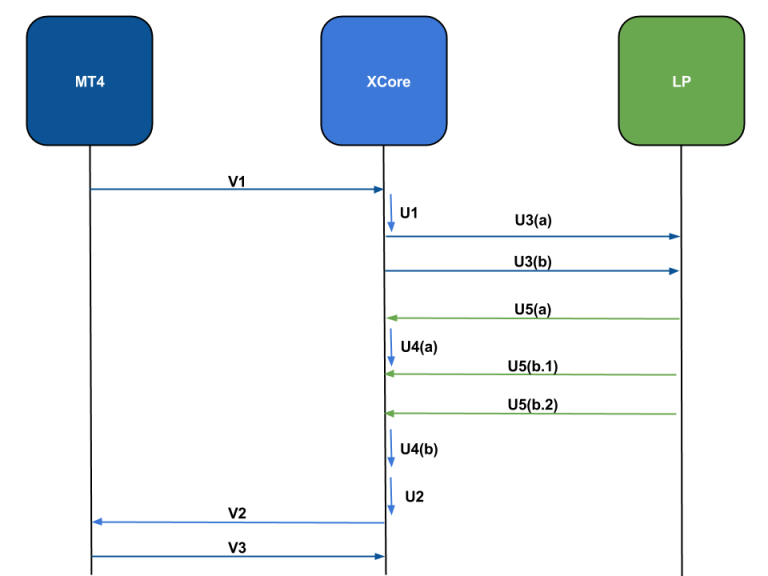
| Value | Action | Route | Explanation |
|---|---|---|---|
| V1 | OrderRequest | MT4 => XCore | |
| U1 | OrderOpen | XCore Function | |
| U3 | LegOpen | XCore => LP | |
| U5 | DealDone | LP => XCore | |
| U4 | LegClose | XCore Function | |
| U2 | OrderClose | XCore Function | |
| V2 | OrderResponse | XCore => MT4 | |
| V3 | OrderDone | MT4 => XCore |
Connector versions
The field tables below describe GIVEUP_ACTIVITY and GIVEUP_ACTIVITY_V2, with fields specific to other versions marked. An omitted field has no empty placeholder in the comma-separated payload. The other versions differ as follows.
| Connector type | Messages | Differences |
|---|---|---|
| GIVEUP_ACTIVITY | V1, V2, V3, U1–U5 | Layouts as documented below. |
| GIVEUP_ACTIVITY_V2 | V1, V2, V3, U1–U5, W1, W2 | Same layouts. On logon the connector additionally sends one W1 message per XCore symbol (symbol,display name,factor) and one W2 message per provider symbol in stream 0 (provider,symbol,instrument,quote_size,quote_price,trade_size,trade_price). |
| GIVEUP_ACTIVITY_CL | V1, V2, V3, U1, U2 | No leg or deal messages. V1: connector,protocol,clOrdID,security,group,manager,login,ticket,isEntry,side,type,instrument,size,price,bid,ask,dev,markup,spread,shift,digits,milli,micro with isEntry as 0 = ENTRY, 1 = EXIT; negative dev is reported as 0. V2: connector,clOrdID,request milli,orderID,fillsize,fillprice,message,milli,0; fillprice is the XCore client fill price before the MT4 bridge adjustment. V3: connector,clOrdID,request milli,ticket,orderID,0,fillsize,fillprice,conversion,comment,milli,micro. U1: orderID,connector,protocol,account,clOrdID,subID1,subID2,subID3,subID4,side,type,instrument,symbol,digits,factor,currency,size,minsize,price,deviation,milli,micro. U2: orderID,subID2,fillSize,fillPrice,message,milli,micro. |
| GIVEUP_ACTIVITY_V3 | V1, V2, V3, U1–U5 | V1, V2, V3 and U2 as for GIVEUP_ACTIVITY_CL. U1 as documented below with subID2 after subID1, factor after digits, and mid computed as the average of bid and ask. U3 as documented below with b_book after batch, without price2, and with the fixed and flexible markups in the markup and commission positions. It reports the leg's provider and protocol, with the provider name in lower case; SymbolOverInstrument does not change its instrument field. U5: orderID,legID,dealID,size,price,markup,markup_lp,0.0,0,ordID,execID,valueDate,message,milli,micro,conv_eur,conv_usd,0.0, n/a. The final n/a token has a leading space. |
[V1] Order Request
| Variable | Type | Possible values | Description |
|---|---|---|---|
| clOrdID | Int | XCore clOrdID | |
| connector | String | XCore connector name | |
| protocol | Enum | mt4 | Protocol of the XCore connector, in this case “mt4” |
| security | String | MT4 security | |
| group | String | MT4 group | |
| manager | Int | Manager initiating the trade request, if not initiated by manager this will be 0 | |
| login | Int | MT4 login | |
| ticket | Int | MT4 ticket | |
| side | Enum | buy, sell | Sell or buy |
| type | Enum | mkt,limit,ie,stop | MT4 order type, IE if instant execution request, MKT if market execution request, LIMIT if entry limit or tp, STOP if entry stop or sl |
| instrument | String | MT4 symbol | |
| size | Double | Size of the trade | |
| price | Double | Price the client tried to hit | |
| bid | Double | Current MT4 bid price | |
| ask | Double | Current MT4 ask price | |
| dev | Int | MT4 deviation, only considered if type=IE else -1 | |
| markup | Int | MT4 markup | |
| spread | Int | MT4 symbol spread | |
| shift | Int | MT4 symbol balance | |
| digits | Int | MT4 symbol digits | |
| isEntry | String | ENTRY/EXIT | ENTRY if the request is an entry order, EXIT if the request is an exit order |
| milli | Long Int | Millisecond timestamp of the trade request | |
| micro | Long Int | Microsecond counter (0–999999) of the trade request, not part of the timestamp; use it to calculate the difference between two events (the counter restarts every second). |
[V2] Order Response
| Variable | Type | Possible values | Description |
|---|---|---|---|
| orderID | Int | orderID: XCore orderID | |
| fillsize | Double | XCore reported MT4 fillsize | |
| fillprice | Double | XCore reported MT4 fillprice | |
| message | String | XCore message |
[V3] Order Done
| Variable | Type | Possible values | Description |
|---|---|---|---|
| orderID | Int | XCore orderID | |
| ticket | Int | MT4 ticket | |
| fillsize | Double | MT4 fillsize | |
| fillprice | Double | MT4 fillPrice | |
| conversion | Double | MT4 conversion rate to profit currency | |
| comment | String | MT4 comment | |
| milli | Long Int | Millisecond timestamp | |
| micro | Long Int | Microsecond counter (0–999999), not part of the timestamp; use it to calculate the difference between two events (the counter restarts every second). |
[U1] Order Open
| Variable | Type | Possible values | Description |
|---|---|---|---|
| orderID | Int | XCore orderID | |
| connector | String | XCore connector | |
| protocol | Enum | Type of the XCore connector in lower case, for example mt4 |
|
| account | String | Connector account that hosted the execution | |
| clOrdID | String | clOrdID | |
| subID1 | String | subID1 value represents the tag 115 | |
| subID2 | String | FIX tag 116 (OnBehalfOfSubID), or the MT4/MT5 group. Included only by GIVEUP_ACTIVITY_CL and GIVEUP_ACTIVITY_V3. |
|
| subID3 | String | FIX tag 526; for MT4, the login; for MT5, the login or login-partyId when a PartyID is supplied. |
|
| subID4 | String | FIX tag 527; for MT4, the ticket; for MT5, the position ID. | |
| side | Enum | sell,buy | Order side |
| type | Enum | market,limit,stop | Order type in lower case |
| instrument | String | Instrument, in this case, the MT4 symbol | |
| symbol | String | XCore symbol name | |
| digits | Int | Digits of XCore symbol | |
| factor | Double | XCore symbol factor. Included only by GIVEUP_ACTIVITY_CL and GIVEUP_ACTIVITY_V3. |
|
| currency | String | Currency of trade, for MT4 this will always be the base currency | |
| size | Double | Size of the trade | |
| minsize | Double | Minsize of the trade | |
| price | Double | XCore price of the trade | |
| deviation | Double | XCore deviation of the trade | |
| ttl | Int | XCore ttl of the trade (in milliseconds) | |
| mid | Double | Always 0 for GIVEUP_ACTIVITY and GIVEUP_ACTIVITY_V2; GIVEUP_ACTIVITY_V3 writes the average of bid and ask |
|
| bid | Double | Current XCore bid | |
| ask | Double | Current XCore ask | |
| pool | String | Liquidity pool of execution | |
| profile | String | Markup profile of execution | |
| minspread | Double | Unused; reported as 0. | |
| maxspread | Double | Unused; reported as 0. | |
| markupbid | Double | Unused; reported as 0. | |
| markupask | Double | Unused; reported as 0. | |
| milli | Long Int | Millisecond timestamp | |
| micro | Long Int | Microsecond counter (0–999999), not part of the timestamp; use it to calculate the difference between two events (the counter restarts every second). |
For GIVEUP_ACTIVITY_V3, execution markups are reported in the markup and commission fields of Leg Open.
Note: To Link message [U1] Order Open with [V1] Order Request use the below statement:
[V1] Order Request.clOrdID = [U1] Order Open.clOrdID
AND
[V1] Order Request.connector= [U1] Order Open.connector
AND
[V1] Order Request.milli BETWEEN ( [U1] Order Open.milli -1sec) AND [U1] Order Open.milli
[U2] Order Close
| Variable | Type | Possible values | Description |
|---|---|---|---|
| orderID | Int | XCore orderID | |
| fillSize | Decimal | XCore order fillsize | |
| fillPrice | Decimal | XCore order fillprice | |
| message | String | XCore message | |
| milli | Long Int | Millisecond timestamp | |
| micro | Long Int | Microsecond counter (0–999999), not part of the timestamp; use it to calculate the difference between two events (the counter restarts every second). |
[U3] Leg Open
| Variable | Type | Possible values | Description |
|---|---|---|---|
| orderID | Int | XCore orderID | |
| legID | Int | XCore legID | |
| batch | Int | XCore execution batch ID | |
| b_book | Int | Book flag of the leg: 0: A-book leg sent to the LP 1: B-book leg (internalized) 2: cross-hedge leg 3: Synthetic A-book leg Note: This field is present only with giveup connectors of type “GIVEUP_ACTIVITY_V3“ |
|
| provider | String | LP name. In GIVEUP_ACTIVITY and GIVEUP_ACTIVITY_V2, B-book legs use b_book and cross-hedge legs use xhedge. |
|
| protocol | Enum | LP type in lower case. In GIVEUP_ACTIVITY and GIVEUP_ACTIVITY_V2, B-book legs use b_book and cross-hedge legs use xhedge. |
|
| account | String | Account on LP side | |
| clOrdID | String | clOrdID sent to LP | |
| type | Enum | market,limit,pq | Target execution type on LP side (market, limit, PQ (previously quoted)) |
| instrument | String | LP instrument. With SymbolOverInstrument=Y, GIVEUP_ACTIVITY and GIVEUP_ACTIVITY_V2 report the XCore symbol instead. |
|
| size | Double | Requested size | |
| minsize | Double | Requested minsize | |
| price | Double | Requested LP price | |
| price2 | Double | Requested LP price including LP and XCore markups. Included by GIVEUP_ACTIVITY and GIVEUP_ACTIVITY_V2; omitted by GIVEUP_ACTIVITY_V3. |
|
| ttl | Int | Requested ttl (in milliseconds) | |
| markup | Double | Fixed markup of the leg including the skew component (GIVEUP_ACTIVITY_V3); reported as 0.0 by GIVEUP_ACTIVITY and GIVEUP_ACTIVITY_V2. |
|
| commission | Double | Flexible (spread) markup of the leg (GIVEUP_ACTIVITY_V3); reported as 0.0 by GIVEUP_ACTIVITY and GIVEUP_ACTIVITY_V2. |
|
| quoteID | Int | Position of the selected quote in the aggregated execution book; 0 is the top of book | |
| quoteRef | String | LP quote ID | |
| quotetime | Long Int | Timestamp when XCore received quote | |
| quotetimelp | Long Int | LP quote timestamp (FIX tag 52), in epoch milliseconds. Current limitation: U3 repeats quotetime (XCore receive time) in this field. |
|
| milli | Long Int | Millisecond timestamp | |
| micro | Long Int | Reported as 0; this message does not populate a microsecond timestamp. |
[U4] Leg Close
| Variable | Type | Possible values | Description |
|---|---|---|---|
| orderID | Int | XCore orderID | |
| legID | Int | XCore legID | |
| fillSize | Double | Fill size of the leg | |
| fillPrice | Double | LP fill price of the leg | |
| fillPrice2 | Double | Fill price of the leg including XCore markups | |
| milli | Long Int | Millisecond timestamp | |
| micro | Long Int | Microsecond counter (0–999999), not part of the timestamp; use it to calculate the difference between two events (the counter restarts every second). |
[U5] Deal Done
| Variable | Type | Possible values | Description |
|---|---|---|---|
| orderID | Int | XCore orderID | |
| legID | Int | XCore legID | |
| dealID | Int | XCore dealID | |
| size | Double | Fill size of the deal | |
| price | Double | LP price of the deal | |
| ordID | String | LP side order ID | |
| execID | String | LP side exec ID | |
| valueDate | String | Value date | |
| message | String | LP message | |
| milli | Long Int | Millisecond timestamp | |
| micro | Long Int | Microsecond counter (0–999999), not part of the timestamp; use it to calculate the difference between two events (the counter restarts every second). |