Account
The Account component is available in the XTrader module within your XCore Portal and can be used for checking out the main information and base indexes of the linked XCore Account with XTrader such as balance, equity, margin utilization, etc..
Note: In order to be able to view data in this component the XCore account must be linked with a specific XTrader through Account Connector component and provided required Data Access to the user of the XTrader to view the specific XCore account in the XTrader Module.
Here is an example of an XTrader account component:
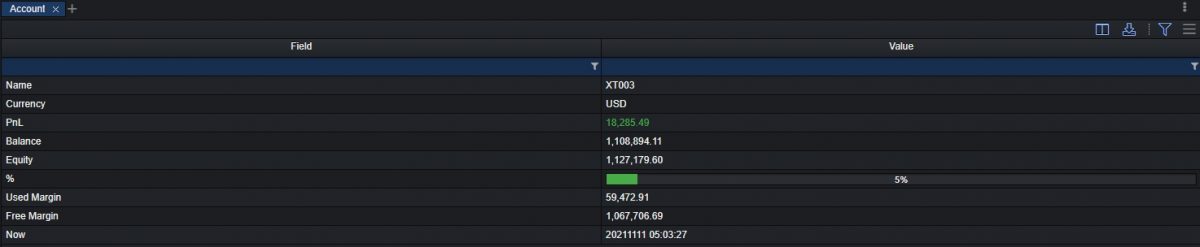
Technical Specifications
| Columns | Description |
|---|---|
| Name | The name of the XCore account. |
| Currency | The currency of the XCore account. |
| PnL | Equity − Balance: the PnL of all positions (open PnL plus closed PnL not yet booked to the balance), in account currency. |
| Balance | The amount of money that was deposited to the account plus all closed positions during trading. |
| Equity | The amount of money that was deposited to the account plus all open positions during trading. |
| % | Used margin as a percentage of equity (% = Margin Used / Equity × 100). |
| Margin Used | The amount of funds required in a margin account as collateral in order to maintain existing positions. |
| Free Margin | The amount of funds that is still available in excess of collateral to maintain open positions. |
| Now | The time of the server now |
Note: Stop-out is triggered by XCore's margin utilization, not by this %. XCore divides Margin Used by the account group's reference: the Balance when the group's EXPOSURE is BALANCE, the Equity otherwise. For BALANCE groups the two differ whenever Equity differs from Balance.
Account component settings
There are setting button in the top-right corner of the tab, as it is demonstrated below:
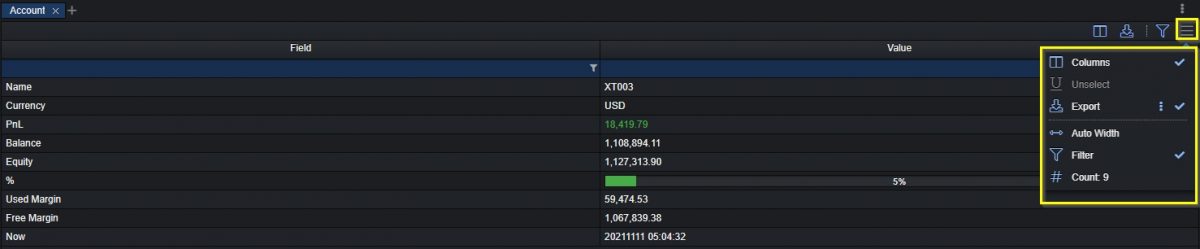
Every ticked option is present in the header tab and every unticked option () is located in this drop-down menu respectively.
To customize the account tab for better convenience the following attributes might be added or hidden such as columns, unselected, export, auto width, filter, count (count of positions in the column “Field”).
Note: The Account component of the Xtrader component can only show one XCore Account which is defined from the Admin Client Module as data for the Xtrader.