MTServer
The MT Server component of the Admin Client module offers you the ability to configure the MT Servers that could be used for the MT Monitor Module, which is a complete risk management and monitoring solution for MT4 and MT5 designed to improve operating performance and reduce costs. It can also be used for the Pricing Chart component of the XTrader Module to connect your MT Server to stream prices on the charts for XTrader users.
Note: Please consult with your Account Manager before adding MT Server on the XCore in case you wish to use it for the MT Monitor Module, as there are fees applied and must be enabled before use. Once the module has been enabled, you can proceed and configure the MT Server.
From the MT Server component, press the Add button, which will open the wizard to add MT Server information to which you wish to connect.
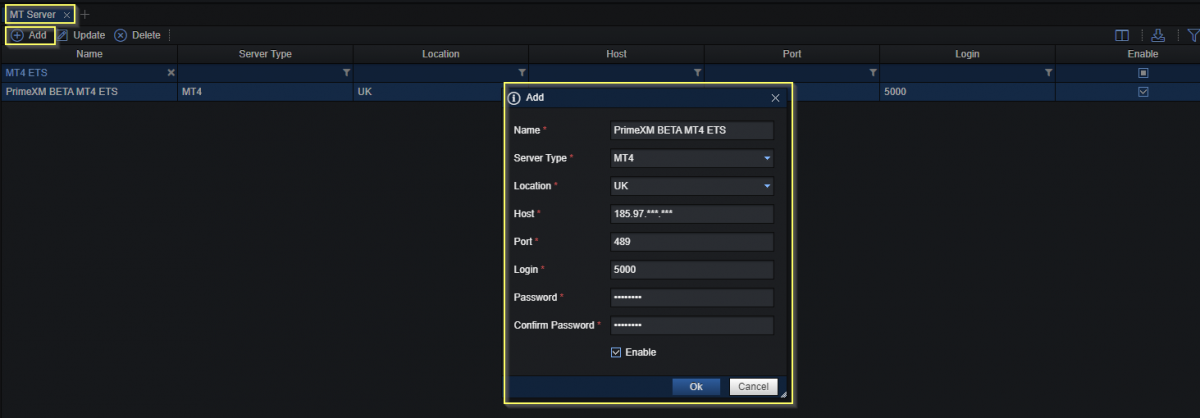
| Name | The name of the MT Server can be defined as you wish |
|---|---|
| Server Type | The type of the MT Server: - MT4 - MT5 |
| Location | The location of your XCore: - UK - US - JP - SG If you are unsure of your XCore Location, please contact PrimeXM Support |
| Host | The host (IP) of the MT Server to which you want to connect |
| Port | The port of the MT Server |
| Login | The login of the MT Server you use to connect to your MT4/MT5 Server. Note: To use the Corporate Actions on the MT Monitor, the MT Admin User credentials will be required to be used for the configuration of the MT Server |
| Password | The password of the login you use to connect to your MT4/MT5 Server |
| Confirm Password | Confirm the password entered previously |
Note: All the fields in the wizard are mandatory
Once all the fields have been completed, tick the Enable box and press OK to complete the wizard, which will populate the system.
Please note that you will need to contact PrimeXM Support to finish the setup, which will refresh your XCore Instance for the MT Server to start working.
To use the MT Server for the Pricing Chart component, once you have configured the credentials of your MT Server need to contact PrimeXM Support which will finish the configuration so that it can be used on the Pricing Chart component of the XTrader.
In case configuration changes are applied on your MT4/MT5 Server regarding fields on the wizard such as Host, Port, Login, and Password, the information would need to be updated on the MT Server component; otherwise, the connection will not be established.