MT4 Bridge Configuration Examples
Use these examples to configure routing, control execution behavior, and troubleshoot Bridge rules. Choose a topic below, then expand an example to view its instructions and screenshots.
Bridge setup · Routing Rules · Execution Rules
Find an example
-
Rule setup and priority
Apply changes, back up rules, and understand which rule takes precedence.
-
Routing and execution
Route by group, account, symbol, or account color; configure order types.
-
Special rules
Manager exclusions, stop-out behavior, size factors, and skipped rules.
-
Validation and naming
Resolve validation errors and organize groups for A-book and B-book routing.
Rule setup and priority
Apply, back up, and order rules
Deploy execution rules
Click OK in the Bridge plugin configuration to apply rule changes immediately. Updating rules does not require an MT4 server restart.
Backup execution rules
Back up the Bridge configuration file, primexm_bridge.ini, before changing rules.
Security-based execution rules
A security rule can match multiple symbols. Include only the symbols that the Bridge should process to avoid conflicts with other plugins.
Group-based execution rules
A group rule can match multiple MT4 logins. Include only the accounts that the Bridge should process to avoid conflicts with other plugins.
Skip execution rules:
The Bridge ignores a configuration row when:
- Its Value begins with at least five dashes:
-----. - Its Name contains
Comment,comment, orCOMMENT. - Its Name contains
Delimiter,delimiter, orDELIMITER. - Its Name contains
Ignore,ignore, orIGNORE.
Value field length
Each rule's Value field is limited to 127 characters.
Sorting of execution rules
The Name column determines rule order. Use consistent numeric prefixes, such as 1000: Bridge and 1001: Bridge, to control that order.
For general rules, a later matching rule takes precedence over an earlier matching rule. Client-specific and symbol-specific rules take precedence over general rules, regardless of their position. Define the required general group/security rule before a specific rule so the Bridge can build the account and instrument mappings.
The examples below show how rule order and specificity affect routing.
How general rules override each other
Rule 1001: Bridge routes orders for security Forex from groups matching ABC*, excluding DFE, to XCore Connector Account acc1.
Rule 1002: Bridge routes orders for Forex from all groups to acc2.
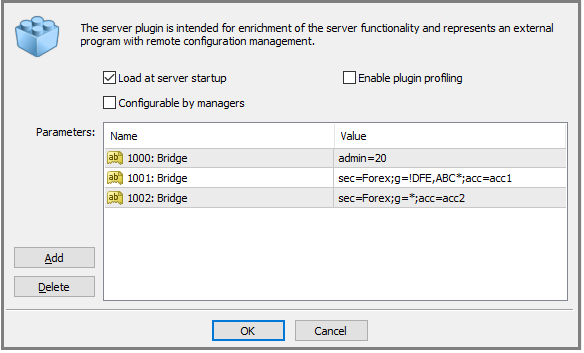
Because 1002: Bridge is a later general rule that matches all groups, it overrides 1001: Bridge. In this example, all matched Forex orders are routed to acc2.
Why a client-specific rule takes priority
Rule 1002: Bridge explicitly selects MT4 login 10000 and security Forex, routing its orders to acc1.
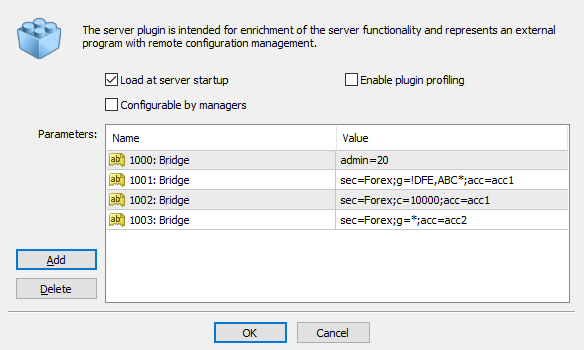
The client-specific rule takes precedence over the general rule 1003: Bridge, even though the general rule appears later.
Note: The Bridge reads rules from top to bottom. Once it finds a rule explicitly selecting a client or symbol, subsequent rules relating to that client or symbol, including general group or security rules, do not override it.
Note: Negative price protection resets a negative order price to 0.0 and rejects the trade at that price.
Note: Enabling or disabling the Bridge plugin in MT4 Administrator automatically restarts the MetaTrader 4 Server service. This is different from applying rule changes with OK.
Routing and execution examples
Route orders by group and security
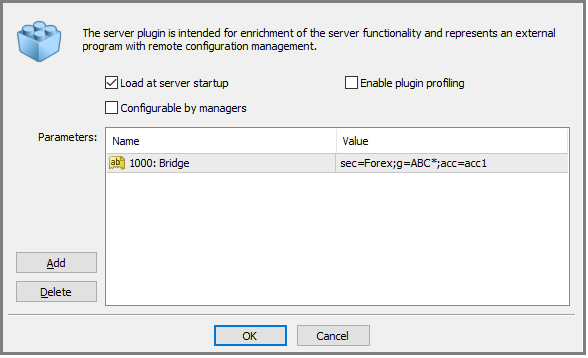
Rule 1000: Bridge routes orders for security Forex from MT4 groups matching ABC* to XCore Connector Account acc1.
Route orders for a specific account
Use sec, c, and acc to route orders for a specific MT4 login.
First define a general rule that includes the login's MT4 group. Place that rule above the client-specific rule. The Bridge uses the general rule to build the group-to-login mapping; the client-specific rule then selects a different route for that login.
Account Specific Bridge Execution Rule Example
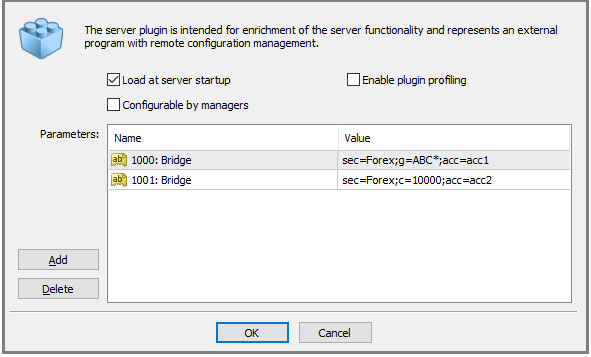
The general rule routes orders for Forex from groups matching ABC* to acc1. Rule 1001: Bridge overrides that route for login 10000, sending its Forex orders to acc2.
Other logins in the matched groups continue to use acc1.
Note: Login 10000 must belong to a group included by the preceding general rule. Otherwise, the client-specific rule is invalid.
Route orders for a specific symbol
Use sym, g, and acc to route a specific symbol for a group, or sym, c, and acc to route it for an individual login.
First define a general rule that includes the relevant MT4 group and security. Place it above the symbol-specific rule. The Bridge needs this general rule to build the group, security, and symbol mappings.
Symbol Specific Bridge Execution Rule Example
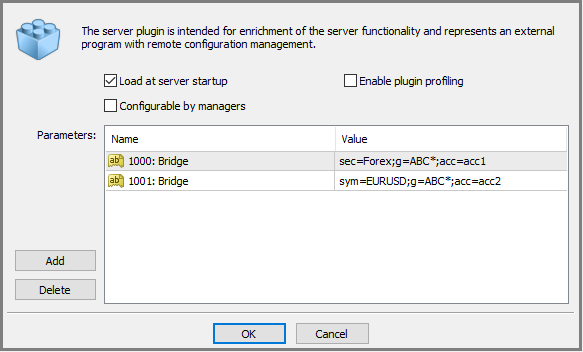
Rule 1001: Bridge routes EURUSD orders from groups matching ABC* to XCore Connector Account acc2.
Note: EURUSD must belong to security Forex, which is included by the preceding general rule. Otherwise, the symbol-specific rule is invalid.
Configure order types and execution settings
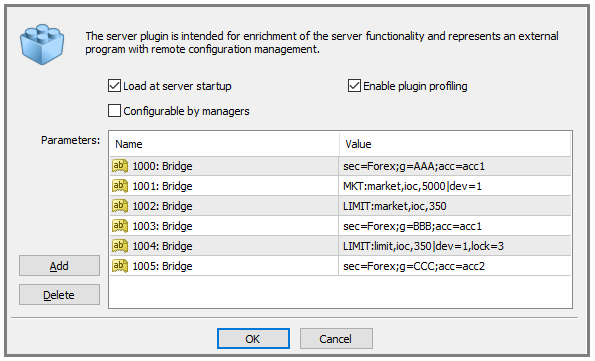
Order-category settings apply to the routing rules that follow them, until another setting for the same category overrides them.
1000: BridgeroutesForexorders from groupAAAtoacc1using the default execution settings.1001: Bridgeoverrides theMKTsettings, setting the time to live (ttl) to 5000 ms.1002: Bridgeoverrides theLIMITsettings, using XCore market orders with attlof 350 ms.1003: BridgeroutesForexorders from groupBBBtoacc1. It inherits theMKTandLIMITsettings from rows1001and1002.1004: BridgeoverridesLIMITagain, using XCore limit orders with attlof 350 ms andlock=3.1005: BridgeroutesForexorders from groupCCCtoacc2. It inheritsMKTfrom row1001andLIMITfrom row1004.
Route orders by account color
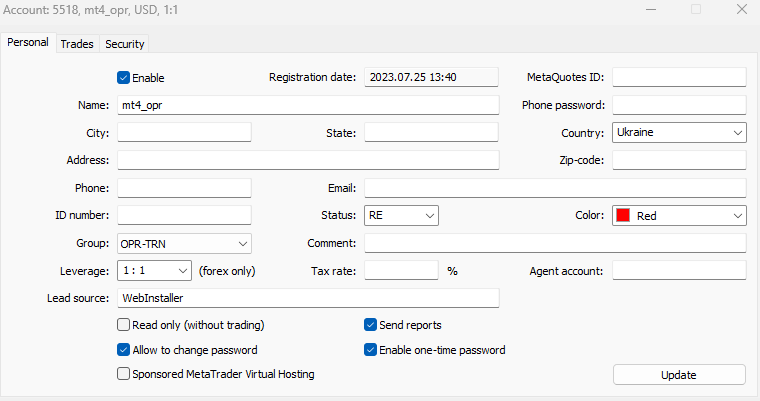
MT4 client login color:
Bridge rules:
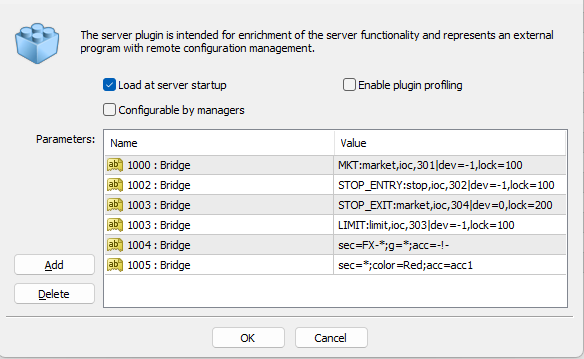
In this example, the general rule excludes matching orders from Bridge execution with acc=-!-. The color-specific rule selects logins by their integer color value and routes their matched orders to acc1.
Note: The login must belong to a group included by the preceding general rule. Otherwise, rule 1005: Bridge is invalid.
Color value: Use the first component of the client login color displayed as R,G,B. For example, 223,0,0 corresponds to:
public int login2_color = 223;
The corresponding routing condition is color=223. Use the first component (R); the second and third components are not used by this condition.
Screenshot note: The Bridge screenshot shows the historical syntax color=Red. Use the integer value in the routing rule, as illustrated above.
Special rules
admin / alien — Manager exclusions
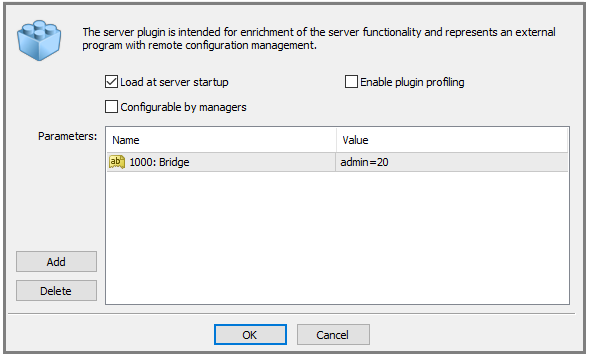
The admin rule identifies an MT4 Manager account whose operations the Bridge should ignore. This account can be used to correct discrepancies or insert and delete trades in MT4 without sending those operations to XCore for execution.
Note: Place the admin rule at the top of the configuration, before routing rules and order-category settings.
Note: Operations performed by this manager can create exposure differences between MT4 and XCore if used incorrectly.
The alien=XX setting identifies an Alien Manager account, where XX is the manager login. The Bridge does not intercept trades placed by this account at all. This setting is primarily used for compatibility with third-party dealers.
stop_all — Close all positions at stop-out
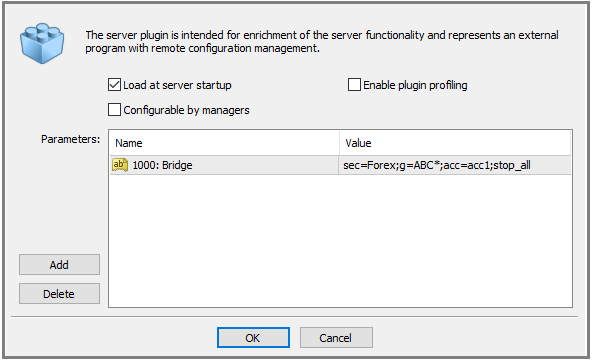
Add stop_all to a rule to close all open positions for a matched MT4 account when it reaches the stop-out threshold, instead of the standard MT4 behavior of closing positions sequentially.
Note: This setting applies only to the groups matched by the rule containing stop_all.
factor — Multiply order size
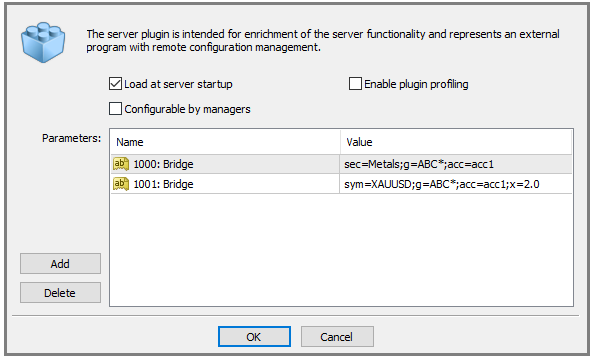
The factor setting multiplies the requested order size before the Bridge sends the order for execution.
First define a general rule that includes the relevant security, such as 1000: Bridge. Then add the symbol-specific factor rule, such as 1001: Bridge.
In the example, x=2.0 doubles the order size for XAUUSD, relative to the size derived from the MT4 contract specification.
Note: The Bridge supports only factor values greater than 1.0.
stop_block — Block stop-out orders
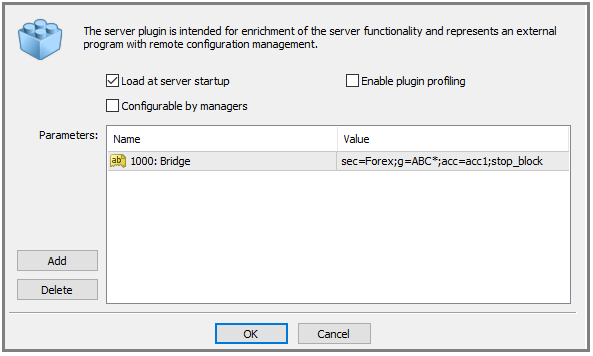
Add stop_block to a rule to prevent the Bridge from processing MT4 stop-out orders for the matched accounts.
When an affected account reaches the stop-out threshold, the Bridge writes the following message to the Bridge log and the XCore Connector log:
MT4 STOPOUT REACHED: mt4login: mt4comment
The message is logged once every 15 minutes per affected MT4 login.
Note: This setting applies only to the groups matched by the rule containing stop_block. The specified accounts are placed in READ ONLY mode.
ignore — Exclude groups
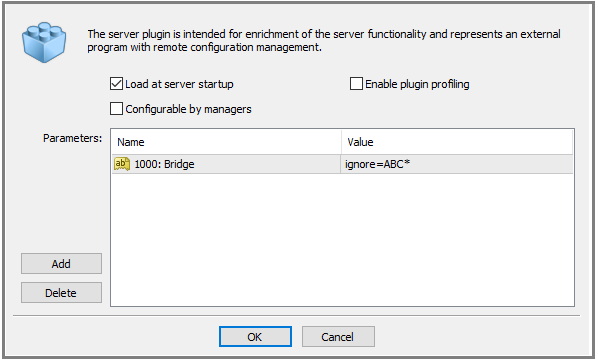
Use an ignore rule to exclude trades from specified MT4 groups, such as MAM slave groups, from Bridge processing.
Note:
- Place the rule at the top of the Bridge configuration, above the routing rules.
- Groups matched by the
ignorerule do not need to be excluded again from subsequent rules.
skip — Temporarily disable a rule
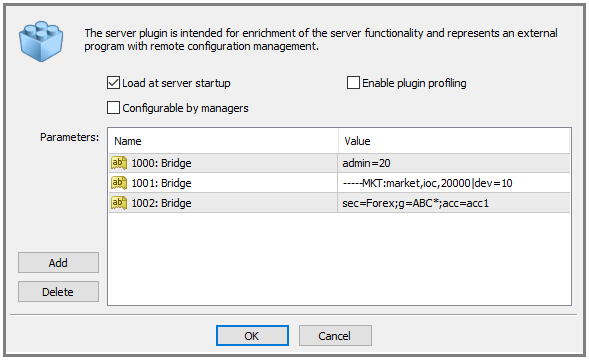
To disable a rule temporarily without deleting it, prefix its Value with at least five dashes: -----.
The Bridge skips that row while the prefix is present. Remove the prefix when you want the Bridge to process the rule again.
Validation and naming
Troubleshoot rule validation errors
The Bridge validates each rule when you click OK to apply the configuration. If validation fails, the error identifies the affected rule and the reason.
Default Bridge Execution Rule Validation
-
no symbols found— check the security name or pattern. If the security was just created, confirm that the MT4 Server service was restarted.ERR_00: 1000: no symbols found: sec=TEST-FX;g=TEST*;acc=acc1 -
no groups/clients found— check the group name or pattern.ERR_00: 1010: no groups/clients found: sec=TEST-FX;g=TEST*;acc=acc1
Account Specific Bridge Execution Rule Validation
-
An incorrect or nonexistent client login can produce:
ERR_00: 1010: Bridge client not found: 12345432 ERR_01: 1010: Bridge no groups/clients found: sec= TEST- FX;c=12345432;acc= acc1 -
A client whose group is not included by a preceding general rule can produce:
ERR_00: 1010: client group not active: sec= TEST- FX;c=12345432;acc=acc1
Symbol Specific Bridge Execution Rule Validation
Check the symbol name and, if the symbol was just created, confirm that the MT4 Server service was restarted.
ERR_00: 1020: no symbols found: sym=EURUSD.test;c=12345432;acc= acc1
Incorrect Execution Rule Syntax Validation
Invalid client selectors, such as c=* or c=test, can produce:
ERR_00: 1020: invalid data: *
ERR_00: 1020: invalid data: test
Note: All Bridge rule values are case-sensitive.
Name groups for A-book and B-book routing
Each MT4 group name must be unique within the server and must not exceed 15 characters.
Naming Conventions:
Use consistent group names and numeric rule prefixes to make the configuration easier to review. A group-name suffix can indicate the intended execution route, but the suffix alone does not configure routing: the Bridge rules and XCore execution settings must implement that route.
A-book via the PrimeXM Bridge
In this convention, groups ending in -A, such as ECN-USD-A and ECN2-USD-A, are routed through the Bridge to an XCore account configured for liquidity provider execution.
B-book via the PrimeXM Bridge
Groups ending in -B, such as ECN-USD-B and ECN2-USD-B, are routed through the Bridge to an XCore account configured to internalize orders.
B-book in MT4 Server
Groups without -A or -B, including groups ending in -C, are not matched by the two Bridge rules below. Examples are ECNB-USD, ECN2B-USD, ECNB-USD-C, and ECN2B-USD-C. Their orders remain in MT4 unless another Bridge rule matches them.
The corresponding Bridge configuration is:
| Name | Value |
|---|---|
| 1000: Bridge | sec=*;g=*-A;acc=acc_a |
| 1001: Bridge | sec=*;g=*-B;acc=acc_b |
Configure acc_a and acc_b in XCore for the intended A-book and B-book execution respectively.
Note: MT4 groups excluded from Bridge processing can use automatic internal execution, manual execution by human dealers, or manual execution handled by a virtual dealer plugin, according to the MT4 configuration.