MT4 Coverage Manual
MT4 Coverage
MT4 Coverage functionality allows setting up a coverage account, within one of the MT4 connectors, on which trades coming from any connector(s) or connector account(s) on the XCore will be recorded, for tracking and exposure monitoring purposes.
Setting up a coverage account requires at least an MT4 Server linked to the XCore, as a connector, where the coverage account is placed. The PrimeXM Bridge will facilitate the coverage functionality, based on the rules and parameters in place.
Once the XCore executes a trade, if a coverage rule is in place, it will send the information of the executed trade to the relevant MT4 account configured as coverage, based on the rules defined on the XCore.
The diagram below, shows the workflow for trades being executed and recorded on a coverage account:
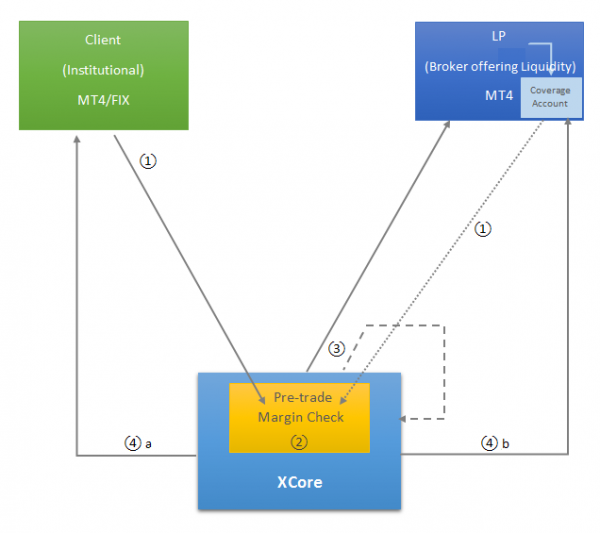
- (1) client places a trade request from any connector linked to the XCore
- (2) the XCore margin engine checks if the margin is sufficient (provided that a margin account is set up under the relevant connector) to process the trade, otherwise the trade will be rejected
- (3) the trade will be executed by either sending it to the LP (A-book) or internalizing it inside the XCore (B-book)
- (4a) trade execution will be confirmed back to the client
- (4b) the same information of the executed trade will be recorded on the MT4 account configured as coverage, based on the configured coverage rules
It is also possible to execute trades from the coverage account itself. When trading from the coverage account, it will follow the flow outlined below:
- (1) client places a trade from the coverage account
- (2) the XCore margin engine checks if the margin is sufficient (it should be configured that the trades from the coverage account are checked by the same margin account as the client’s flow)
- (3) the trade will be executed in the XCore by either sending it to the LP (A-book) or internalizing it inside the XCore (B-book)
- (4) the trade will be confirmed back to the MT4 coverage account