MT5 Gateway Configuration Examples
Use these examples to configure routing, understand rule priority, and adjust execution settings. Choose a topic below, then expand an example to view its configuration.
Gateway setup · Routing Rules · Execution Rules · Special Gateway Rules
Find an example
-
Rule priority
Understand how client-specific and symbol-specific rules take precedence.
-
Routing examples
Route by group, client login, symbol, or account color, and combine routing conditions.
-
Execution and validation
Set execution parameters and verify that the Gateway loaded your rules.
The examples use illustrative group, login, symbol, and XCore Connector Account values. Replace them with your own values. Enable the required groups and symbol paths in the Gateway before applying the rules.
Rule priority
Why a client-specific rule takes priority
The example below contains four routing rules. The Gateway uses the match priority to select a rule, then uses the last matching rule within that priority.
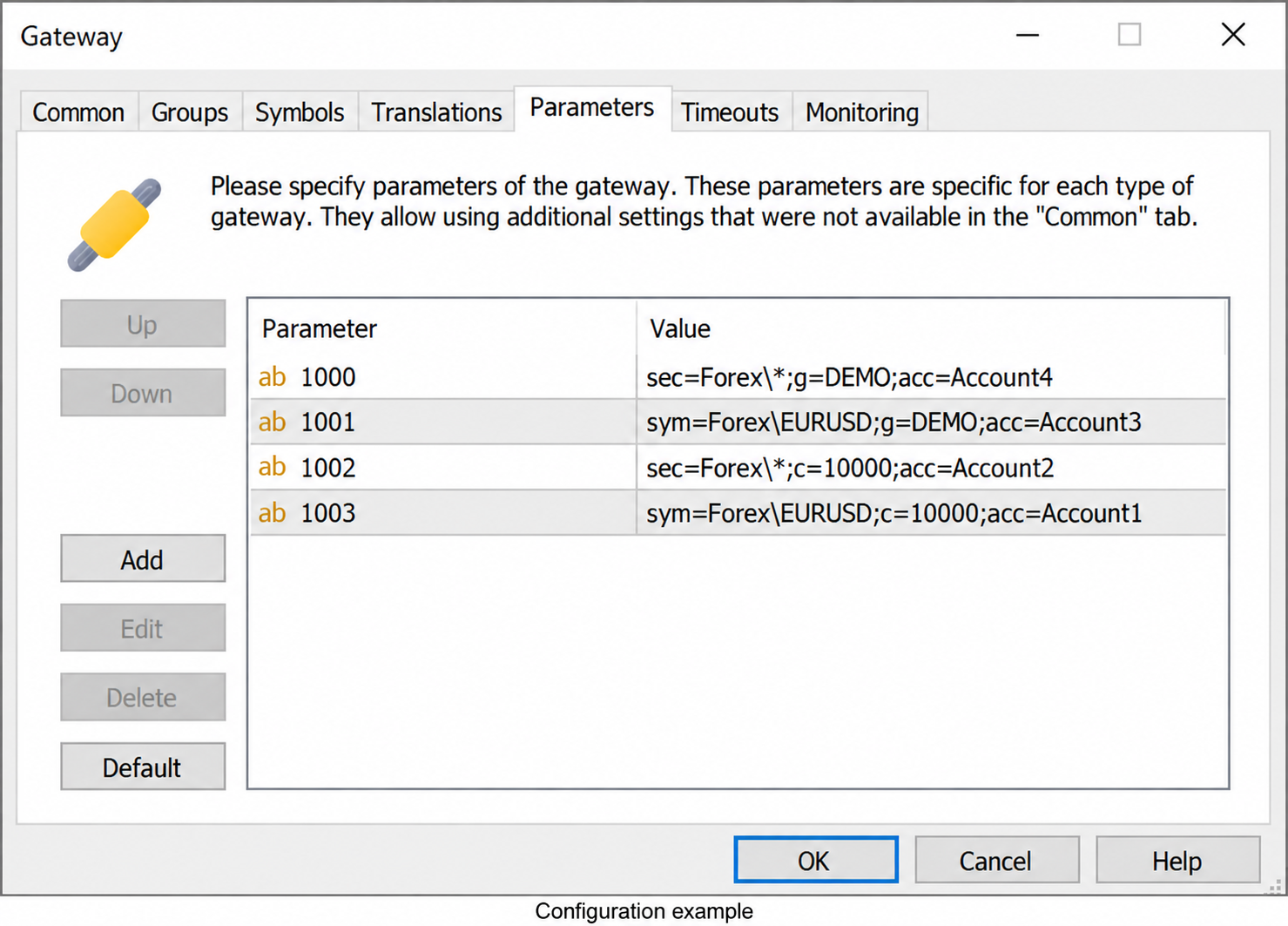
Configuration example — edited values.
| Parameter | Value |
|---|---|
| 1000 | sec=Forex\*;g=DEMO;acc=Account4 |
| 1001 | sym=Forex\EURUSD;g=DEMO;acc=Account3 |
| 1002 | sec=Forex\*;c=10000;acc=Account2 |
| 1003 | sym=Forex\EURUSD;c=10000;acc=Account1 |
| Order | Selected rule | XCore Connector Account |
|---|---|---|
Login 10000, symbol Forex\EURUSD |
1003: login + symbol |
Account1 |
Login 10000, another symbol under Forex\* |
1002: login + security |
Account2 |
Another login in DEMO, symbol Forex\EURUSD |
1001: group + symbol |
Account3 |
Another login in DEMO, another symbol under Forex\* |
1000: group + security |
Account4 |
A login-specific match takes precedence over a group-specific match. Within the same account match type, a symbol-specific match takes precedence over a security match.
How the last matching rule is selected
When several rules match at the same priority, the Gateway uses the last matching rule. For example, these two rules match the same group and security:
| Parameter | Value |
|---|---|
| 1000 | sec=Forex\*;g=DEMO;acc=Account4 |
| 1001 | sec=Forex\*;g=DEMO;acc=Account3 |
With the rules in this order, an order from DEMO for a symbol under Forex\* uses Account3, provided no rule at a higher priority matches. Check both the match priority and the rule order when troubleshooting routing.
Routing examples
Route orders by group and security
Use a general group/security rule to route orders for a group of clients and a symbol path.
sec=Forex\*;g=DEMO;acc=Account4
This rule routes orders from group DEMO for symbols under Forex\* to XCore Connector Account Account4. A matching rule with a higher priority takes precedence.
Route orders for a specific account
Use c to route a specific MT5 client login independently of its group.
sec=Forex\*;c=10000;acc=Account2
This rule routes orders from login 10000 for symbols under Forex\* to Account2. It takes precedence over a group/security rule for the same order. A matching login/symbol rule has higher priority.
Route orders for a specific symbol
Use sym to configure routing for a specific symbol. This example follows the symbol path used in the illustrated configuration.
sym=Forex\EURUSD;g=DEMO;acc=Account3
This rule routes Forex\EURUSD orders from group DEMO to Account3. Other symbols continue to use the applicable security rule. A matching login-specific rule takes precedence.
Route orders by account color
Use color together with the group and security selectors to route orders from accounts with a specific MT5 client login color.
sec=Forex\*;g=OBO-TEST;color=222;acc=Account2
| Parameter | Example value | Purpose |
|---|---|---|
sec |
Forex\* |
Select symbols under the Forex path. |
g |
OBO-TEST |
Select the OBO-TEST group. |
color |
222 |
Match accounts whose first color component (R) is 222. |
acc |
Account2 |
Route matching orders to this XCore Connector Account. |
Replace 222 with the first component of the target accounts' color (R in R,G,B). The example selects orders that match the group, security, and color conditions together.
For the displayed color 222,0,0, the first component is 222, so use:
public int login2_color = 222;
The screenshot shows Color set to 222,0,0. The rule uses its first component: color=222. The second and third components are not used by this condition.
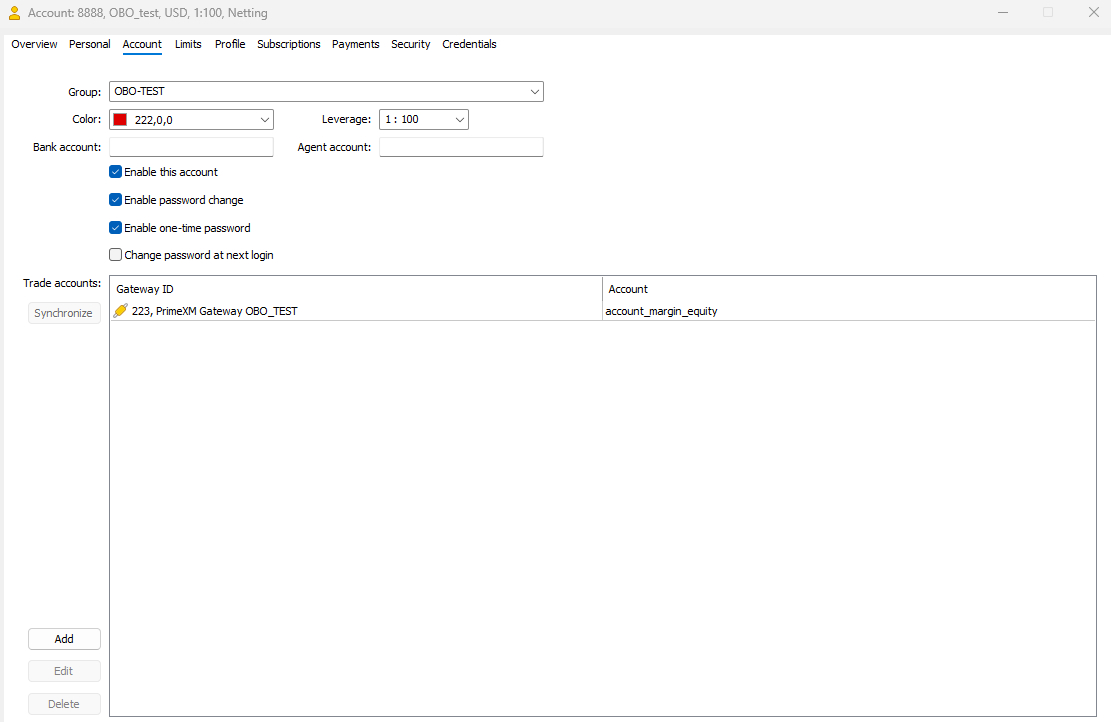
Simple routing example
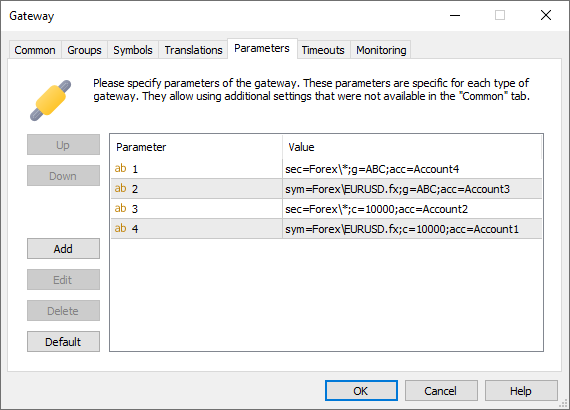
The table lists the rules in match-priority order. Select the first applicable match type; within that type, the last matching rule is used.
| Parameter | Value | Description |
|---|---|---|
| 4 | sym=Forex\EURUSD.fx;c=10000;acc=Account1 | Routes Forex\EURUSD.fx orders from login 10000 to Account1. |
| 3 | sec=Forex\*;c=10000;acc=Account2 | Routes orders from login 10000 for symbols under Forex\* to Account2, unless a login/symbol rule matches. |
| 2 | sym=Forex\EURUSD.fx;g=ABC;acc=Account3 | Routes Forex\EURUSD.fx orders from groups matching ABC to Account3, unless a login-specific rule matches. |
| 1 | sec=Forex\*;g=ABC;acc=Account4 | Routes orders from groups matching ABC for symbols under Forex\* to Account4, unless a higher-priority rule matches. |
Advanced routing example
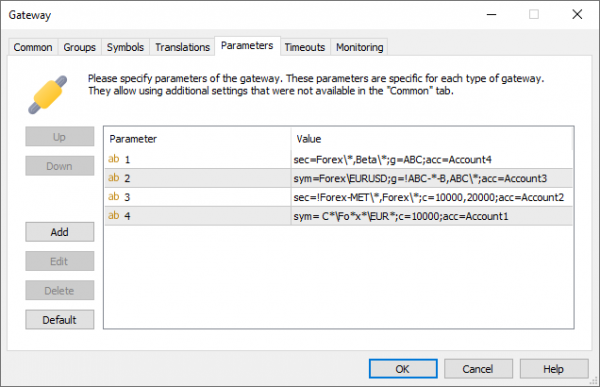
The table lists the rules in match-priority order. Select the first applicable match type; within that type, the last matching rule is used.
| Parameter | Value | Description |
|---|---|---|
| 4 | sym= C*\Fo*x*\EUR*;c=10000;acc=Account1 | Routes orders from login 10000 to Account1 when the symbol path matches C*\Fo*x*\EUR*. |
| 3 | sec=!Forex-MET\*,Forex\*;c=10000,20000;acc=Account2 | Routes orders from logins 10000 or 20000 under Forex\*, excluding Forex-MET\*, to Account2, unless a login/symbol rule matches. |
| 2 | sym=Forex\EURUSD;g=!ABC-*-B,ABC\*;acc=Account3 | Routes Forex\EURUSD orders from groups matching ABC\*, excluding names beginning with ABC- and ending in -B, to Account3, unless a login-specific rule matches. |
| 1 | sec=Forex\*,Beta\*;g=ABC;acc=Account4 | Routes orders from group ABC for symbols under Forex\* or Beta\* to Account4, unless a higher-priority rule matches. |
Execution and validation
Execution settings example
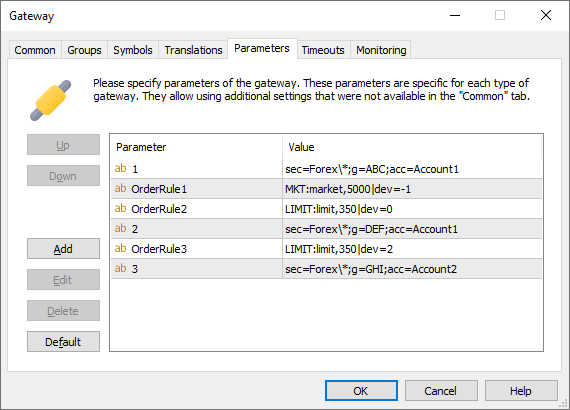
Execution settings apply to the routing rules that follow them in the configuration. The example shows how changing OrderRule entries affects each group:
| Parameter | Value | Description |
|---|---|---|
| 1 | sec=Forex\*;g=ABC;acc=Account1 | Routes orders from group ABC for symbols under Forex\* to Account1. |
| OrderRule1 | MKT:market,5000|dev=-1 | Sets the MKT execution type to market, TTL to 5000 ms, and dev to -1 for subsequent routing rules. |
| OrderRule2 | LIMIT:limit,350|dev=0 | Sets the LIMIT execution type to limit, TTL to 350 ms, and dev to 0 for subsequent routing rules. |
| 2 | sec=Forex\*;g=DEF;acc=Account1 | Routes group DEF to Account1 using the MKT settings from OrderRule1 and the LIMIT settings from OrderRule2. |
| OrderRule3 | LIMIT:limit,350|dev=2 | Updates the LIMIT settings for subsequent routing rules: type limit, TTL 350 ms, and dev=2. |
| 3 | sec=Forex\*;g=GHI;acc=Account2 | Routes group GHI to Account2 using the MKT settings from OrderRule1 and the updated LIMIT settings from OrderRule3. |
How settings carry forward: Each execution category keeps its last configured settings until another rule changes that category. If no settings have been configured for a category, the Gateway uses its defaults. In this example, routing rule 2 uses OrderRule1 and OrderRule2; routing rule 3 uses OrderRule1 and OrderRule3.
Verify configuration changes
After changing Gateway rules, check the MT5 Connector's trading log. Locate PARSE CONFIG START, review the following GatewayConfig entries, and confirm PARSE CONFIG SUCCESS. Investigate any configuration errors before relying on the new rules.
Example of a successful configuration load:
2022-04-18 07:45:10.989|671380 [INFO ] in : msg : PARSE CONFIG START
2022-04-18 07:45:10.989|671394 [INFO ] in : msg : GatewayConfig: name=1000:Gateway value=sec=*;g=*;acc=acc1
2022-04-18 07:45:10.989|671395 [INFO ] in : msg : GatewayConfig: name=1001:Gateway value=sec=Forex\*;c=10000;acc=acc2
2022-04-18 07:45:10.989|671395 [INFO ] in : msg : PARSE CONFIG SUCCESS