Account History
The Account history component is available in the XTrader module within your XCore Portal is used to show balance operations that have been transitioned on the XCore account that is linked with a specific XTrader connector, notably when it comes to checking out the sequence of actions that were applied to the account such as deposits, withdrawals, swap charges, etc.
Note: In order to be able to view data in this component the XCore account must be linked with specific XTrader through Account Connector component and provided required Data Access to the user of the XTrader to view specific XCore account in the XTrader Module.
Here is an example of an account history component:

The tab displays the changes that took place and affected the main account attributes and values E. g. Deposits and withdrawals. The account history tab consists of the following columns.
Technical Specification
| Columns | Description |
|---|---|
| Account | The account of the user. |
| Currency | Currency of the account. |
| Wallet | The account wallet the entry was booked to (see Wallet History). |
| Balance | The current account balance. |
| Delta | The cash transaction amount that affected the balance. |
| Equity | The current equity of the account: Balance + PnL. |
| % | Used margin as a percentage of equity (% = Margin Used / Equity × 100). |
| Margin Used | The amount of funds required in a margin account as collateral in order to maintain existing positions. |
| Free Margin | The amount of funds that is still available in excess of collateral to maintain open positions. |
| PnL | Equity − Balance: the PnL of all positions (open PnL plus closed PnL not yet booked to the balance), in account currency. |
| Now | The time of applying the particular action. |
| Comment | The comment that was left to describe the origin or extra information about a particular action. |
Equity, %, Margin Used, Free Margin and PnL show the current values on the account row; the history rows show Currency, Wallet, Balance, Delta, Now and Comment.
Note: Stop-out is triggered by XCore's margin utilization, not by this %. XCore divides Margin Used by the account group's reference: the Balance when the group's EXPOSURE is BALANCE, the Equity otherwise. For BALANCE groups the two differ whenever Equity differs from Balance.
Account History settings
To display the most recent actions that took place in a particular account, the recent operations filter might be used. It is available in the drop-down list of the setting button of the tab. It is demonstrated below:
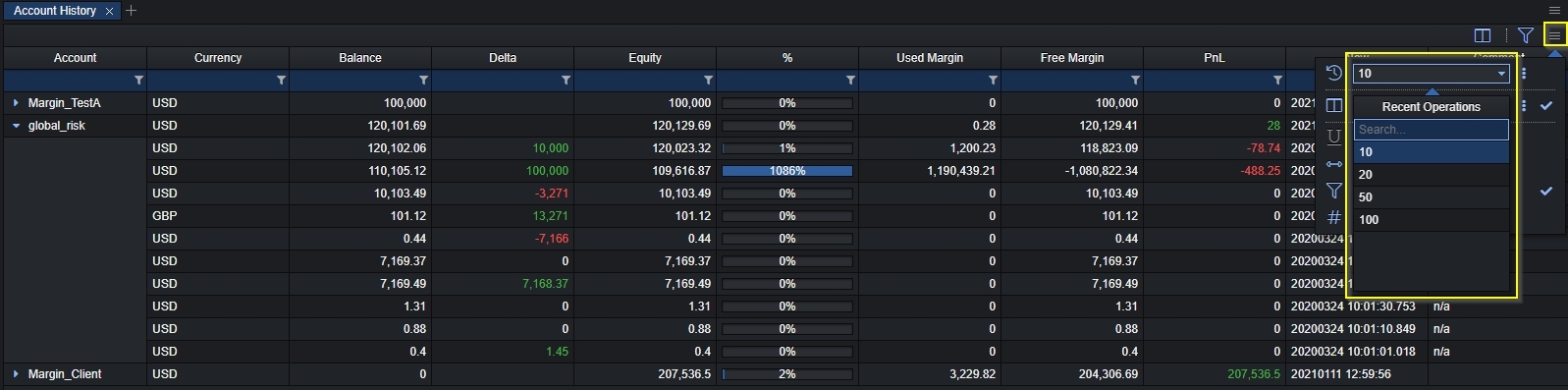
The selected number will display the quantity of the actions that the user prefers to be shown in the account history component.